



C# Multidimensional Arrays: 2D Arrays Explained with Code Examples
C# Multidimensional Arrays
In this tutorial, we’ll explore C#’s multidimensional arrays, focusing on two‑dimensional examples with clear code snippets.
Before diving into multidimensional arrays, review C#’s single‑dimensional arrays.
In a multidimensional array, each element is itself an array. For example,
int[ ] x = { { 1, 2 ,3}, { 3, 4, 5 } };Here, x is a two‑dimensional array containing the rows {1, 2, 3} and {3, 4, 5}. Each row is an array of three elements.
Two‑Dimensional Array in C#
A two‑dimensional array is essentially a table of rows and columns. The array’s elements are single‑dimensional arrays.
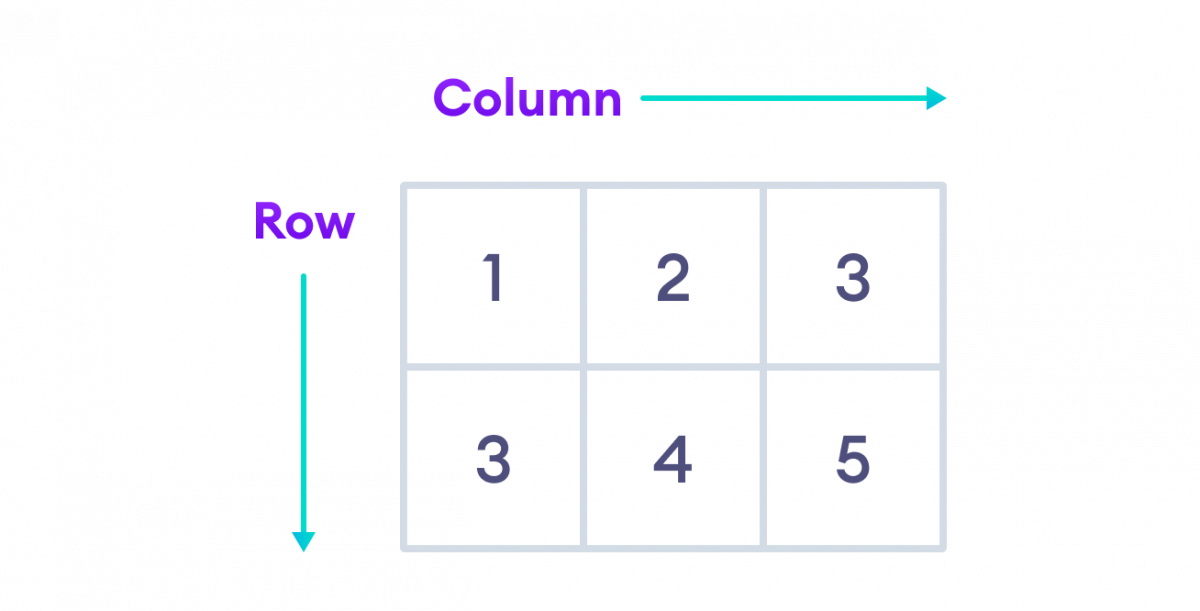
In the image, the rows {1, 2, 3} and {3, 4, 5} represent the two rows of the 2D array.
1. Declaration
Declare a 2D array like this:
int[ ] x = new int [2, 3];Here, x can hold 2 rows and 3 columns—6 values in total.
Note: The single comma between brackets ([ ]) indicates a two‑dimensional array.
2. Initialization
You can initialize the array at declaration:
int[ ] x = { { 1, 2 ,3}, { 3, 4, 5 } };Or specify size and values simultaneously:
int[ ] x = new int[2, 3]{ {1, 2, 3}, {3, 4, 5} };3. Accessing Elements
Use zero‑based indices: x[row, column]. Examples:
// 2D array
int[ ] x = { { 1, 2 ,3}, { 3, 4, 5 } };

// first element of first row
x[0, 0];  // 1

// third element of second row
x[1, 2];  // 5

// third element of first row
x[0, 2];  // 3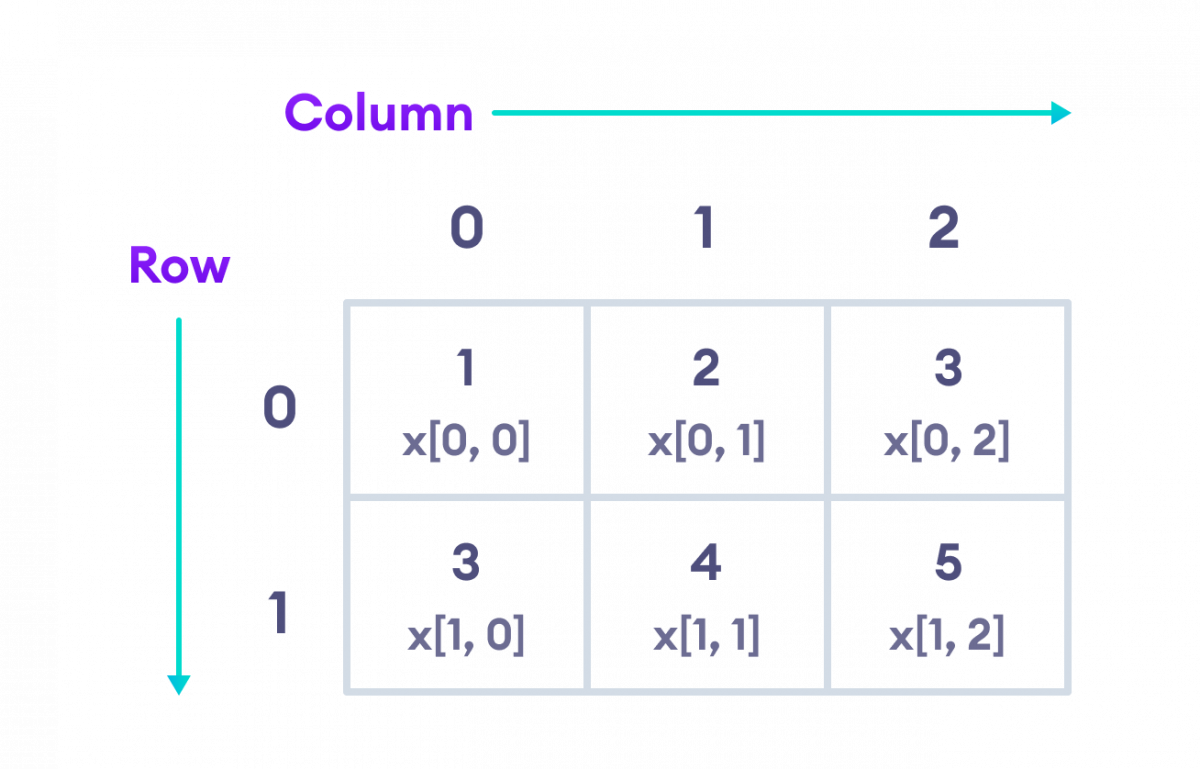
Example: C# 2D Array
using System;

namespace MultiDArray {
  class Program {
    static void Main(string[] args) {

        //initializing 2D array
       int[ ] numbers = {{2, 3}, {4, 5}};

        // access first element from the first row
       Console.WriteLine("Element at index [0, 0] : "+numbers[0, 0]);

        // access first element from second row
       Console.WriteLine("Element at index [1, 0] : "+numbers[1, 0]);
    }
  }
}
Output
Element at index [0, 0] : 2
Element at index [1, 0] : 4
In this example, numbers has rows {2, 3} and {4, 5}. We print values using the indices shown.
numbers[0, 0]– first element of first row (2)numbers[1, 0]– first element of second row (4)
Changing Elements
Assign a new value to an index to modify the array:
using System;

namespace MultiDArray {
  class Program {
    static void Main(string[] args) {

    int[ ] numbers = {{2, 3}, {4, 5}};

     // old element
    Console.WriteLine("Old element at index [0, 0] : "+numbers[0, 0]);

      // assigning new value
    numbers[0, 0] = 222;

      // new element
    Console.WriteLine("New element at index [0, 0] : "+numbers[0, 0]);
    }
  }
}
Output
Old element at index [0, 0] : 2
New element at index [0, 0] : 222
Here, the value at [0, 0] changes from 2 to 222.
Iterating with Nested Loops
using System;

namespace MultiDArray {
  class Program  {
    static void Main(string[] args)  {

      int[ ] numbers = { {2, 3, 9}, {4, 5, 9} };

      for(int i = 0; i < numbers.GetLength(0); i++)  {
        Console.Write("Row "+ i+": ");

        for(int j = 0; j < numbers.GetLength(1); j++)  {
          Console.Write(numbers[i, j]+" ");

        }
        Console.WriteLine();

      }
    }
  }
}
Output
Row 0: 2 3 9
Row 1: 4 5 9
The outer loop iterates over rows (GetLength(0)), the inner loop over columns (GetLength(1)).
Note: A three‑dimensional array contains multiple 2D arrays:
int[ , ] numbers = { { { 1, 3, 5 }, { 2, 4, 6 } },
                                 { { 2, 4, 9 }, { 5, 7, 11 } } };
Here, [ , ] (two commas) denotes a 3D array.
C Language
- Superconductivity: Zero Resistance, Quantum Phenomena, and Practical Applications
- Mastering C# Arrays: Declaration, Initialization, and Operations
- Mastering C# Jagged Arrays: Declaration, Initialization, and Access
- Mastering C++ Arrays: Declaration, Initialization, and Practical Examples
- Mastering Multidimensional Arrays in C++: Declaring, Initializing, and Looping
- Mastering C Arrays: Declaration, Initialization, and Common Operations
- Mastering Multidimensional Arrays in C: 2D & 3D Explained
- Mastering Java Multidimensional Arrays: 2D & 3D Examples
- C Arrays Explained: Efficient Data Storage & Access
- Mastering Arrays in C#: Efficient Data Storage & Access