



Mastering Multidimensional Arrays in C++: Declaring, Initializing, and Looping
C++ Multidimensional Arrays
This guide walks you through declaring, initializing, and iterating over 2‑D and 3‑D arrays in C++. Practical code samples and best practices are included.
In C++, a multidimensional array is simply an array of arrays. For example:
int x[3][4];Here, x is a two‑dimensional array that can hold 12 elements. Visualize it as a table with 3 rows and 4 columns.
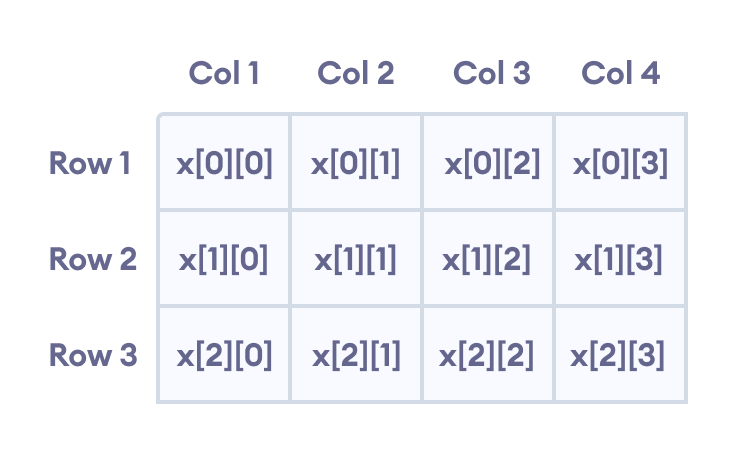
Three‑dimensional arrays follow the same logic:
float x[2][4][3];With 24 elements in total, calculated by multiplying the dimensions: 2 × 4 × 3 = 24.
Multidimensional Array Initialization
Like one‑dimensional arrays, multidimensional arrays can be initialized in multiple ways, but clarity matters. The following sections show recommended practices.
1. Two‑Dimensional Array Initialization
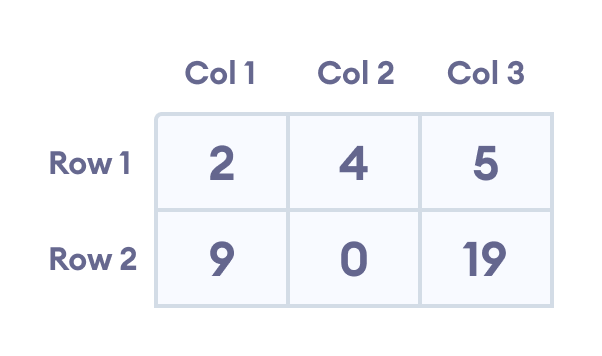
int test[2][3] = {2, 4, 5, 9, 0, 19};While syntactically correct, this style is hard to read. Prefer a nested initializer:
int test[2][3] = {{2, 4, 5}, {9, 0, 19}};This makes the 2 rows and 3 columns explicit.
2. Three‑Dimensional Array Initialization
int test[2][3][4] = {3, 4, 2, 3, 0, -3, 9, 11, 23, 12, 23,
                 2, 13, 4, 56, 3, 5, 9, 3, 5, 5, 1, 4, 9};
Again, readability suffers. A clearer approach groups each dimension:
int test[2][3][4] = {
    {{3, 4, 2, 3}, {0, -3, 9, 11}, {23, 12, 23, 2}},
    {{13, 4, 56, 3}, {5, 9, 3, 5}, {5, 1, 4, 9}}
};
Notice that the first dimension contains two 3‑row blocks, each with four columns.
Example 1: Two‑Dimensional Array
#include <iostream>
using namespace std;

int main() {
    int test[3][2] = {{2, -5},
                      {4, 0},
                      {9, 1}};
    for (int i = 0; i < 3; ++i) {
        for (int j = 0; j < 2; ++j) {
            cout << "test[" << i << "][" << j << "] = " << test[i][j] << endl;
        }
    }
    return 0;
}
Output
test[0][0] = 2
test[0][1] = -5
test[1][0] = 4
test[1][1] = 0
test[2][0] = 9
test[2][1] = 1
This snippet demonstrates a nested for loop that first iterates over rows, then columns, printing each element.
Example 2: Taking Input for a Two‑Dimensional Array
#include <iostream>
using namespace std;

int main() {
    int numbers[2][3];
    cout << "Enter 6 numbers: " << endl;
    for (int i = 0; i < 2; ++i) {
        for (int j = 0; j < 3; ++j) {
            cin >> numbers[i][j];
        }
    }
    cout << "The numbers are: " << endl;
    for (int i = 0; i < 2; ++i) {
        for (int j = 0; j < 3; ++j) {
            cout << "numbers[" << i << "][" << j << "]: " << numbers[i][j] << endl;
        }
    }
    return 0;
}
Output
Enter 6 numbers:
1
2
3
4
5
6
The numbers are:
numbers[0][0]: 1
numbers[0][1]: 2
numbers[0][2]: 3
numbers[1][0]: 4
numbers[1][1]: 5
numbers[1][2]: 6
Here, two nested loops collect user input and then display the stored values.
Example 3: Three‑Dimensional Array
#include <iostream>
using namespace std;

int main() {
    int test[2][3][2] = {
        {{1, 2}, {3, 4}, {5, 6}},
        {{7, 8}, {9, 10}, {11, 12}}
    };
    for (int i = 0; i < 2; ++i) {
        for (int j = 0; j < 3; ++j) {
            for (int k = 0; k < 2; ++k) {
                cout << "test[" << i << "][" << j << "][" << k << "] = " << test[i][j][k] << endl;
            }
        }
    }
    return 0;
}
Output
test[0][0][0] = 1
test[0][0][1] = 2
test[0][1][0] = 3
test[0][1][1] = 4
test[0][2][0] = 5
test[0][2][1] = 6
test[1][0][0] = 7
test[1][0][1] = 8
test[1][1][0] = 9
test[1][1][1] = 10
test[1][2][0] = 11
test[1][2][1] = 12
Looping over a 3‑D array requires three nested loops—each corresponding to a dimension. This pattern scales naturally to higher dimensions, though complexity grows rapidly.
C Language
- Mastering C# Arrays: Declaration, Initialization, and Operations
- C# Multidimensional Arrays: 2D Arrays Explained with Code Examples
- Mastering C++ Arrays: Declaration, Initialization, and Practical Examples
- Mastering C Arrays: Declaration, Initialization, and Common Operations
- Mastering Multidimensional Arrays in C: 2D & 3D Explained
- Mastering Java Multidimensional Arrays: 2D & 3D Examples
- C++ Arrays Demystified: Declaration, Initialization, and Pointer Techniques
- Master C++ Dynamic Array Allocation: A Practical Guide with Code Examples
- C Arrays Explained: Efficient Data Storage & Access
- Mastering Arrays in C#: Efficient Data Storage & Access