



Mastering C Arrays: Declaration, Initialization, and Common Operations
Mastering C Arrays
Discover how to declare, initialize, and manipulate C arrays with practical examples, best‑practice tips, and safety guidelines.
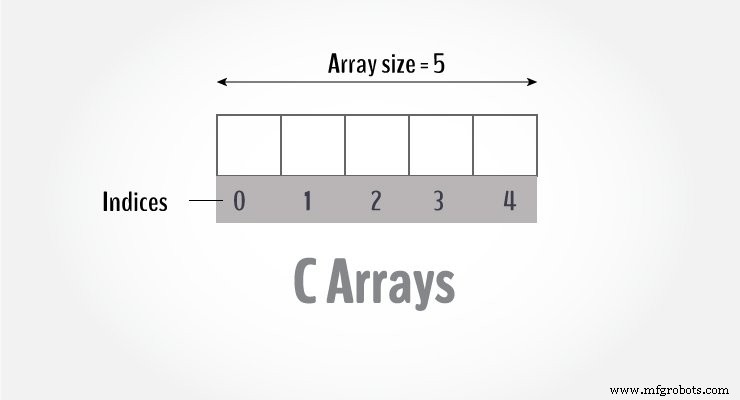
In C, an array is a contiguous block of memory that stores multiple values of the same type. For example, to hold 100 integers you would write:
int data[100];Declaring an Array
Use the syntax:
dataType arrayName[arraySize];Example:
float mark[5];Here, mark can store five float values. Note that the size and type are fixed after declaration.
Accessing Elements
Array indices start at 0. For an array of size n, the last element is array[n-1]. Example:
mark[0]  // first element
mark[4]  // last element for size 5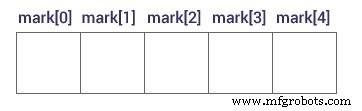
Key Points:
- First index is 0, not 1.
- For
float(4 bytes), each subsequent index increments the address by 4. - Never access beyond
array[n-1]to avoid undefined behavior.
Initializing an Array
Initialize at declaration:
int mark[5] = {19, 10, 8, 17, 9};Or let the compiler deduce the size:
int mark[] = {19, 10, 8, 17, 9};Resulting values:
mark[0] = 19
mark[1] = 10
mark[2] = 8
mark[3] = 17
mark[4] = 9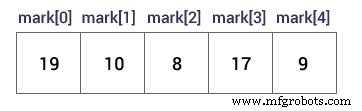
Modifying Elements
int mark[5] = {19, 10, 8, 17, 9};
mark[2] = -1;  // third element
mark[4] = 0;   // fifth element
Input & Output
Reading into an array element:
scanf("%d", &mark[2]);          // third element
scanf("%d", &mark[i-1]);        // i-th element (1‑based)
Printing an element:
printf("%d", mark[0]);        // first
printf("%d", mark[2]);        // third
printf("%d", mark[i-1]);      // i‑th
Example 1: Array Input/Output
#include <stdio.h>

int main() {
    int values[5];

    printf("Enter 5 integers: ");
    for (int i = 0; i < 5; ++i) {
        scanf("%d", &values[i]);
    }

    printf("Displaying integers:\n");
    for (int i = 0; i < 5; ++i) {
        printf("%d\n", values[i]);
    }
    return 0;
}
Output
Enter 5 integers: 1
-3
34
0
3
Displaying integers:
1
-3
34
0
3
Example 2: Calculate Average
#include <stdio.h>

int main() {
    int marks[10], n, sum = 0;

    printf("Enter number of elements: ");
    scanf("%d", &n);

    for (int i = 0; i < n; ++i) {
        printf("Enter number%d: ", i + 1);
        scanf("%d", &marks[i]);
        sum += marks[i];
    }

    int average = sum / n;
    printf("Average = %d", average);
    return 0;
}
Output
Enter n: 5
Enter number1: 45
Enter number2: 35
Enter number3: 38
Enter number4: 31
Enter number5: 49
Average = 39
Beware of Out‑of‑Bounds Access
Accessing testArray[12] when the array has only 10 elements leads to undefined behavior—crashes, corrupted data, or silent errors. Always validate indices before accessing.
Multidimensional Arrays
So far we’ve covered one‑dimensional arrays. In the next tutorial, we’ll explore multidimensional arrays (arrays of arrays) and how to use them effectively.
C Language
- Mastering C# Arrays: Declaration, Initialization, and Operations
- C# Multidimensional Arrays: 2D Arrays Explained with Code Examples
- Mastering C++ Arrays: Declaration, Initialization, and Practical Examples
- Mastering Multidimensional Arrays in C++: Declaring, Initializing, and Looping
- Mastering Java Arrays: Declaration, Initialization, and Manipulation
- Mastering Java Multidimensional Arrays: 2D & 3D Examples
- Java Array Copying Techniques: A Comprehensive Guide
- C Arrays Explained: Efficient Data Storage & Access
- MATLAB: Mastering Multidimensional and Special Arrays
- Mastering Arrays in C#: Efficient Data Storage & Access