



C++ Arrays Demystified: Declaration, Initialization, and Pointer Techniques
What is an Array?
In C++, an array is a fixed‑size, contiguous block of memory that holds elements of the same data type. Think of it as a single variable that represents a collection of values, each accessed by an index starting at 0.
Arrays simplify data handling by grouping related values, enabling efficient traversal, random access, and bulk operations.
Why Use Arrays?
Arrays offer:
- Compact representation of homogeneous data.
- Constant‑time index access (
O(1)). - Natural fit for algorithms that require sequential or matrix‑style processing.
Declaring an Array
Syntax:
type arrayName[arraySize];
- type: Valid C++ data type (e.g.,
int,double,char). - arrayName: Identifier for the array.
- arraySize: Positive integer specifying element count.
Example: int age[5]; creates space for five integers.
Initializing an Array
Values can be set at declaration or later:
int age[5] = {19, 18, 21, 20, 17};
Leaving arraySize unspecified lets the compiler infer the size:
int age[] = {19, 18, 21, 20, 17};
Individual elements can be assigned via index:
age[3] = 20; // 4th element
Array Types
- One‑Dimensional (1D)
- Multi‑Dimensional (2D, 3D, …)
- Pointers to arrays
One‑Dimensional Array
Standard linear storage:
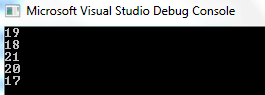
int age[5] = {19, 18, 21, 20, 17};
Traversal example:
#include <iostream>
using namespace std;

int main() {
    int age[5] = {19, 18, 21, 20, 17};
    for (int i = 0; i < 5; ++i) {
        cout << age[i] << "\n";
    }
    return 0;
}
Output:
Two‑Dimensional Array (Matrix)
Syntax: type arrayName[rows][cols];
int matrix[2][3] = {{0, 2, 1}, {4, 3, 7}};
Access pattern: matrix[row][col]. Traversal:
#include <iostream>
using namespace std;

int main() {
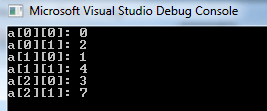
    int a[3][2] = {{0, 2}, {1, 4}, {3, 7}};
    for (int i = 0; i < 3; ++i) {
        for (int j = 0; j < 2; ++j) {
            cout << "a[" << i <<"] [" << j <<"] = " << a[i][j] << endl;
        }
    }
    return 0;
}
Output:
Three‑Dimensional Array
Illustrates a cube of data:
#include <iostream>
using namespace std;

int main() {
    int a[2][3][2] = {
        {{4, 8}, {2, 4}, {1, 6}},
        {{3, 6}, {5, 4}, {9, 3}}
    };
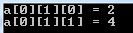
    cout << "a[0][1][0] = " << a[0][1][0] << "\n";
    cout << "a[0][1][1] = " << a[0][1][1] << "\n";
    return 0;
}
Output:
Pointer to an Array
An array name decays to a pointer to its first element. Example:
#include <iostream>
using namespace std;

int main() {
    int age[5] = {19, 18, 21, 20, 17};
    int *p = age;          // p points to age[0]
    cout << "Address: " << p << "\n";
    cout << "First value: " << *p << "\n";
    return 0;
}
Access via arithmetic:
for (int i = 0; i < 5; ++i) {
    cout << "*(p + " << i <<") = " << *(p + i) << endl;
}
Accessing Elements
Use the index operator [ ]:
int john = age[2]; // third element
Full example:
#include <iostream>
using namespace std;

int main() {
    int age[5] = {19, 18, 21, 20, 17};
    int john = age[2];
    cout << "The age of John is: " << john;
    return 0;
}
Pros of Arrays in C++
- Fast sequential traversal.
- O(1) random access.
- Low memory overhead—no dynamic allocation needed.
- Facilitates algorithmic optimizations (e.g., cache‑friendly loops).
- Built‑in support in the language and standard library.
Cons of Arrays in C++
- Fixed size—cannot resize after declaration.
- Risk of out‑of‑bounds errors if indices are mismanaged.
- Memory waste if the declared size exceeds actual usage.
- No bounds checking in standard arrays (use
std::arrayorstd::vectorfor safety).
Summary
- An array is a contiguous block of memory holding elements of one type.
- Indices start at 0; the last index is
size-1. - Declare with
type name[size];and initialize with{ }or individually. - 1D arrays store values linearly; 2D and 3D arrays model matrices and tensors.
- Pointers to arrays provide flexible indexing and arithmetic access.
- Choose arrays when size is known and performance is critical; otherwise prefer
std::vectororstd::array.
C Language
- Mastering C# Arrays: Declaration, Initialization, and Operations
- Mastering C++ Arrays: Declaration, Initialization, and Practical Examples
- Mastering Multidimensional Arrays in C++: Declaring, Initializing, and Looping
- Mastering C Arrays: Declaration, Initialization, and Common Operations
- Master C++ Dynamic Array Allocation: A Practical Guide with Code Examples
- Mastering C++ Pointers: Concepts, Examples & Practical Applications
- Master C# Arrays: Declaring, Initializing, and Working with Integer Collections
- Java Arrays Tutorial: Declaration, Creation, and Initialization – Example Code
- C Arrays Explained: Efficient Data Storage & Access
- Mastering Arrays in C#: Efficient Data Storage & Access