



Mastering the C# Continue Statement: How to Skip Loop Iterations Effectively
Mastering the C# Continue Statement: How to Skip Loop Iterations Effectively
This guide explains how the continue statement works in C#, with practical examples for for, while, foreach, and nested loops.
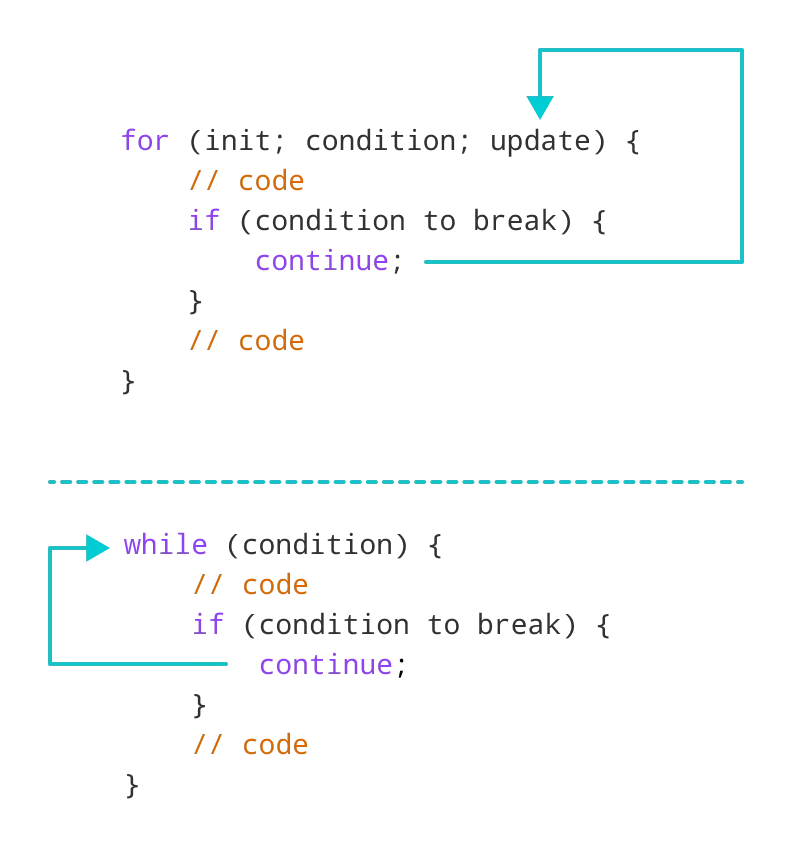
In C#, the continue keyword allows a loop to immediately skip the remainder of the current iteration and jump to the next cycle. When encountered, control moves to the loop’s test condition (or update expression in a for loop) before the next iteration begins.
The syntax is straightforward:
continue;Before diving into continue, ensure you’re comfortable with these fundamentals:
- for loop
- while loop
- if…else
Example 1: Using continue with a for loop
using System;

namespace ContinueLoop
{
    class Program
    {
        static void Main(string[] args)
        {
            for (int i = 1; i <= 5; ++i)
            {
                if (i == 3)
                {
                    continue;
                }
                Console.WriteLine(i);
            }
        }
    }
}
Output
1
2
4
5
Here, the loop prints numbers 1 through 5 but skips 3 because the continue statement is triggered when i == 3.
Note: continue is most effective when paired with conditional logic like if…else.
Example 2: Using continue with a while loop
using System;

namespace ContinueWhile
{
    class Program
    {
        static void Main(string[] args)
        {
            int i = 0;
            while (i < 5)
            {
                i++;

                if (i == 3)
                {
                    continue;
                }

                Console.WriteLine(i);
            }
        }
    }
}
Output
1
2
4
5
The behavior mirrors the for example: iteration 3 is skipped.
How the continue Statement Works
Using continue in Nested Loops
Nested loops are common when processing multi‑dimensional data. continue can be applied to the inner loop to skip specific inner iterations.
using System;

namespace ContinueNested
{
    class Program
    {
        static void Main(string[] args)
        {
            int sum = 0;

            // outer loop
            for (int i = 1; i <= 3; i++)
            {
                // inner loop
                for (int j = 1; j <= 3; j++)
                {
                    if (j == 2)
                    {
                        continue;
                    }
                    Console.WriteLine("i = " + i + " j = " + j);
                }
            }
        }
    }
}
Output
i = 1 j = 1
i = 1 j = 3
i = 2 j = 1
i = 2 j = 3
i = 3 j = 1
i = 3 j = 3
The statement inside the inner loop skips the iteration where j == 2, preventing that specific pair from being printed.
For more on nested loops, see the dedicated C# Nested Loops article.
Using continue with a foreach Loop
The foreach construct also supports continue, allowing you to skip specific elements in a collection.
using System;

namespace ContinueForeach
{
    class Program
    {
        static void Main(string[] args)
        {
            int[] num = { 1, 2, 3, 4, 5 };
            foreach (int number in num)
            {
                if (number == 3)
                {
                    continue;
                }
                Console.WriteLine(number);
            }
        }
    }
}
Output
1
2
4
5
When the loop encounters the value 3, the continue statement causes the remainder of that iteration to be skipped, so 3 never appears in the output.
C Language
- Mastering the C# Switch Statement: Syntax, Examples & Best Practices
- C# Break Statement: How & When to Use It
- Mastering the C++ break Statement
- Mastering C++ Continue Statement: Practical Examples & Loop Control
- Mastering C Conditional Statements: If, Else, and More
- Mastering the C Switch Statement: Syntax, Flow, and Practical Example
- Mastering the C Goto Statement: Syntax, Practical Use, and Best Practices
- Java Continue Statement – Mastering Loop Control with Examples
- Mastering C Basic Syntax: Tokens, Structure, and Semicolons
- Mastering C Loops: A Comprehensive Guide to Repetition Control