



Mastering C++ Continue Statement: Practical Examples & Loop Control
Mastering C++ Continue Statement
This guide explains how the continue statement works in C++ loops, complete with clear examples for for, while, and nested loops.
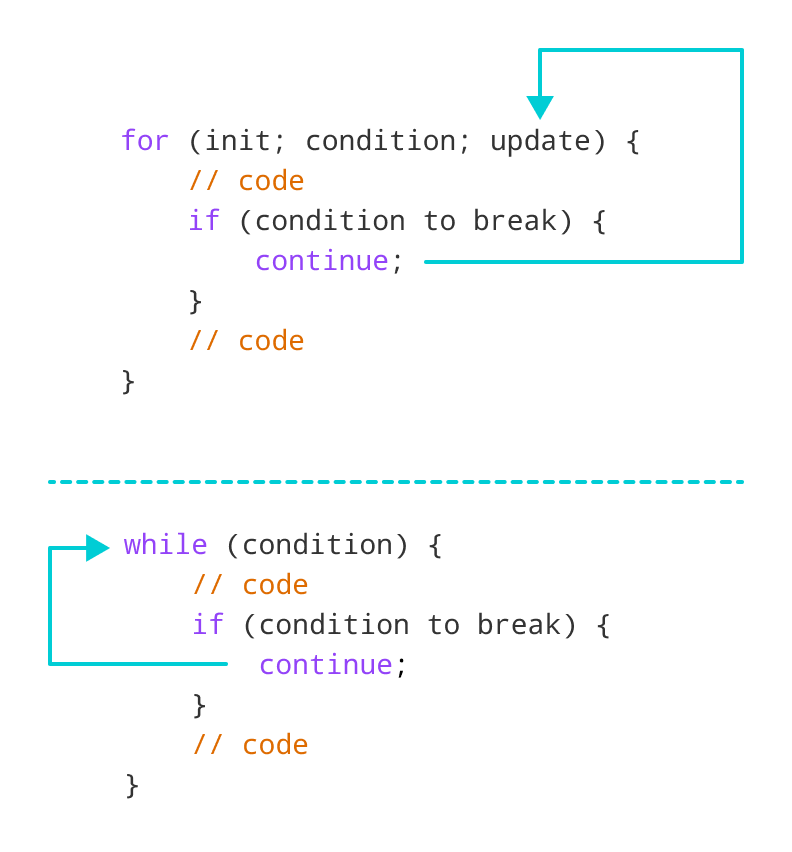
In C++ programming, the continue keyword instructs a loop to skip the remaining code in the current iteration and immediately evaluate the loop condition or update expression for the next pass.
The syntax is straightforward:
continue;Before diving into continue, ensure you are comfortable with:
- C++
forloops - C++
if/elsestatements - C++
whileloops
How continue Operates in C++
Example 1: Using continue in a for Loop
In a for loop, continue bypasses the current iteration and jumps directly to the update expression.
#include <iostream>
using namespace std;

int main() {
    for (int i = 1; i <= 5; ++i) {
        if (i == 3) {
            continue; // Skip printing when i equals 3
        }
        cout << i << endl;
    }
    return 0;
}
Output
1
2
4
5
Explanation:
- When
iequals 3,continueskips thecoutstatement. - The loop then increments
ito 4 and proceeds with the next iteration. - Consequently, only 1, 2, 4, and 5 are printed.
Tip: continue is most effective when paired with conditional logic.
Example 2: Using continue in a while Loop
In a while loop, continue returns control to the loop’s condition check.
#include <iostream>
using namespace std;

int main() {
    int sum = 0, number = 0;

    while (number >= 0) {
        sum += number; // Accumulate positive numbers
        cout << "Enter a number: ";
        cin >> number;

        if (number > 50) {
            cout << "The number is greater than 50 and won't be calculated." << endl;
            number = 0; // Reset to continue prompting
            continue;   // Skip the rest of this loop cycle
        }
    }

    cout << "The sum is " << sum << endl;
    return 0;
}
Sample Run
Enter a number: 12
Enter a number: 0
Enter a number: 2
Enter a number: 30
Enter a number: 50
Enter a number: 56
The number is greater than 50 and won't be calculated.
Enter a number: 5
Enter a number: -3
The sum is 99
Key points:
- Numbers > 50 trigger
continue, skipping addition and re‑prompting. - A negative input ends the loop.
Note: The same logic applies to do…while loops.
Using continue in Nested Loops
When placed inside nested loops, continue only affects the innermost loop.
#include <iostream>
using namespace std;

int main() {
    for (int i = 1; i <= 3; ++i) {
        for (int j = 1; j <= 3; ++j) {
            if (j == 2) {
                continue; // Skip j == 2 for this i
            }
            cout << "i = " << i << ", j = " << j << endl;
        }
    }
    return 0;
}
Output
i = 1, j = 1
i = 1, j = 3
i = 2, j = 1
i = 2, j = 3
i = 3, j = 1
i = 3, j = 3
The continue statement skips the inner loop’s iteration where j == 2, then jumps to the next j value.
Remember: break exits the entire loop, whereas continue only skips the current iteration.
C Language
- Mastering Conditional Logic in C#: If, If‑Else, If‑ElseIf, and Nested If Statements
- Mastering the C# Continue Statement: How to Skip Loop Iterations Effectively
- Master C++ Conditional Statements: if, if...else, and Nested if...else Explained
- Mastering the C++ break Statement
- Mastering the C++ Switch‑Case Statement: Syntax, Workflow, and Practical Examples
- Mastering C Control Flow: Break and Continue Statements Explained
- Mastering the C Goto Statement: Syntax, Practical Use, and Best Practices
- Java Continue Statement – Mastering Loop Control with Examples
- Understanding C++ Loop Types: For, While, Do-While Explained
- Mastering Decision-Making in C++: If, Switch, and More