



Mastering C Control Flow: Break and Continue Statements Explained
Mastering C Control Flow: Break and Continue Statements Explained
Understanding loop control is essential for writing efficient C programs. In this guide, we dive into the break and continue statements, showcasing how they shape loop behavior through practical examples.
C break
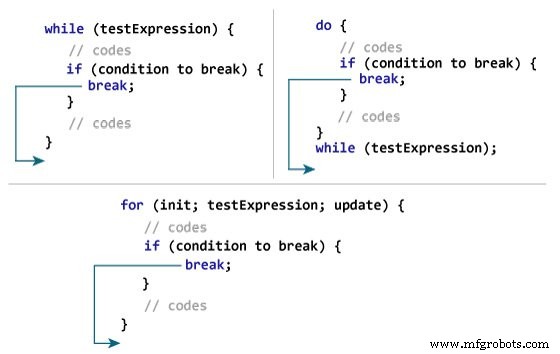
The break statement terminates a loop immediately when it is encountered. Its syntax is straightforward:
break;Typically, break is used in conjunction with an if...else condition inside the loop to exit under specific circumstances.
How break Works
Example 1: Using break to Stop Input Early
// Calculate the sum of up to 10 numbers
// The loop exits if the user enters a negative value

#include <stdio.h>

int main() {
   int i;
   double number, sum = 0.0;

   for (i = 1; i <= 10; ++i) {
      printf("Enter n%d: ", i);
      scanf("%lf", &number);

      if (number < 0.0) {
         break;
      }

      sum += number;
   }

   printf("Sum = %.2lf\n", sum);
   return 0;
}
Output
Enter n1: 2.4
Enter n2: 4.5
Enter n3: 3.4
Enter n4: -3
Sum = 10.30
This program demonstrates that break stops the for loop when a negative number is entered, preventing further input and immediately displaying the accumulated sum.
In addition, break is widely used within switch statements to exit a case block—a topic covered in our next tutorial.
C continue
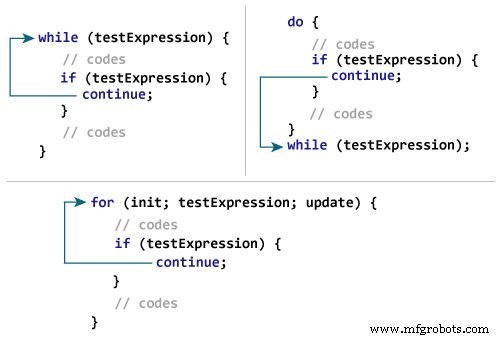
The continue statement skips the remainder of the current loop iteration and proceeds directly to the next iteration. Its syntax is:
continue;Like break, it is most commonly paired with an if...else condition to control loop flow dynamically.
How continue Works
Example 2: Skipping Negative Numbers with continue
// Calculate the sum of up to 10 numbers
// Negative entries are ignored using continue

#include <stdio.h>

int main() {
   int i;
   double number, sum = 0.0;

   for (i = 1; i <= 10; ++i) {
      printf("Enter a n%d: ", i);
      scanf("%lf", &number);

      if (number < 0.0) {
         continue;
      }

      sum += number;
   }

   printf("Sum = %.2lf\n", sum);
   return 0;
}
Output
Enter n1: 1.1
Enter n2: 2.2
Enter n3: 5.5
Enter n4: 4.4
Enter n5: -3.4
Enter n6: -45.5
Enter n7: 34.5
Enter n8: -4.2
Enter n9: -1000
Enter n10: 12
Sum = 59.70
Here, the continue statement prevents negative numbers from contributing to the total, ensuring that only valid inputs affect the sum.
C Language
- Minterms & Maxterms in Karnaugh Maps: Clear Notation & Practical Examples
- Mastering Conditional Logic in C#: If, If‑Else, If‑ElseIf, and Nested If Statements
- C# Break Statement: How & When to Use It
- Mastering the C# Continue Statement: How to Skip Loop Iterations Effectively
- Master C++ Conditional Statements: if, if...else, and Nested if...else Explained
- C++ While and Do‑While Loops – Mastering Repetition in Your Code
- Mastering C++ Continue Statement: Practical Examples & Loop Control
- Mastering C Control Flow: Break and Continue Statements Explained
- C Recursion Made Easy: Writing and Using Recursive Functions
- Mastering Python Loop Control: break & continue