



Mastering While and Do‑While Loops in C: Practical Examples
Mastering While and Do‑While Loops in C
Learn how to use while and do‑while loops in C with clear explanations and hands‑on code examples.
Loops are fundamental in programming, allowing you to repeat a block of code until a specific condition is met. C offers three primary looping constructs: for, while, and do‑while. This guide focuses on the latter two, providing step‑by‑step explanations, flowcharts, and real‑world code samples.
While Loop
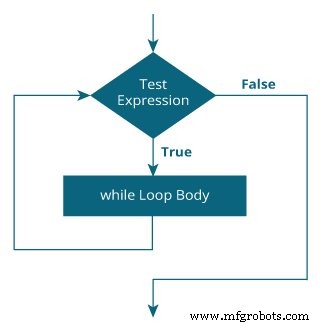
The while loop evaluates its condition before each iteration. If the condition is true, the loop body executes; otherwise, the loop terminates.
while (testExpression) {
    // loop body
}
How the While Loop Works
- The expression inside
( )is evaluated first. - If it returns true, the statements inside the loop run, then the expression is evaluated again.
- This cycle continues until the expression evaluates to false, at which point the loop ends.
- If the initial evaluation is false, the loop body never executes.
For a deeper understanding of logical conditions, review relational and logical operators.
Flowchart of a While Loop
Example 1: Printing Numbers 1 to 5
// Print numbers from 1 to 5
#include <stdio.h>
int main() {
    int i = 1;
    while (i <= 5) {
        printf("%d\n", i);
        ++i;
    }
    return 0;
}
Output
1
2
3
4
5
Explanation: i starts at 1. The condition i <= 5 is true, so the loop prints i and increments it. The process repeats until i becomes 6, causing the condition to evaluate to false and the loop to terminate.
Do‑While Loop
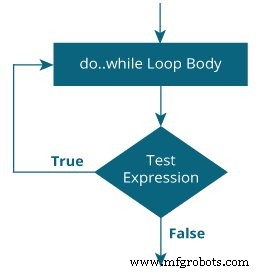
The do‑while loop guarantees that the loop body runs at least once, checking the condition only after the first execution.
do {
    // loop body
} while (testExpression);
How the Do‑While Loop Works
- The body executes first, regardless of the condition.
- Afterward,
testExpressionis evaluated. - If true, the loop repeats; if false, the loop ends.
Flowchart of a Do‑While Loop
Example 2: Sum Numbers Until Zero is Entered
// Program to add numbers until the user enters zero
#include <stdio.h>
int main() {
    double number, sum = 0;
    do {
        printf("Enter a number: ");
        scanf("%lf", &number);
        sum += number;
    } while (number != 0.0);
    printf("Sum = %.2lf", sum);
    return 0;
}
Sample Interaction
Enter a number: 1.5
Enter a number: 2.4
Enter a number: -3.4
Enter a number: 4.2
Enter a number: 0
Sum = 4.70
In this example, the user is prompted at least once. If the first input is non‑zero, the number is added to sum, and the loop continues. Entering zero terminates the loop and displays the final sum.
Understanding these loops is essential for effective C programming. Use while when you need to test a condition before each iteration, and do‑while when the body must execute at least once.
C Language
- Mastering C# While and Do‑While Loops: Syntax, Examples, and Best Practices
- C# foreach Loops: Iterate Arrays and Collections with Ease
- C++ While and Do‑While Loops – Mastering Repetition in Your Code
- Mastering Python's While Loop: Syntax, Examples, and Best Practices
- Mastering Python Loop Control: break & continue
- Mastering Java While & Do‑While Loops: Step‑by‑Step Tutorial
- Mastering Loop and Exit Constructs in VHDL: A Practical Guide
- Master C Loops: For, While, and Do‑While Explained with Practical Examples
- While vs. Do‑While Loops: Clear Comparison with Practical Examples
- Mastering WHILE Loops in SINUMERIK 840D CNC Programming