



C# foreach Loops: Iterate Arrays and Collections with Ease
C# foreach Loops
Discover how the foreach loop simplifies iteration over arrays and collections in C#, boosting readability and performance.
In C#, the foreach loop offers a cleaner, more expressive alternative to the traditional for loop when working with arrays, lists, and other collections. It automatically handles indexing, making your code easier to read and less error‑prone.
Before diving in, review these foundational topics:
Syntax of the foreach Loop
foreach (element in iterableItem)
{
    // body of foreach loop
}
The iterableItem can be an array, a list, or any type that implements IEnumerable.
How the foreach Loop Works
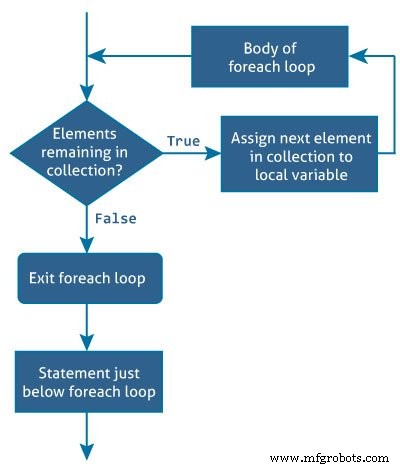
The in keyword selects each item from iterableItem on every iteration and assigns it to the variable element. The loop executes once per element, so the number of iterations equals the number of items in the collection.
Example 1: Printing an Array with a for Loop
using System;

namespace Loop
{
    class ForLoop
    {
        public static void Main(string[] args)
        {
            char[] myArray = {'H','e','l','l','o'};
            for (int i = 0; i < myArray.Length; i++)
            {
                Console.WriteLine(myArray[i]);
            }
        }
    }
}
Example 2: Printing an Array with a foreach Loop
using System;

namespace Loop
{
    class ForEachLoop
    {
        public static void Main(string[] args)
        {
            char[] myArray = {'H','e','l','l','o'};
            foreach (char ch in myArray)
            {
                Console.WriteLine(ch);
            }
        }
    }
}
Both programs produce:
H
e
l
l
o
The foreach version is shorter, eliminates index calculations, and reduces the risk of off‑by‑one errors.
Example 3: Counting Males and Females in a Gender Array
This example tallies occurrences of 'm' and 'f' in an array.
using System;

namespace Loop
{
    class GenderCount
    {
        public static void Main(string[] args)
        {
            char[] gender = {'m','f','m','m','m','f','f','m','m','f'};
            int male = 0, female = 0;
            foreach (char g in gender)
            {
                if (g == 'm')
                    male++;
                else if (g == 'f')
                    female++;
            }
            Console.WriteLine("Number of male = {0}", male);
            Console.WriteLine("Number of female = {0}", female);
        }
    }
}
Output:
Number of male = 6
Number of female = 4
Example 4: Summing a List with foreach
Using a List<int> demonstrates that foreach works seamlessly with generic collections.
using System;
using System.Collections.Generic;

namespace Loop
{
    class SumList
    {
        public static void Main(string[] args)
        {
            var numbers = new List<int>() { 5, -8, 3, 14, 9, 17, 0, 4 };
            int sum = 0;
            foreach (int number in numbers)
            {
                sum += number;
            }
            Console.WriteLine("Sum = {0}", sum);
            Console.ReadLine();
        }
    }
}
Result:
Sum = 44
In both array and collection scenarios, foreach delivers cleaner, more maintainable code. Prefer it whenever you only need to read elements and do not require direct index manipulation.
C Language
- Mastering C# While and Do‑While Loops: Syntax, Examples, and Best Practices
- Mastering C# For Loops: Syntax, Flow, and Practical Examples
- Master C++ For Loops: A Step-by-Step Guide
- Mastering the C for Loop: Syntax, Mechanics, and Practical Examples
- Mastering While and Do‑While Loops in C: Practical Examples
- Mastering Python's While Loop: Syntax, Examples, and Best Practices
- Mastering the Java Enhanced For Loop: Syntax, Examples, and Best Practices
- Mastering For Loops in Verilog: Build Reusable Hardware Logic
- Mastering C Loops: A Comprehensive Guide to Repetition Control
- Master C# Loops: Efficient Code Repetition Techniques