



Java Break Statement: How, When, and Labeled Breaks Explained
Java Break Statement
This tutorial explains the Java break statement, its syntax, and how to use labeled breaks for precise loop control.
When working with loops, you may need to skip the remaining statements in an iteration or terminate the loop entirely without evaluating the loop condition again. The break and continue statements provide that control. The next tutorial covers continue.
The break statement immediately exits the innermost loop or switch construct, and program execution continues with the statement that follows the terminated block.
It is most often used in combination with conditional logic such as if…else to create early exit points.
Syntax:
break;How the break Statement Works
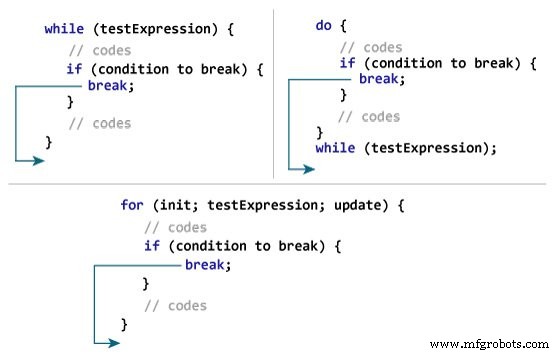
Example 1: Using break in a for loop
class Test {
    public static void main(String[] args) {
        // for loop
        for (int i = 1; i <= 10; ++i) {
            // if the value of i is 5 the loop terminates
            if (i == 5) {
                break;
            }
            System.out.println(i);
        }
    }
}Output:
1
2
3
4
The loop prints values 1 through 4. The if block checks i; when it equals 5, break stops the loop.
Example 2: break in a while loop with user input
Here we sum numbers entered by the user until a negative number is supplied.
We use Scanner to read input. For more on Scanner, see the Java Scanner tutorial.
import java.util.Scanner;

class UserInputSum {
    public static void main(String[] args) {
        Double number, sum = 0.0;
        Scanner input = new Scanner(System.in);
        while (true) {
            System.out.print("Enter a number: ");
            number = input.nextDouble();
            if (number < 0.0) {
                break;
            }
            sum += number;
        }
        System.out.println("Sum = " + sum);
    }
}Output:
Enter a number: 3.2
Enter a number: 5
Enter a number: 2.3
Enter a number: 0
Enter a number: -4.5
Sum = 10.5
The while (true) loop runs indefinitely until break is hit when a negative value is entered.
Break in Nested Loops
In nested loops, break exits only the innermost loop.
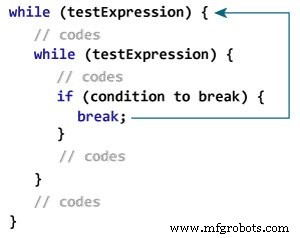
The image illustrates that break inside the inner while jumps to the outer loop.
Labeled Break Statement
Beyond the simple break, Java offers a labeled variant that can terminate an outer loop directly. This is useful when you need to exit multiple levels of nested loops.
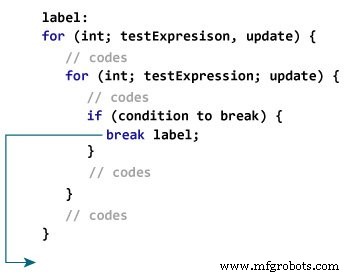
The label precedes the loop, and break label; ends that loop, jumping to the statement that follows it.
while (testExpression) {
   // codes
   second:
   while (testExpression) {
      // codes
      while(testExpression) {
         // codes
         break second;
      }
   }
   // control jumps here
}
When break second; executes, the loop marked second ends, and control resumes after that loop.
Example 3: Using a Labeled Break
class LabeledBreak {
    public static void main(String[] args) {
        first:
        for (int i = 1; i < 5; i++) {
            second:
            for (int j = 1; j < 3; j++) {
                System.out.println("i = " + i + "; j = " + j);
                if (i == 2)
                    break first;
            }
        }
    }
}Output:
i = 1; j = 1
i = 1; j = 2
i = 2; j = 1
Here, break first; exits the outer for loop, so the program stops after printing the third line.
If we replace break first; with break second;, only the inner loop terminates, and the outer loop continues.
class LabeledBreak {
    public static void main(String[] args) {
        first:
        for (int i = 1; i < 5; i++) {
            second:
            for (int j = 1; j < 3; j++) {
                System.out.println("i = " + i + "; j = " + j);
                if (i == 2)
                    break second;
            }
        }
    }
}Output:
i = 1; j = 1
i = 1; j = 2
i = 2; j = 1
i = 3; j = 1
i = 3; j = 2
i = 4; j = 1
i = 4; j = 2
Note: The break statement also terminates switch cases. For more, read the Java switch statement tutorial.
Java
- C# Break Statement: How & When to Use It
- Mastering the C++ break Statement
- Master Java Operators: Types, Syntax, & Practical Examples
- Mastering Java if…else: Control Flow Explained
- Mastering the Java Switch Statement: Syntax, Usage, and Best Practices
- Java Continue Statement – Mastering Loop Control with Examples
- Mastering Java's super Keyword: Advanced Usage & Practical Examples
- Mastering Java Interfaces: Concepts, Implementation, and Best Practices
- Mastering Java Loop Control: Efficient Repetition Techniques
- Java Decision-Making: Mastering Conditional Statements for Robust Programming