



Mastering Python Sets: Creation, Manipulation & Operations
Python Sets
Discover how Python’s set data type simplifies data deduplication and set-based operations. This guide covers creation, modification, deletion, and all essential set operations.
Video: Sets in Python
A set is an unordered collection of unique, immutable items. While the set itself is mutable—allowing you to add or remove elements—its individual elements must be hashable (e.g., numbers, strings, tuples).
Python sets support mathematical set operations such as union, intersection, difference, and symmetric difference, making them ideal for tasks like data deduplication, membership testing, and set algebra.
Creating Python Sets
Use curly braces or the built‑in set() constructor to create a set. Elements can be of any immutable type, but mutable types such as lists, dicts, or other sets cannot be included.
# Example 1: Sets with different data types
# set of integers
my_set = {1, 2, 3}
print(my_set)

# set of mixed datatypes
my_set = {1.0, 'Hello', (1, 2, 3)}
print(my_set)
Output
{1, 2, 3}
{1.0, (1, 2, 3), 'Hello'}
Notice how duplicate values are automatically removed and how tuples—being immutable—are accepted.
# Removing duplicates
my_set = {1, 2, 3, 4, 3, 2}
print(my_set)

# Constructing a set from a list
my_set = set([1, 2, 3, 2])
print(my_set)

# Attempting to include a mutable item causes an error
# my_set = {1, 2, [3, 4]}  # TypeError: unhashable type: 'list'
Output
{1, 2, 3, 4}
{1, 2, 3}
Traceback (most recent call last):
  File "<string>", line 15, in <module>
    my_set = {1, 2, [3, 4]}
TypeError: unhashable type: 'list'
Creating an empty set requires the set() constructor; using {} creates an empty dictionary instead.
# Distinguish set and dictionary when creating empty structures

a = {}
print(type(a))

a = set()
print(type(a))
Output
<class 'dict'>
<class 'set'>
Modifying a Set in Python
Sets are mutable, but they do not support indexing or slicing due to their unordered nature.
Use add() to insert a single element and update() to merge another iterable into the set. Duplicate entries are automatically ignored.
# Example: Adding elements
my_set = {1, 3}
print(my_set)

# Attempting to index a set raises an error
# my_set[0]  # TypeError: 'set' object does not support indexing

# Add a single element
my_set.add(2)
print(my_set)

# Add multiple elements from a list
my_set.update([2, 3, 4])
print(my_set)

# Combine a list and another set
my_set.update([4, 5], {1, 6, 8})
print(my_set)
Output
{1, 3}
{1, 2, 3}
{1, 2, 3, 4}
{1, 2, 3, 4, 5, 6, 8}
Removing Elements from a Set
Use discard() to remove an element if it exists, or do nothing otherwise. In contrast, remove() raises a KeyError when the element is absent.
# Example: Discard vs. remove
my_set = {1, 3, 4, 5, 6}
print(my_set)

my_set.discard(4)
print(my_set)

my_set.remove(6)
print(my_set)

my_set.discard(2)
print(my_set)

# The following will raise KeyError
# my_set.remove(2)
Output
{1, 3, 4, 5, 6}
{1, 3, 5, 6}
{1, 3, 5}
{1, 3, 5}
Traceback (most recent call last):
  File "<string>", line 28, in <module>
KeyError: 2
The pop() method removes and returns an arbitrary element, while clear() empties the set entirely.
# Pop and clear example
my_set = set("HelloWorld")
print(my_set)

print(my_set.pop())
print(my_set)

my_set.clear()
print(my_set)
Output
{'H', 'l', 'r', 'W', 'o', 'd', 'e'}
H
{'r', 'W', 'o', 'd', 'e'}
set()
Python Set Operations
Python sets support classic set algebra: union, intersection, difference, and symmetric difference. These can be invoked via operators or dedicated methods.
Let’s use two example sets:
A = {1, 2, 3, 4, 5}
B = {4, 5, 6, 7, 8}
Union
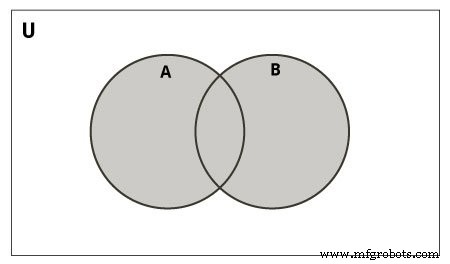
The union of A and B combines all distinct elements.
print(A | B)Output
{1, 2, 3, 4, 5, 6, 7, 8}
Intersection
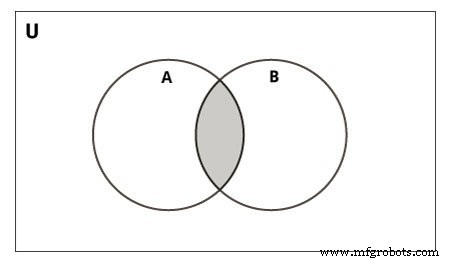
The intersection returns only elements common to both sets.
print(A & B)Output
{4, 5}
Difference
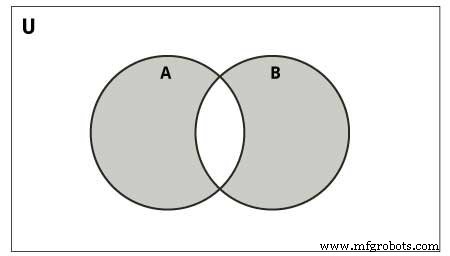
The difference A - B lists elements present in A but not in B.
print(A - B)Output
{1, 2, 3}
Symmetric Difference
Symmetric difference A ^ B returns elements that are in either set but not in both.
print(A ^ B)Output
{1, 2, 3, 6, 7, 8}
Additional Set Methods
Below is a quick reference for all built‑in methods available on set objects:
| Method | Description |
|---|---|
| add() | Adds an element to the set |
| clear() | Removes all elements |
| copy() | Returns a shallow copy |
| difference() | Returns a new set of elements present in the caller but not in others |
| difference_update() | In‑place difference removal |
| discard() | Remove element if present; no error if absent |
| intersection() | Returns a new set of common elements |
| intersection_update() | In‑place intersection update |
| isdisjoint() | True if sets have no elements in common |
| issubset() | True if caller is a subset of another set |
| issuperset() | True if caller contains another set entirely |
| pop() | Removes and returns an arbitrary element; KeyError if empty |
| remove() | Remove element; KeyError if absent |
| symmetric_difference() | Returns a new set of elements exclusive to each set |
| symmetric_difference_update() | In‑place symmetric difference update |
| union() | Returns a new set containing all unique elements |
| update() | In‑place union with another iterable |
Set Membership Test
Check for element existence using the in keyword.
my_set = set("apple")
print('a' in my_set)   # True
print('p' not in my_set)  # False
Output
True
False
Iterating Through a Set
Loop over a set with a standard for loop; order is not guaranteed.
for letter in set("apple"):
    print(letter)
Built‑in Functions with Sets
Functions like len(), max(), min(), sum(), all(), any(), and sorted() work seamlessly with sets. Here’s a table of common utilities:
| Function | Description |
|---|---|
| all() | True if all elements are truthy (or set is empty) |
| any() | True if at least one element is truthy |
| enumerate() | Iterates with an index, useful for debugging |
| len() | Number of elements |
| max() | Largest element |
| min() | Smallest element |
| sorted() | Returns a sorted list from the set |
| sum() | Sum of all numeric elements |
Python Frozenset
A frozenset is an immutable counterpart to a set. Once created, its elements cannot change, making it hashable and usable as a dictionary key.
A = frozenset([1, 2, 3, 4])
B = frozenset([3, 4, 5, 6])
Supported operations mirror those of regular sets, except for mutating methods.
print(A.isdisjoint(B))
print(A.difference(B))
print(A | B)
# Attempting to add an element raises an AttributeError
# A.add(3) # AttributeError: 'frozenset' object has no attribute 'add'Python
- Mastering Python Data Types: A Practical Guide
- Mastering Python Operators: A Comprehensive Guide
- Mastering Python's While Loop: Syntax, Examples, and Best Practices
- Mastering the Python Pass Statement: A Practical Guide
- Master Python Functions: Syntax, Types, and Practical Examples
- Mastering Python Function Arguments: Positional, Keyword, and Default Parameters
- Python List Operations: Creation, Access, Modification, and Advanced Techniques
- Mastering Python Tuples: Creation, Access, and Advanced Operations
- Mastering Python Sets: Creation, Manipulation & Operations
- Mastering Python Dictionaries: Creation, Manipulation, and Advanced Techniques