



Python List Operations: Creation, Access, Modification, and Advanced Techniques
Python List Operations
Python lists are one of the most versatile data structures in the language, enabling you to store, organize, and manipulate sequences of values efficiently. This guide covers everything you need to know—from creating and accessing list elements to advanced techniques such as slicing, comprehensions, and built‑in methods.
Video: Python Lists and Tuples
Python lists allow you to work with multiple items simultaneously. For example:
# a list of programming languages
['Python', 'C++', 'JavaScript']
Create Python Lists
A list is created by placing elements inside square brackets [], separated by commas. Lists can contain any number of items and support mixed data types.
# list of integers
my_list = [1, 2, 3]
Examples:
# empty list
my_list = []

# mixed data types
my_list = [1, "Hello", 3.4]
A list may also contain another list, creating a nested structure.
# nested list
my_list = ["mouse", [8, 4, 6], ["a"]]
Access List Elements
Python offers several ways to access items.
Indexing
Use the [] operator. Indices start at 0; attempting to access an out‑of‑range index raises IndexError, while non‑integer indices raise TypeError.
my_list = ['p', 'r', 'o', 'b', 'e']

print(my_list[0])  # p
print(my_list[2])  # o
print(my_list[4])  # e

n_list = ["Happy", [2, 0, 1, 5]]
print(n_list[0][1])  # a
print(n_list[1][3])  # 5

print(my_list[4.0])  # TypeError
Output
p
o
e
a
5
Traceback (most recent call last):
  File "<string>", line 21, in <module>
TypeError: list indices must be integers or slices, not float
Negative Indexing
Negative indices count from the end of the list: -1 is the last element, -2 the second last, and so on.
my_list = ['p','r','o','b','e']
print(my_list[-1])  # e
print(my_list[-5])  # p
Output
e
p
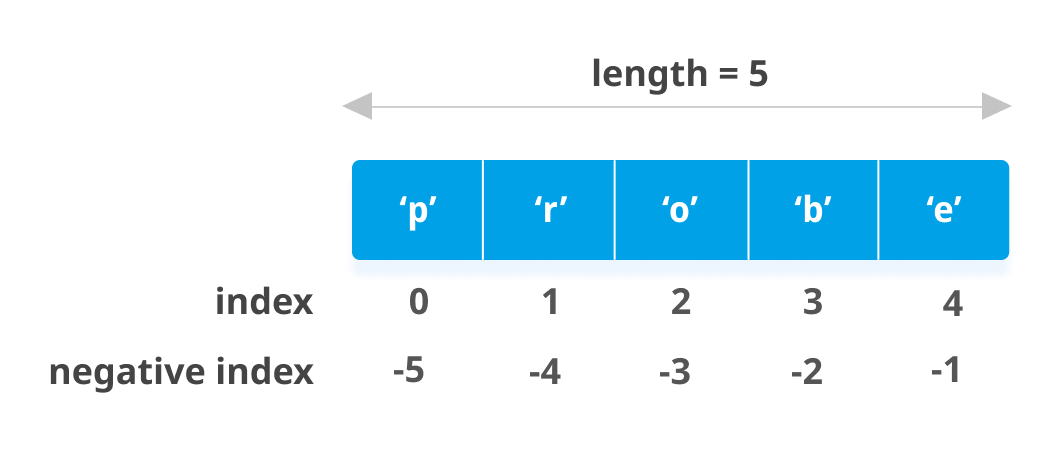
List Slicing
Slicing extracts a range of items using the colon operator :. The start index is inclusive; the end index is exclusive.
my_list = ['p','r','o','g','r','a','m','i','z']
print(my_list[2:5])  # ['o', 'g', 'r']
print(my_list[5:])   # ['a', 'm', 'i', 'z']
print(my_list[:])    # full list
Output
['o', 'g', 'r']
['a', 'm', 'i', 'z']
['p', 'r', 'o', 'g', 'r', 'a', 'm', 'i', 'z']
Note: Slicing returns a new list; the original remains unchanged.
Modify List Elements
Lists are mutable. You can replace single items or slices.
odd = [2, 4, 6, 8]
odd[0] = 1
print(odd)
odd[1:4] = [3, 5, 7]
print(odd)
Output
[1, 4, 6, 8]
[1, 3, 5, 7]
Add elements with append() (single) or extend() (multiple). Use + for concatenation and * for repetition.
odd = [1, 3, 5]
off.append(7)
print(odd)
off.extend([9, 11, 13])
print(odd)

print(odd + [9, 7, 5])
print(["re"] * 3)
Output
[1, 3, 5, 7]
[1, 3, 5, 7, 9, 11, 13]
[1, 3, 5, 9, 7, 5]
['re', 're', 're']
Insert elements at a specific index with insert() or by assigning to an empty slice.
odd = [1, 9]
odd.insert(1, 3)
print(odd)

odd[2:2] = [5, 7]
print(odd)
Output
[1, 3, 9]
[1, 3, 5, 7, 9]
Delete List Elements
Use del to remove items by index or slice, or to delete the entire list. remove() deletes the first matching value, pop() removes and returns an element by index (or the last element if no index is given). clear() empties the list.
my_list = ['p', 'r', 'o', 'b', 'l', 'e', 'm']

# delete one item
del my_list[2]
print(my_list)

# delete multiple items
del my_list[1:5]
print(my_list)

# delete the entire list
del my_list
print(my_list)  # NameError
Output
['p', 'r', 'b', 'l', 'e', 'm']
['p', 'm']
Traceback (most recent call last):
  File "<string>", line 18, in <module>
NameError: name 'my_list' is not defined
Alternative deletion via slice assignment:
>>>>> my_list = ['p','r','o','b','l','e','m']
>>>>>> my_list[2:3] = []
>>>>>> my_list
['p', 'r', 'b', 'l', 'e', 'm']
>>>>>> my_list[2:5] = []
>>>>>> my_list
['p', 'r', 'm']
Common List Methods
| Method | Description |
|---|---|
| append() | Adds an element to the end |
| extend() | Appends all elements from another iterable |
| insert() | Inserts an item at a specified index |
| remove() | Removes the first occurrence of a value |
| pop() | Removes and returns an element by index (or last) |
| clear() | Empties the list |
| index() | Returns the first index of a value |
| count() | Counts occurrences of a value |
| sort() | Sorts the list in ascending order |
| reverse() | Reverses the list order |
| copy() | Returns a shallow copy |
my_list = [3, 8, 1, 6, 8, 8, 4]
my_list.append('a')
print(my_list)
print(my_list.index(8))   # 1
print(my_list.count(8))   # 3
List Comprehension
List comprehensions provide a concise way to generate lists.
pow2 = [2 ** x for x in range(10)]
print(pow2)
Output
[1, 2, 4, 8, 16, 32, 64, 128, 256, 512]
Equivalent to:
pow2 = []
for x in range(10):
    pow2.append(2 ** x)
Comprehensions may include multiple for clauses or an if filter.
>>>>> pow2 = [2 ** x for x in range(10) if x > 5]
>>>>>> pow2
[64, 128, 256, 512]

>>>>>> odd = [x for x in range(20) if x % 2 == 1]
>>>>>> odd
[1, 3, 5, 7, 9, 11, 13, 15, 17, 19]

>>>>>> [x+y for x in ['Python ','C '] for y in ['Language','Programming']]
['Python Language', 'Python Programming', 'C Language', 'C Programming']
Explore more at the official Python documentation.
Additional List Operations
Membership Test
Check if a value exists using in or not in.
my_list = ['p', 'r', 'o', 'b', 'l', 'e', 'm']
print('p' in my_list)   # True
print('a' in my_list)   # False
print('c' not in my_list)  # True
Output
True
False
True
Iterating Through a List
Use a for loop to process each item.
for fruit in ['apple','banana','mango']:
    print("I like", fruit)
Output
I like apple
I like banana
I like mango
Python
- Mastering Python Data Types: A Practical Guide
- Mastering Python Operators: A Comprehensive Guide
- Mastering Python Tuples: Creation, Access, and Advanced Operations
- Mastering Python Dictionaries: Creation, Manipulation, and Advanced Techniques
- Mastering Python Lists: Append, Sort, Length & List Comprehensions (Practical Guide)
- Calculating Averages in Python: A Practical Guide
- Python list.count(): Expert Guide with Practical Examples
- How to Remove Duplicate Elements from a Python List
- Python List index() – How to Find Element Positions with Practical Examples
- Mastering Python Lists: A Comprehensive Guide