



Mastering Python Tuples: Creation, Access, and Advanced Operations
Python Tuples
Discover the power of tuples in Python—immutable sequences that offer speed, safety, and versatility for heterogeneous data. This guide covers everything from basic syntax to advanced operations, ensuring you understand when to choose tuples over lists.
Video: Python Lists and Tuples
A tuple behaves like a list but is immutable once created. Unlike lists, you cannot alter its elements, making tuples ideal for fixed data sets.
Creating a Tuple
Tuples are defined by placing comma‑separated values inside parentheses (). While parentheses are optional, they improve readability.
Tuples can contain any number of items and mix data types—integers, floats, strings, lists, other tuples, etc.
# Different types of tuples

# Empty tuple
my_tuple = ()
print(my_tuple)

# Tuple with integers
my_tuple = (1, 2, 3)
print(my_tuple)

# Mixed data types
my_tuple = (1, "Hello", 3.4)
print(my_tuple)

# Nested tuple
my_tuple = ("mouse", [8, 4, 6], (1, 2, 3))
print(my_tuple)
Output
()
(1, 2, 3)
(1, 'Hello', 3.4)
('mouse', [8, 4, 6], (1, 2, 3))
Tuples can also be created without parentheses—a technique known as tuple packing.
my_tuple = 3, 4.6, "dog"
print(my_tuple)

# Tuple unpacking
a, b, c = my_tuple
print(a)
print(b)
print(c)
Output
(3, 4.6, 'dog')
3
4.6
dog
When a tuple contains a single element, a trailing comma is required to distinguish it from a plain value.
my_tuple = ("hello")
print(type(my_tuple))  # <class 'str'>

# Single‑element tuple
my_tuple = ("hello",)
print(type(my_tuple))  # <class 'tuple'>

# Parentheses optional
my_tuple = "hello",
print(type(my_tuple))  # <class 'tuple'>
Output
<class 'str'>
<class 'tuple'>
<class 'tuple'>
Accessing Tuple Elements
Tuples support several methods for element access:
1. Indexing
Use the index operator [] with zero‑based indices. Out‑of‑range access raises IndexError; non‑integer indices raise TypeError.
# Indexing example
my_tuple = ('p','e','r','m','i','t')
print(my_tuple[0])  # 'p'
print(my_tuple[5])  # 't'

# Nested indexing
n_tuple = ("mouse", [8, 4, 6], (1, 2, 3))
print(n_tuple[0][3])  # 's'
print(n_tuple[1][1])  # 4
Output
p
t
s
4
2. Negative Indexing
Negative indices count from the end: -1 is the last element.
# Negative indexing
my_tuple = ('p', 'e', 'r', 'm', 'i', 't')
print(my_tuple[-1])  # 't'
print(my_tuple[-6])  # 'p'
Output
t
p
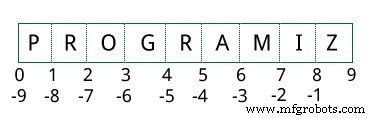
3. Slicing
Use start:stop syntax to extract sub‑tuples.
# Slicing example
my_tuple = ('p','r','o','g','r','a','m','i','z')
print(my_tuple[1:4])   # ('r', 'o', 'g')
print(my_tuple[:-7])   # ('p', 'r')
print(my_tuple[7:])    # ('i', 'z')
print(my_tuple[:])     # full tuple
Output
('r', 'o', 'g')
('p', 'r')
('i', 'z')
('p', 'r', 'o', 'g', 'r', 'a', 'm', 'i', 'z')
Modifying a Tuple
Tuples are immutable. Direct assignment to an element raises TypeError:
# Attempting modification
my_tuple = (4, 2, 3, [6, 5])
# my_tuple[1] = 9  # TypeError
However, if an element is itself mutable (e.g., a list), its internal state can change:
my_tuple[3][0] = 9
print(my_tuple)  # (4, 2, 3, [9, 5])
Tuples can be reassigned to a new value entirely:
my_tuple = ('p', 'r', 'o', 'g', 'r', 'a', 'm', 'i', 'z')
print(my_tuple)
Use + for concatenation and * for repetition; both return a new tuple.
print((1, 2, 3) + (4, 5, 6))  # (1, 2, 3, 4, 5, 6)
print(("Repeat",) * 3)        # ('Repeat', 'Repeat', 'Repeat')
Output
(1, 2, 3, 4, 5, 6)
('Repeat', 'Repeat', 'Repeat')
Deleting a Tuple
Individual items cannot be removed. The entire tuple can be deleted with del:
my_tuple = ('p', 'r', 'o', 'g', 'r', 'a', 'm', 'i', 'z')
# del my_tuple[3]  # TypeError

del my_tuple
# print(my_tuple)  # NameError
Output
Traceback (most recent call last):
  File "<string>", line 12, in <module>
NameError: name 'my_tuple' is not defined
Tuple Methods
Tuples expose only two built‑in methods: count() and index().
my_tuple = ('a', 'p', 'p', 'l', 'e')
print(my_tuple.count('p'))  # 2
print(my_tuple.index('l'))  # 3
Output
2
3
Additional Tuple Operations
1. Membership Test
Check for existence with the in keyword.
my_tuple = ('a', 'p', 'p', 'l', 'e')
print('a' in my_tuple)
print('b' in my_tuple)
print('g' not in my_tuple)
Output
True
False
True
2. Iteration
Loop over tuples with for:
for name in ('John', 'Kate'):
    print("Hello", name)
Output
Hello John
Hello Kate
3. Advantages Over Lists
- Ideal for heterogeneous data; lists are usually homogeneous.
- Immutability provides a performance edge in iteration.
- Tuples containing only immutable elements can serve as dictionary keys.
- Write‑protected data is guaranteed, preventing accidental modification.
Python
- Mastering Python Data Types: A Practical Guide
- Mastering Python Operators: A Comprehensive Guide
- Mastering Python's While Loop: Syntax, Examples, and Best Practices
- Mastering the Python Pass Statement: A Practical Guide
- Master Python Functions: Syntax, Types, and Practical Examples
- Mastering Python Function Arguments: Positional, Keyword, and Default Parameters
- Python Packages: Structure, Importing, and Best Practices
- Python List Operations: Creation, Access, Modification, and Advanced Techniques
- Mastering Python Dictionaries: Creation, Manipulation, and Advanced Techniques
- Mastering Python Tuples: Definition, Usage, and Differences from Lists