



Settings Assistant 1.1: Accelerated 3D Scan Configuration with Enhanced GUI for Photoneo Sensors
By Pavel Soral || May 18, 2026
Photoneo’s Settings Assistant 1.1 empowers users to identify the optimal scanning profile in seconds, thanks to a more intuitive interface and intelligent recommendations.
3D sensing presents a unique configuration challenge: the ideal settings for a polished aluminium casting differ from those for a matte black rubber gasket, and the parameters that work in a brightly lit logistics cell can fail in a dim warehouse bay. Exposure, pattern intensity, confidence thresholds, and texture sources form a vast parameter space, and the best point depends on the specific scene.
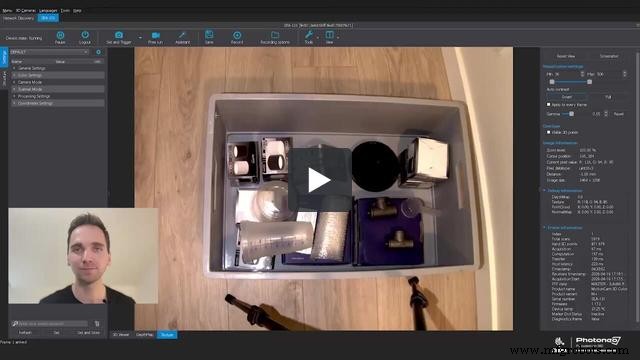 Guided tour of Settings Assistant 1.1
The Problem Settings Assistant Was Built To Solve
While experienced vision engineers can navigate this landscape, it can be a significant hurdle for automation specialists, system integrators, or production teams lacking deep 3D‑sensing expertise. Achieving reliable sensor output should not hinge on memorizing parameter combinations.
Settings Assistant addresses this by shifting the focus from parameter theory to result evaluation—anyone can assess scan quality visually. The tool automatically runs a sweep of configurations, presents the outcomes, and lets the user select the profile that best matches their scene. The assistant then derives the optimal settings from that choice.
Version 1.1 maintains this core concept while accelerating the evaluation step and improving clarity.
What’s New in Settings Assistant 1.1
The PhoXi Control 1.17 release introduces two key enhancements designed to reduce cognitive load during profile selection.
Automatic Ordering by Scanning Time
Previous iterations displayed scan results in a static order, forcing users to mentally map scan times to results or perform iterative comparisons. 1.1 automatically sorts results by scanning time, instantly revealing the fastest profiles that meet quality thresholds. This is especially valuable in production settings where cycle time is critical.
Key Values Displayed per Tile
Each result tile now shows two inline metrics: scanning time and the number of valid 3D points. These are the most decision‑relevant indicators in most workflows. Scanning time informs you whether a profile fits your cycle‑time constraints, while the valid point count indicates the capture’s completeness. Having both visible at a glance eliminates the need for manual cross‑referencing.
The combination of sorted results and instant metrics tightens the feedback loop: run the assistant, review ordered results with key values, select the optimal trade‑off, and the tool applies the corresponding settings—expertise is reduced without compromising outcome quality.
Expanded Coverage for Newer Hardware
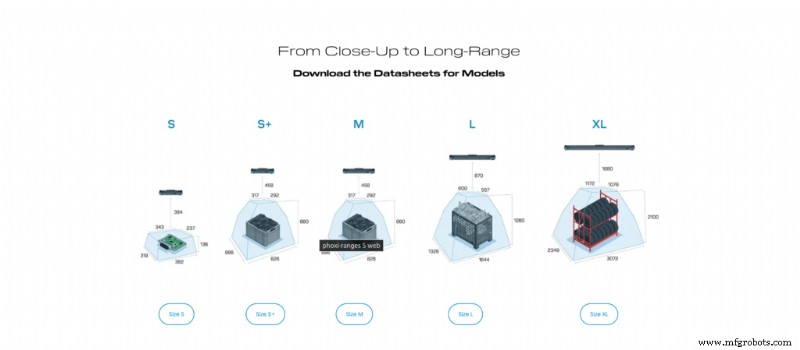
Photoneo’s continuous hardware evolution—new sensor families and expanded parameter sets—had previously limited Settings Assistant’s guidance. 1.1 updates the assistant to fully support the current generation of sensors, ensuring that users benefit from a complete, optimized setup workflow.
For technicians deploying newer Photoneo devices who previously experienced incomplete or sub‑optimal results, the updated assistant now delivers a comprehensive, tailored configuration.
Who Gains the Most From Settings Assistant 1.1
The greatest impact occurs at installation time. Every new cell, part type, or commissioning visit—especially those staffed by non‑specialists—benefits from the reduced friction. This translates to lower engineering effort and faster time to production.
In an industry where guided setup tools vary widely, Settings Assistant’s ability to lower configuration barriers offers a tangible competitive advantage for customers evaluating total deployment costs—not just hardware price.
If you encounter areas for improvement, you can export the assistant’s data and share it with Photoneo support. Our experts can use the exact scan data to fine‑tune your profile.
Available Now
Automation Control System
- NASA Uses RoboDK Software to Automate Cobots Programming for Fuselage Inspection
- FANUC & Plus One Forge Alliance to Boost E‑Commerce Fulfillment
- Seven Proven Ways Computer Vision Drives Efficiency & Saves Costs
- Readers Crown November Cover the 2020 Favorite in Production Machining
- Sepro Unveils Redesign of Its Best‑Selling 5‑Axis Success Robot Line
- Robotics & Automation: Driving the Future of Industry 4.0
- The Future of Machining: Navigating Technological Disruption and Emerging Trends
- Honeywell Expands Life Sciences Automation with Performix Acquisition
- Explore Industry Insights: Comprehensive Webinar Recordings Archive
- Mobile Robot Market to Surge: 6 Million Units Forecast for 2030, Driving $277B Industry Growth