



E3.series 2021 Update: Advanced Connectors & Table Features – Part 3
In this article, we will continue presenting the new features of E3.series 2021. This time, connectors and plugs, tables, among others are covered. See the full article to further optimize your projects and learn how to use the E3.series tool in the most efficient way for your demand.
Plug Connector Only on Valid Mating Connector
A setting can be used to ensure that connectors can only be plugged into mating connectors that are defined as active mating connectors in the Component Properties.
The setting is active for all views of the connectors.
This means that all connectors can only be plugged with the mating connectors defined for them.
To activate the setting, select Tools → Settings in the Main Menu.
Note: The function can be activated and deactivated in the Electric Settings and Fluid Settings dialogs.
Activate the setting Allow only valid mating connectors to plug under Connection. The setting is user-specific:
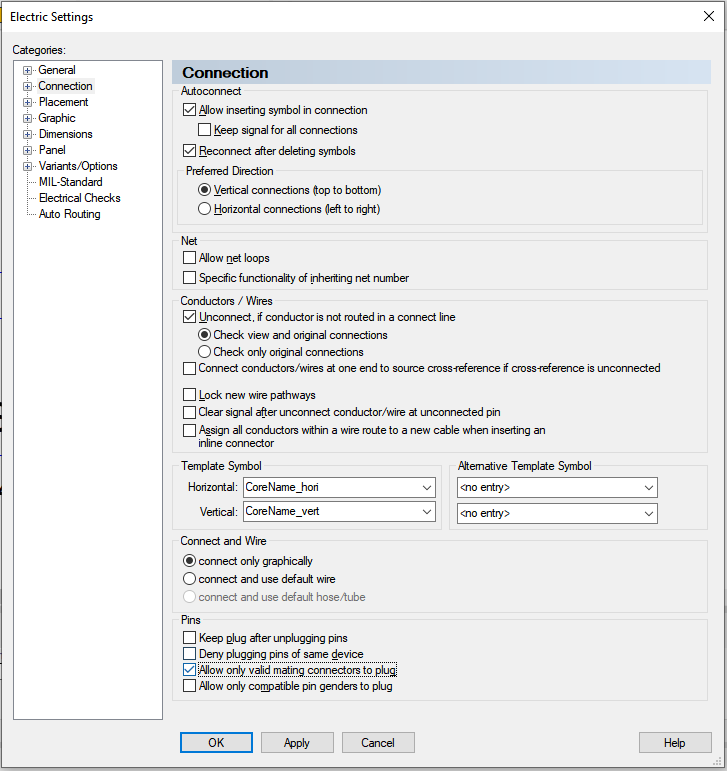
Connectors can now only be plugged into mating connectors that are defined as the active mating connector. Connectors that do not have an active mating connector defined can no longer be plugged in.
Plug Connector Only to Connector with Compatible Pin Gender
A setting can be used to ensure that connectors can only be plugged onto mating connectors that have compatible pin genders. The setting is active for all views of the connectors. The compatible pin gender can be defined in the Component Properties and the Device Properties.
This means that only connectors that are compatible with each other can be plugged in.
To activate the setting, select Tools → Settings in the Main Menu.
Note: The function can be activated and deactivated in the Electric Settings and Fluid Settings dialogs.
Activate the setting Allow only compatible pin genders to plug under Connection. The setting is user-specific:
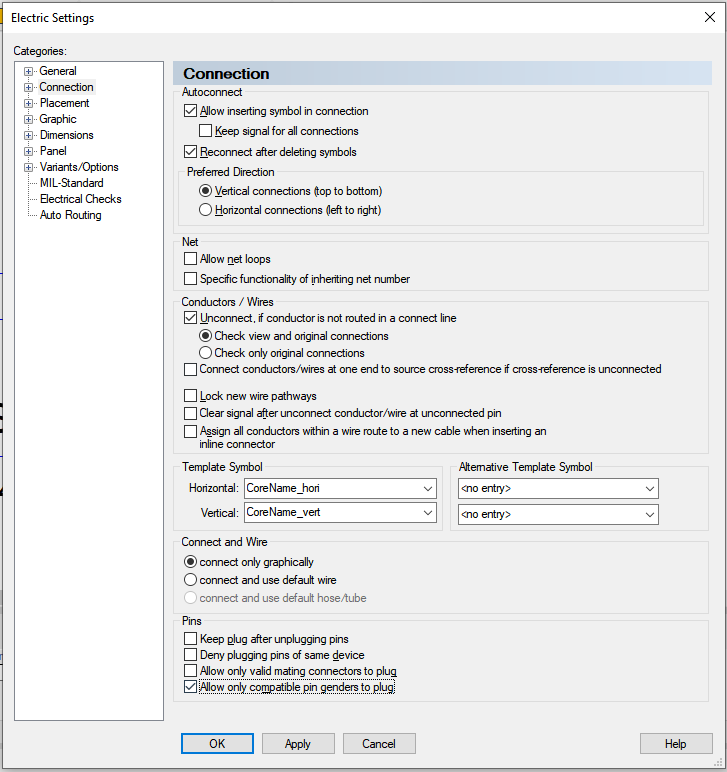
Note: Incompatible pin genders can still be connected. A corresponding message informs about incompatible pin genders.
If the setting is changed, the change does not affect connectors that are already plugged in. Incompatible pin genders that are plugged in are listed during checks.
The following combinations of pin genders are compatible and can be plugged:
- <No entry> and <No entry>
- <No entry> and Male
- <No entry> and Female
- Male and Female
New Information in Connection Table
New information is now displayed in the Connection Table by default.
The additional information provides an overview of what length the conductors/wires of a connection are and whether the length is to scale or not.
To display the tables, select View → Connection Table.
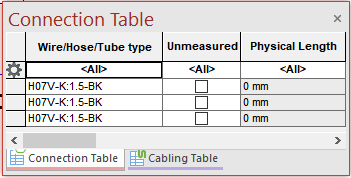
Unmeasure: Determines whether the length of the connection is to scale or not. To set or remove the property, click the check box.
Physical Length: Specifies the physical length of the connection. If the length is to scale, it is calculated automatically. If the length is not to scale, the length can be changed. To do this, click in the line of the value to be changed and enter the new value.
Test E3.series 2021 according to your demand using the button below:

Industrial Technology
- Markforged 2021 Software Enhancements: 10 Features That Tackled Customer Challenges
- Discover the 9 Must‑Learn Programming Languages of 2021
- E3.series 2021: Automate Shield Adjustment for Wire & Cable Projects
- E3.series 2021: Advanced Cable & Harness Features & Free Trial
- E3.series 2021: New Panel Design Tools & 3D Export Features
- New E3.series Course Bundles & Download – Affordable Training for Engineers
- 10 Powerful New Features in E3.series 2017 to Boost Your Electrical Design Workflow
- UID Overview Series – Part I: Tracing the History of UID and MIL-STD-130
- CMMS Expert Series: How to Select the Right Vendor – Part 2
- CMMS Expert Series: Choosing the Right Maintenance Software – Part 1