



E3.series 2021: Automate Connector Integration for Efficient Electrical Projects
This video shows the function of automatically adding compatible connectors to the project sheet. See the full article and optimize your work.
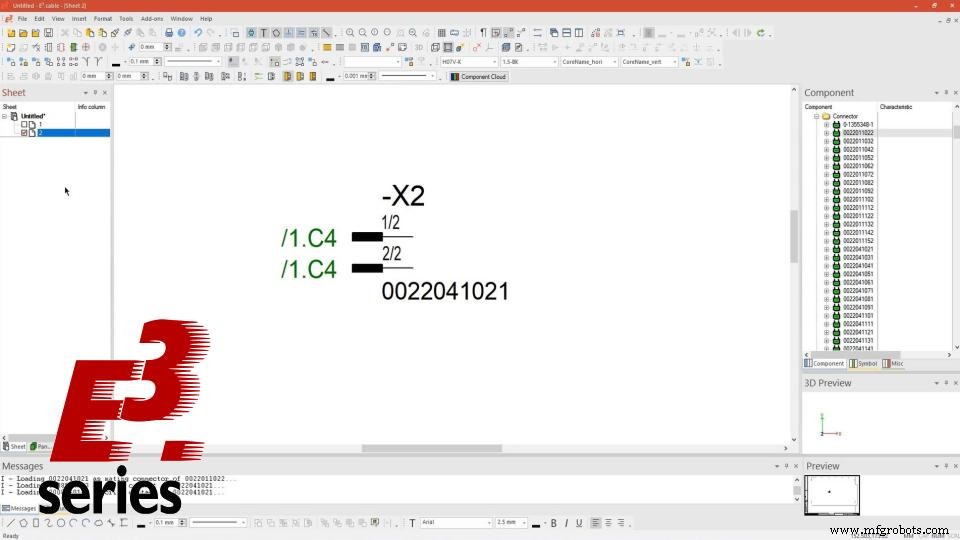
After adding the connector to the project sheet, a second sheet is added and the "Plug to Mating Connector Pin" option is selected. Then the compatible connector is added to the second sheet and the reference is automatically generated, with the sheet number and location of each device in the project.
Try NOW the industry-leading E-CAE E3.series tool in the world with technical training courses!Click on the banner below:
See the full video:
Subscribe to our Youtube channel here for more technical videos.
Test E3.series according to your demand using the button below:

Streamline Electrical Harness Design with E3.series
E3.series 2021 Update: Advanced Connectors & Table Features – Part 3
Industrial Technology
- Master Block Diagram Design in E3.series: Boost Electrical Project Efficiency
- Create Electrical Panel Variants Quickly with E3.series – Efficient Design Layouts & Custom Documentation
- E3.series 2021: Highlight Panel Connections for Faster Electrical Design
- Generate Automatic Reports for Electrical Projects in E3.series – Boost Documentation & Efficiency
- E3.series Electrical Projects: Fast & Intuitive Symbol Creation for DXF/DWG Export
- Effortless Panel Design in E3.series: Quick Assembly Guide
- Master Terminal Strip Creation in E3.series for Electrical Projects
- E3.series Electrical Projects: Mastering Sheet Organization for Efficient Workflows
- Insert Step Models into E3.series Electrical Projects: A Step-by-Step Guide
- 70+ Innovative Electrical Engineering Projects for Students