



Comprehensive Guide to CNC G‑Codes & M‑Codes – Downloadable PDF Included
Today at The Mechanical post we’ll see about what are G codes and M codes in CNC machining. Also, you can download and print the PDF by clicking on the button provided at the end of the article.
Introduction to CNC programming
In the early days of CNC machines, the input or instructions were fed to the CNC machine using punch tapes or magnetic tapes. However, due to technological advancement, computers have replaced them. A computerized CNC controller is shown below.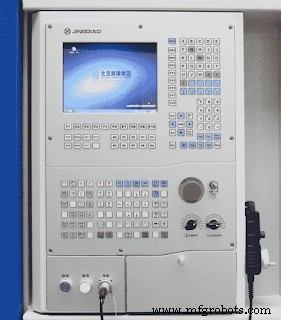 |
| HafeezJD, CC BY-SA 4.0, via Wikimedia Commons |
The CNC machine understands commands in a certain language. This language is made up of a predefined set of codes called G codes and M codes.
N-words
These words represent the sequence number, it helps identify the block (each line of instruction is termed as a block). In short, it’s like when we write something in steps, we give each step a number. Like point no 1, point no 2, and so on. Similarly in the CNC part programming, each line or block of code is given a number like N100, N110, N120, and so on. They are usually written in steps of 10 or 5.Feed word (F code)
The Feed word refers to the feed rate of the machine tool. It is written in the following format F_ _ and then the required feed rate is specified. Take for eg: F240, this means that the feed rate is 240. The feed rate can either be in mm/min (G94) or mm/rev (G95), this depends upon the operator.X, Y, and Z words
These are the words or codes used to specify the coordinates of the tool position. The X, Y, and Z words represent the X, Y, and Z axes. In addition to these linear axes, angular positions are specified using I, J, and K words.Spindle speed word (S-word)
The spindle speed is mentioned by the letter S. The spindle speed is in r.p.m. For eg: S800, which means that the spindle speed is 800 r.p.m.Tool selection (T word)
This function is used in CNC machines with an automatic tool changer. Whenever a different tool is required to perform a task during the CNC machining, the tool selection function is called using the T-word. Each tool present in the tool magazine or tool library has a specific address. Take for eg, if the tool currently being used is a taper tool and now the operator requires to drill a hole, so he uses the tool selection command and calls the drill bit at position 4 by using T04.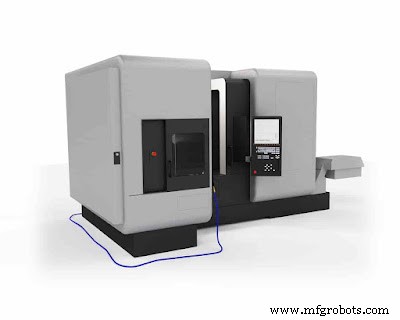 |
| CNC milling machine |
G codes for CNC milling
The following are some of the commonly used G codes and their description in CNC milling. G00 – Rapid positioning G01 – Linear travel/interpolation G02 – Circular travel/interpolation (clockwise) G03 – Circular interpolation (Anti-clockwise) G04 – Dwell G10 – Programmable data input G17 – XY plane selection G18 – ZX plane selection G19 – YZ plane selection G20 – Programming in inch units G21 – Programming in metric units G27 – Reference point return check G28 – Automatic return to point of reference G29 – Automatic return from the point of reference G30 – Return to 2nd, 3rd, or 4th point of reference G40 – Cutter diameter compensation cancel G41 – Cutter diameter compensation left G42 – Cutter diameter compensation right G43 – Tool length compensation in positive (+) sign G44 – Tool length compensation in a negative (-) sign G45 – Tool offset increase G46 – Tool offset decrease G49 – Tool length offset cancel G53 – Machine coordinate system G54-59 – Work coordinate system G80 – Canned cycle cancel G81 – Drilling cycle canned G82 – Counter boring or countersinking cycle canned G83 – Peck drilling cycle (canned) G84 – Tapping cycle (canned) G85 – Reaming cycle (canned) G86 – Boring cycle (canned) G90 – Absolute positioning G91 – Incremental positioning G92 – Zero preset G94 – Feed rate in mm/min G95 – Feed rate in mm/rev G96 – Constant surface speed control G97 – Constant surface speed control cancelG codes for CNC turning
In CNC turning there is some change in G codes as compared to CNC mill. The codes are listed below: G00 – Rapid movement in a linear direction.G01- Linear machining.
G02 – Clockwise machining.
G03 – Counter-clockwise machining.
G04 – Dwell
G09 – Motion Exact stop check
G10 – Programmable data input
G17 – Select X-Y plane
G18 – Select X-Z plane
G19 – Select Y-Z plane
G20 – Programming is in inches
G21 – Programming is in mm
G27 – Reference point return check
G28 – Return to point of reference
G29 – Return to point of reference
G30 – Return to 2nd, 3rd, and 4th point of reference
G32 – Canned Constant lead threading (like G01 synchronized with spindle)
G40 – Tool cutter compensation off (radius comp.)
G41 – Tool cutter compensation left (radius comp.)
G42 – Tool cutter compensation right (radius comp.)
G43 – Tool length compensation (positive)
G44 – Tool length compensation (negative)
G49 – Tool length compensation cancel
G50 – Reset all scale factors to 1.0
G51 – Turn on scale factors
G52 – Local work shift for all coordinate systems
G53 – Machine coordinate system (cancel work offsets)
G54 – Work coordinate system (1st Workpiece)
G55 – Work coordinate system (2nd Workpiece)
G56 – Work coordinate system (3rd Workpiece)
G57 – Work coordinate system (4th Workpiece)
G58 – Work coordinate system (5th Workpiece)
G59 – Work coordinate system (6th Workpiece)
G70 – Finish Turning Cycle (canned)
G71 – Rough Turning Cycle (canned)
G72 – Rough Facing Cycle (canned)
G73 – Pattern Repeating Cycle (canned)
G74 – Peck Drilling Cycle (canned)
G75 – Grooving Cycle (canned)
G76 – Threading Cycle (canned)
G80 – Cancel canned cycle (canned)
G83 – Face drilling cycle (canned)
G84 – Face Tapping cycle (canned)
G86 – Boring canned cycle, spindle stop, rapid out (canned)
G87 – Side Drilling Cycle (canned)
G88 – Side Tapping Cycle (canned)
G89 – Side Boring Cycle (canned)
G90 – Absolute programming (type B and C systems)
G91 – Incremental programming (type B and C systems)
G92 – Thread Cutting Cycle (canned)
G94 – Endface Turning Cycle G96 – Constant Surface Speed ON
G97 – Constant Surface Speed Cancel
G98 – Feedrate in mm/min
G99 – Feed rate in mm/rev
M codes in CNC
M codes in CNC are almost the same for turning and milling. M codes are usually used for turning ON/OFF various processes. The following are the M codes. M00 – Program stop M01 – Optional stop M02 – Program end M03 – Spindle start M04 – Spindle start (anti-clockwise) M05 – Spindle stop M06 – Tool change M07 – Coolant ON (Within the spindle) M08 – Coolant ON M09 – Coolant OFF M30 – End program M98 – Call subroutine M99 – End subroutineYou might also like to read:
- What is casting? detailed explanation.
- What is industrial automation and what are its types?
- What is GTAW or TIG welding?
Explanation of most commonly used G codes
G00 – Rapid movement
The G00 code stands for rapid movement. It is used for moving the tool rapidly from one point to another. By using this code the tool moves with the maximum velocity. This velocity is specified by the manufacturer. During the traveling of the tool, no cutting operation is performed. This command is usually used when the tool is far away from the workpiece. When we usually call the tool at a point it traverses at a slower rate. This increases the time which eventually results in losses. Thus the G00 code is used. The G00 code is written in the format: G00 X_ Y_ Z_ First, the code G00 is called, then the X, Y, and Z coordinates of the destination are specified. For eg. G00 X25 Y05 Z00G01 – Linear travel/ interpolation
This code is used for cutting or machining in a linear direction from one point to another. The G01 code is written in the format: G01 X_ Y_ Z_F_ First, the code G01 is called then the X, Y, and Z coordinates of the destination are specified. Along with this, the feed rate is also provided. For eg. G01 X30 Y15 Z2 F120. The feed rate can either be in mm/min (G94) or mm/rev (G95), this depends upon the design of the workpiece and the operatorG02 – Circular travel/ interpolation (Clockwise)
When the tool is required to be used for cutting or machining purposes along a circular path the G02 code (clockwise) is used. Similarly for the anti-clockwise tool movement G03 code is used.G04 – Dwell
This code is used when no machining is required. The tool remains idle during dwell. The format of writing G04 code is: G04 X_ or G04 P_ First, the code is written, then the time for dwell is specified. Here X stands for seconds and P for milliseconds. For eg: G04 X5 / G04 P60 This was a brief explanation of some of the widely used G codes. You can also check out more details about each of the above-mentioned G codes on machinistguides.comAlso, here is an example of an actual part program used to produce the finished workpiece. ╍╍╍╍╍╍╍╍╍╍
That’s an overview of G codes and M codes used in CNC machines. If you like this post or have any suggestions do let us know in the comments we would love to hear it from you.
Also do join our Telegram Channel to stay updated on Mechanical engineering. We’ll be back soon with another interesting article, till then Keep reading!
Download PDF Link
Electric Discharge Machining (EDM): Process, Benefits, and Applications
CNC Machines Explained: How They Work, Types, Benefits & Applications – PDF Guide
Industrial Technology
- NC vs CNC Machines: Key Differences Explained
- CNC Machines Explained: How They Work, Types, Benefits & Applications – PDF Guide
- Mastering CNC Accuracy & Repeatability: Key Concepts Explained
- How AI and Machine Learning Revolutionize CNC Machining
- What Products Can Be Created with CNC Machines
- CNC Machining: Benefits and Constraints for Precision Manufacturing
- Top 8 CNC Machine Failures & Expert Troubleshooting Guide
- CNC Fundamentals: Mastering Computer Numerical Control
- Mastering CNC M-Codes: A Comprehensive Introduction
- Comprehensive Guide to CNC G‑Codes & M‑Codes for Milling & Lathes