



Fast-Track Your Custom Quote: Accurate Pricing in 2–3 Days
We consistently make your custom enclosures, parts and panels in 2-3 days. And the very first step in making your designs a reality is the quoting stage – you have a design, and you want to know how much it will cost to build it. Protocase Designer, our free 3D CAD software, is ideal for this – you can instantly price your design as you go (not to mention easily order right from the software). But you can also submit quote requests online, or by contacting us, too.
We know having a project stalled due to downtime while you wait for a quote is frustrating, so we aim to provide you a thorough quote within 24 hours. Sometimes, I’m asked why there was a delay in turning around a quote, and the answer is usually simple – we needed more information.
I wrote this blog post to provide a rundown of all of the important steps and key information you should include when submitting a request for quote.
- Send the correct files and formats
It all starts with the design you’ve created. Here are the CAD formats we work with:
When sending in a CAD file from Solidworks, be sure to send us the “Pack and Go” file. This will gather all related files for your design (parts, assemblies, drawings, references, etc.) into one folder or zip file – ensuring we have everything we need to process your quote quickly. For all other formats, if you are including multiple files, please ‘ZIP’ them as a single file and attach. |
Please ensure that your file opens and is not too small or empty – just do a quick check before you press send to make sure everything is there.
(Of course, we are happy to work with you if you aren’t able to complete the design yourself. Our Design Services team can create your design for a reasonable hourly fee – talk to your Protocase account manager about your options).
- Make clear notes
Keep in mind that the most important step in getting a quote is for you to communicate clearly what you need. Some designs are so simple and straightforward that just a drawing will suffice. However, often there is more that we need to know in order to quote correctly. If you don’t include extra information in your request, we will simply reach out to you to ask the required questions, which will take additional time.
So it helps to have as much clear and concise information as you can in your notes. To help streamline your work, here are the most important pieces of info you should include:
- At a minimum, please indicate your material, thickness and finish. (I.e. 10 units, Stainless Steel, 0.125″, Gentian Blue Powdercoat).
- Note if your design is a reorder.
- Is your quote request for a design we’ve already manufactured? Great! Once we have the job number, your quote request will move like lightning.
- Be careful of revisions, however – make sure you provide us very clear direction on what job you’d like to reorder so that we don’t manufacture the wrong job.
- If your design is a revision of a reorder, provide us clear guidance of what is being changed this time around. The more you communicate to us, the better.
- Note if you are looking to have multiple jobs combined into one quote.
- Note if your design was previously quoted for a price estimate, but not ordered.
- Note if you are looking for a budget quote or an accurate quote.
- A budget quote means it’s a design we can modify to save you money, while an accurate quote means that we need to manufacture (and therefore quote) the design exactly as is.
- Reference a job that is comparable or a reorder.
- If your design is similar to something you already had manufactured and needs a few changes, specify those modifications to your current design while referencing your previous design.
All of this will ensure your account manager and the member of Engineering and Design Services has all of the facts at hand in order to provide you a fast, yet thorough, quote. The more your account manager has to go back and forth with you to confirm all of the information listed above, the longer it will take to turnaround your quote.
- Accepting substitutions
Make sure to let us know in your notes if we can quote with substitutions. If you have items in your design that we do not stock, but we have a substitution for that item – we can go ahead and quote with our stocked materials to get you your quote and design faster.
- Tell us about your graphics if you can
Ideally, you would have complete graphics files (including logos, labeling, and other artwork) ready when requesting a quote. But if you don’t, don’t worry, it’s not critical, as you can add those once you actually decide to order. However this will likely affect your price quoted, so you should definitely let us know via notes if you plan to include graphics on the design.
If you do know your design includes graphics, be sure to include the following in your email or in the description box for online quoting.
- If you have artwork, specify if you would prefer digital printing or silkscreening. For file formats we accept, please click here.
- Include a High-Resolution file for logos, and if your company uses a specific color, be sure to include the Pantone color.
- We will always prefer vector files over raster – watch this Proto Tech Tip video to find out why.
Protocase Designer Quoting
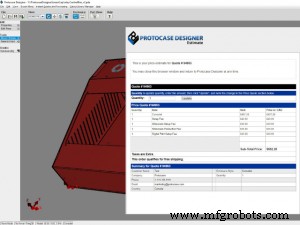
One of the key advantages of creating your design using Protocase Designer is that you can instantly get a quote at any time during your design process.
There is one caveat, however: if your design has elements that fall outside of the capabilities of our software (ie. You need to add a gasket or use third-party finishes such as anodizing, etc.), we will need to provide you an external quote from Protocase Designer when you are ready to order.
Protocase Designer will trigger warnings when it picks up on something that could be done a different way, doesn’t fall within our manufacturing capabilities, or just doesn’t feel right.
Using the notes function in Protocase Designer will ensure we are armed with all of the information we need to process your order:
- Let us know if your design is a modification or a reorder of another design.
- If a warning pops up, and you decide to proceed anyway, indicate in the notes section that you are aware of the warning, and would like to go with the design as is.
- If you would like an additional finish on your design that’s not available on Protocase Designer, such as anodizing, create a note in the software so that our team is aware when processing your design.
If you didn’t provide any notes about the warnings you receive, when you actually purchase your order in Protocase Designer, your account manager or an EDS member will contact you to verify your design. This will likely slow your quoting down.
When a Quote Takes Longer
There are a few instances where we cannot fast track quoting because your request requires externally sourced services such as anodizing, or materials that we don’t stock. (We are happy to order non-stock materials for you, however, it will take a bit of time to determine the cost and leadtime associated with ordering the material).
The suppliers we work with are generally responsive, so we can usually still get you a quote within 24 to 48 hours.
Conclusion
To ensure you get your quote back as fast as possible, there are key things you can do:
- Have your design finalized before you reach out
- Communicate clearly all of the information you can about your design and requirements
- Stay within our stocked materials, components and finishes
For a simple and concise look at what you need to include in your request for quote, download our Quoting Checklist. The next time you send in your request for quote, you can do a quick pass of the checklist to make sure you’ve noted everything you can. The end result will be a quote returned to you as fast as humanly possible.
Happy designing (and quoting)!
Industrial Technology
- Unlock Efficiency: A Practical Guide to Adopting Industry 4.0 in Your Manufacturing Business
- Spotting Weak Links in Your Electrical Design Process: A Practical Guide
- Master Front-End Engineering Design: A Step-by-Step Guide to Project Planning
- Convincing Management: A Guide to Justifying Engineering Design Enhancements
- Planning Your Floor Medallion: A Professional Guide to Design and Placement
- GD&T Basics: How Symbolic Language Enhances Design Precision
- Accelerate Design with 3D Printing Prototypes: Boost Efficiency & Accuracy
- Designing an Effective Preventative Maintenance Program for Equipment
- How to Prepare Your Custom Machining Project for a Competitive Quote
- Selecting the Right CNC Manufacturer for Your Prototype Design