



RTC Module Essentials: Your Complete Guide to Accurate Timekeeping
Do you have an electronic device that requires accurate timekeeping? Or does your project require you to count seconds, minutes, hours, and even months?
Well, if you don’t know how to go about it, don’t worry, you’re in the right place. Projects that involve timekeeping, even when there’s no power, can be tricky. Thankfully, we’ve got you covered.
All you need is a real-time clock (RTC) module. So, in this article, we will look at everything about the RTC module and show you how to make an easy project using the RTC module circuit.
Are you ready? Then, let’s begin!
What Is an RTC Module?
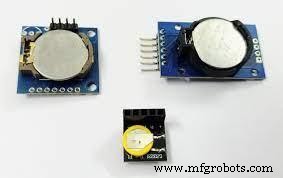
RTC Modules
A real-time clock (RTC) is an integrated circuit clock module usually found in modern computers, servers, or embedded systems. Also, the RTC module has one purpose; timekeeping.
This device can count seconds, minutes, hours, and years. Plus, it’s capable of handling various time-keeping applications accurately.
How Does the RTC Module Work?
Since RTCs have such important roles, it keeps time even when the system is turned off. For this reason, an RTC can serve as a trigger to turn on a system in events like alarm clocks or scheduled power found on mobile devices.
How do RTCs achieve this? Well, this integrated circuit works on a power source different from one powering its system. Hence, the RTC can continuously operate in low power situations or power failure. Plus, you only need a tiny bit of current to run the RTC.
Also, older RTC modules featured lithium batteries as alternate power sources, while the newer versions use supercapacitors or auxiliary batteries. Now, there are differences between the two RTC ICs.
Real-time clock modules with supercapacitors have rechargeable features, and you can solder them to your circuit. On the other hand, RTCs with auxiliary batteries are more common since you can find them on most consumer-grade motherboards. In this case, the RTC gets power from a single battery. So, when you remove this battery, it resets the RTC and sends it back to its starting point.
Furthermore, real-time clock modules utilize crystal oscillators to regulate time. Thus, they’re different from regular hardware clocks since they don’t need clock signals.
DS3231 RTC Module Features & Specification
Here are the features and specifications of the DS3231 module:
Features
- The DS3231 RTC module is capable of counting in seconds, minutes, hours, days, months, and years
- It doesn’t need high power to operate
- It uses a CR2032 battery for its backup power. The battery can last up to three years.
- It has a small size
- You can use the DS3231 RTC module as a register for aging trim
- You can program the square wave output of this module
- It comes with a digital temperature sensor that has an extra 3°C accuracy
- The RTC module uses a 400Khz I2C interface
- It also has two time-of-day alarms
- The accuracy of this RTC module is: +3.5ppm to -3.5ppm for -40°C to + 85°C, +2ppm to -2pmm for 0°C to +40°C
- It switches automatically to battery power whenever there’s a power failure
Specifications
- The DS3231 RTC module operates at the following voltage: 2.3v – 5.5v
- You can use this RTC module at low voltages
- When on battery power, it consumes only 500mA
- The SDA and SCL maximum voltage is VCC = 0.3V
- It has an operating temperature of -45°C to +80°C
Applications
Here are some cases to consider when understanding the applications of the DS3231:
- If you’re concerned about power consumption issues on your circuit, the DS3231 doesn’t require high amounts of power to run. So, you can use this module on mobile system applications or computer peripherals.
- Despite a ton of RTC modules on the market, the DS3231 is well-known for its top-notch accuracy. So, if you’re looking for an accurate time and date for your project, the DSC3231 has what you need. The DS3231 is capable of keeping time updated than other RTC modules.
- In cases where you need fast-speed communication, the DS3231 RTC module can communicate with any fast TWI interface, making it the go-to for such applications as robotics, gaming, and server applications.
- Also, you can use the DS3231 for 12 and 24 hours methods for finding applications—especially in GPS applications.
- It has a few alarm clock attributes and temperature sensors that makes it more useful for several other applications like utility power meter applications.
DS3231 RTC Pin Configuration
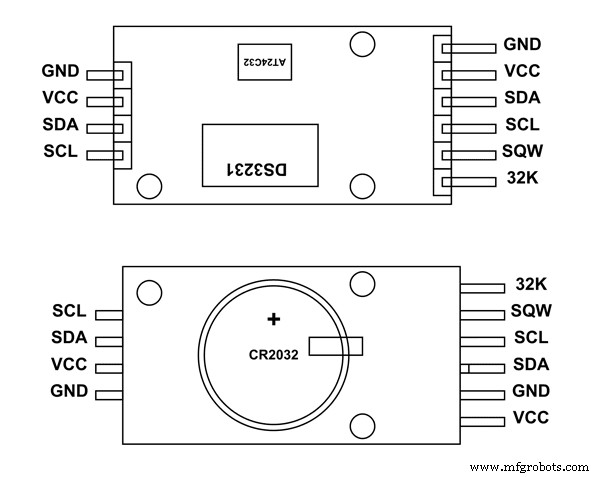
DS3231 RTC Pin Configuration
The DS321 has six terminals. However, it’s not obligatory to use two out of these pins. Thus, we majorly have four terminals or pins. And you can see them on the additional side of the module. Here’s the pin configuration of the DS3231 RTC module:
| PIN NAME | DESCRIPTION |
| VCC | Connects to the positive terminal of the energy source |
| GND | Connects to the ground |
| SDA | The pin of the serial data (I2C interface) |
| SCL | The pin of the serial clock (I2C interface) |
| SQW | The pin of the square wave output |
| 32K | The output of the 32k oscillator |
How to Use the DS3231 RTC Module
You can only communicate with the DS3231 RTC module through the I2C interface. The I2C interface handles the data sent and received from the DS3221. Thus, you can get any information of time and date through the I2C.
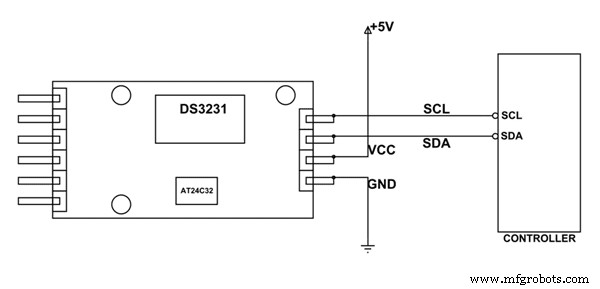
DS3231 and I2C
Additionally, the transmission amidst the module and the I2C is complex. Plus, the communication takes place in a byte format. Thus, it would be best if you used libraries specifically written in regards to DS3231. Why? Well, using libraries improves communication. So, you can download the DS3231 libraries and use programs to call them.
Hence, once you include the header file, the controller starts communicating and shows you the time and date. What’s more, you can use these libraries to control and set the alarm with ease.
Moreover, when there’s low or no power, the RTC module will automatically take power from the battery instead, allowing the chip to give accurate time and data continuously. Once the system starts again, the communication between the controller and module can continue without errors.
Project: Arduino Calendar Clock
In this section, we will learn how to use a real-time clock with Arduino and build an Arduino calendar clock project.
Circuit Design
Here’s the design of the simple Arduino calendar clock using the DS3231 RTC module. Because of the IC2, we connected all devices to a common bus which consists of only four wires:
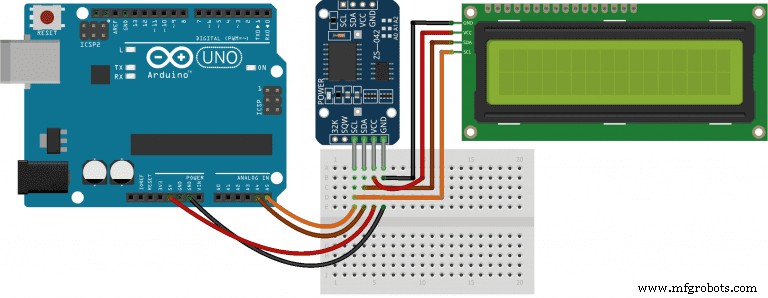
Arduino Calendar Clock’s Circuit Diagram
Components Required
Here are the materials you need for this project:
- (1) Arduino Uno
- (1) Breadboard
- (1) 16×2 I2C character LCD
- Jumper wires
- (1) DS3232 real time clock module
Code
Here, we’ll use libraries and create custom functions to make creating our code easier and more readable. So, this project will make use of the following libraries:
- Wire. h library for the I2C interface
- LiquidCrystal_I2C.h library (by Frank de Brabander) for the I2C 16×2 LCD module
- RTClib.h library (by Adafruit) for the DS3231 RTC module
Once you download these libraries, add them to your code via the #include keywords. So, with this, we’ll set two objects. The first is the lcd() and the other is the rtc. These two objects will help communicate with the LCD and DS3231 modules.
Code for LCD() and rtc
Next, create two custom functions so you can easily manage your code. The updateRTC() is the first function you’ll code. It is the function that asks a user for the current date and time and updates the RTC’s internal clock with the input.
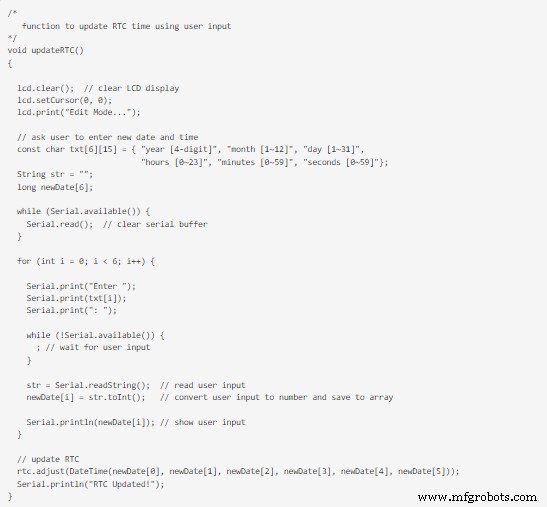
Code for updateRTC()
Next, create two custom functions so you can easily manage your code. The updateRTC() is the first function you’ll code. It is the function that asks a user for the current date and time and updates the RTC’s internal clock with the input.
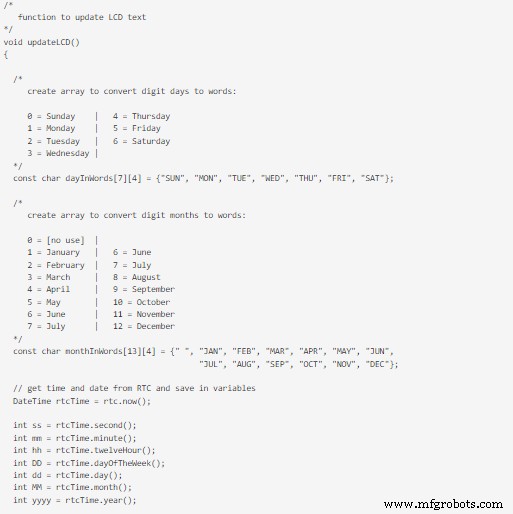
Code for updateRTC()
The next function you’ll create is the updateLCD() function. It is responsible for updating the text the LCD will display.
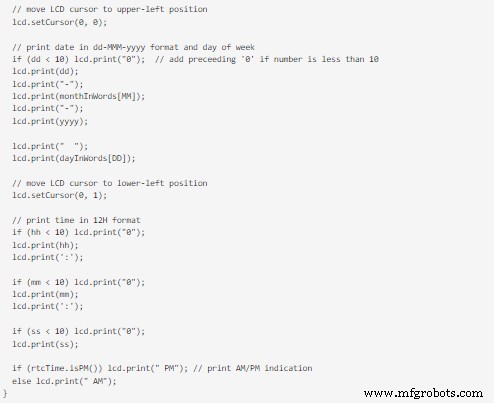
Code for updateLCD() 2
The last step for creating our code is adding the normal functions for Arduino: setup() and loop(). Here are the codes for the two functions:
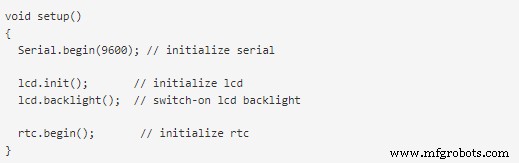
Code for setup()
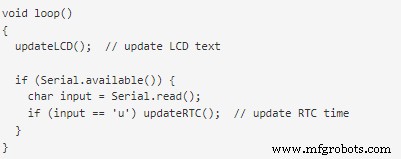
Code for loop()
Finally, upload your code, and your Arduino Uno should start displaying the date and time on the LCD.
Rounding Up
The RTC module is a cheap and simple method of adding timekeeping capabilities to your circuit. What we showed you is just a scratch on the surface. If you tinker with it more, you’ll find many other fun ways to use this module.
It’s worth mentioning that if you can’t find the DS3231 in the market, the DS12C997 and DS1307 are worthy equivalents. Also, for the Arduino project mentioned above, you can use your serial monitor to modify the date and time of your project. All you have to do is type in the letter “U” and follow the prompts. That rounds up this article. If you have any questions feel free to reach us, and we’ll be glad to assist you.
Industrial Technology
- Master Social Media for Manufacturers: Comprehensive eBook Guide
- Safe Use of CNC Router Bits: A Comprehensive Guide
- Essential Safety Protocols for Manufacturing Workers: A Comprehensive Guide
- Ultiboard: Comprehensive Beginner’s Guide to PCB Design
- Understanding Fuses: A Comprehensive Guide to Protecting Your Circuits
- Varicap Diodes Explained: A Comprehensive Guide for Electronics Professionals
- Build a Clap-Activated Switch – A Simple DIY Project for Beginners
- Electronic Circuits Demystified: The Complete Beginner’s Guide
- AMS1117 Pinout & Wiring Guide: A Complete Beginner’s Tutorial
- Bluetooth Communication Protocols: A Comprehensive Beginner’s Guide