



Cut CNC Programming Time with WinMax's Advanced Corner Geometry
In the past, when programming rectangular shaped geometries on the Hurco control, in which the four corners weren’t square or didn’t all have the same size radii, the feature needed to be programmed using a Milling Lines & Arcs data block. However, with the introduction of the latest WinMax mill software, this obstacle has become a thing of the past.
Today, when programming a Mill Frame data block, with variations in one or more of the four corners, the task is now quite simple. Each corner of the frame has been assigned an identifying number and has been given individual controls.
The programmer will simply select the “corners” tab within the data block, and enter the necessary data for each of the four corners independently. By use of the supplied pull-down menus, each corner can be programmed with either a simple corner radius, or a chamfer or line with a specified length and angle.
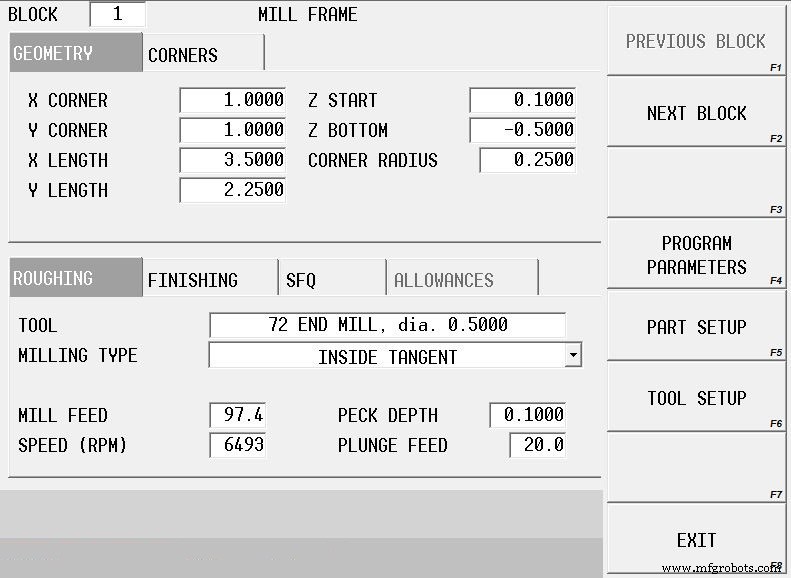
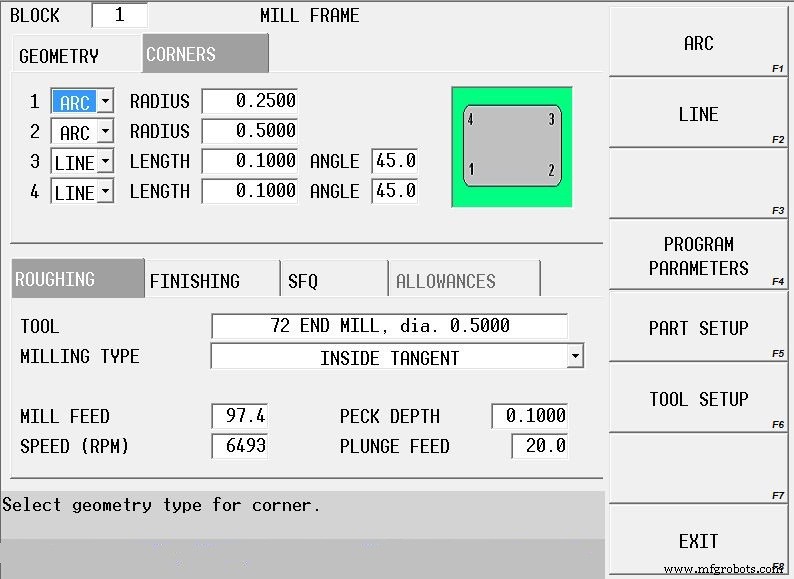
CNC Machine
- Accelerate Time‑to‑Market with RTI Connext DDS Professional Tools
- Harnessing Data in the Internet of Reliability: Strategies for Effective Management
- Cut MRO Costs with Expert Data Cleansing
- Master Python Extension Programming with C: Build Fast, Native Modules
- Eliminate Production Bottlenecks: 5 Proven Tools for Manufacturing Efficiency
- Master 5-Axis CNC Programming with Tool Vectors: A Practical Guide
- Effortless 3D Geometry Programming on Hurco Controls—No CAD/CAM Software Required
- Streamline 5‑Axis Programming with Hurco’s ASR Feature
- Accelerate Manufacturing: Reduce Changeover Time with SMED & Standard Work
- 6 Proven Strategies to Cut CNC Prototyping Costs