



Accelerate Time‑to‑Market with RTI Connext DDS Professional Tools

Only two weeks remained before the demo.
We had a single, high‑stakes opportunity to deliver a fully functional microgrid control system that had to:
- Run on Intel and ARM processors
- Target Linux and Windows platforms
- Include applications written in C, C++, Java, Scala, Lua, and LabVIEW
- Communicate with legacy equipment using ModBus and DNP3 protocols
- Perform real‑time control while meeting all of the above requirements
In this post, I’ll share the real‑world challenges we faced and how the tools included in RTI Connext DDS Professional helped us resolve integration issues in just a couple of days. I’ll highlight common problems and the specific RTI tools that addressed each one, and provide links to supporting videos and articles for those who want a deeper dive. My goal is to give you a practical starting point for applying RTI tools to accelerate your DDS development.
The Big Demo
This was the first working demonstration of the Smart Grid Interoperability Panel’s Open Field Message Bus (OpenFMB), a new approach to edge‑grid device control using IoT technologies like DDS.
Below is a block diagram of the system, showing hardware architectures, operating systems, and programming languages:
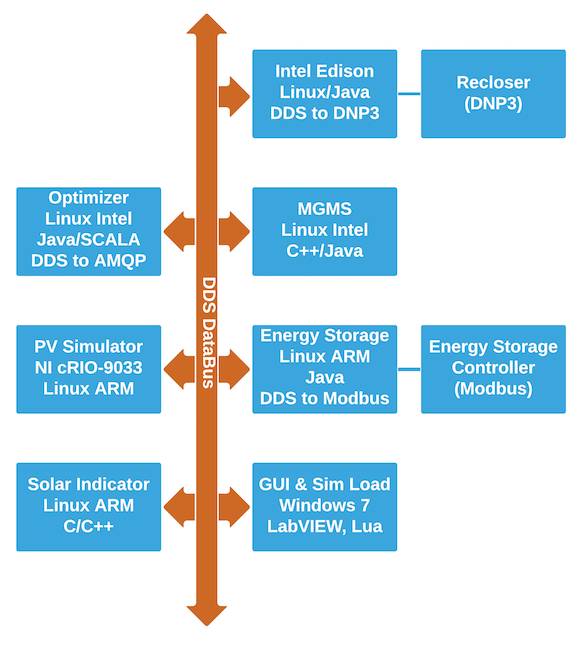
As we brought each participant online, we encountered a number of challenges. The following sections describe each issue and the tools we used to resolve it. Scan the headings to see if you’ve faced similar problems in your DDS system, then click the links to learn new troubleshooting techniques. Consider how you would have diagnosed these issues without the tools mentioned.
Problem: Network configuration issues
Tools: RTI DDS PingThe Oak Ridge National Labs team was building a LabVIEW GUI that would serve as the primary display. Their laptop couldn’t see data from any of the networked clients. We first verified that the machine was on the same subnet – the classic “check the basics” step. While the standard ping utility confirms basic reachability, it doesn’t verify that DDS discovery ports are open. The rtiddsping utility does exactly that, and it revealed in seconds that a government‑issued laptop firewall was blocking DDS discovery traffic. For a thorough guide on basic diagnostics, see this community post.
Problem: Is my application publishing data?
Tools: Spy, Admin ConsoleA frequent question among vendors new to DDS is whether their application is behaving correctly: Is it publishing data at the expected intervals, and does the data make sense? We used RTI DDS Spy, a lightweight subscriber that can filter for specific types and topics and print each sample it receives. Every vendor performed a quick sanity check with Spy immediately after launching their application.
If the same topic is updated by multiple publishers, the “-showSampleIdentity” switch reveals which publisher sent the latest sample.
Spy is a console app that can run on embedded targets for basic testing. Its small footprint, fast startup, and simplicity make it ideal for quick verification. Detailed usage instructions are available here.
Problem: Data type mismatch
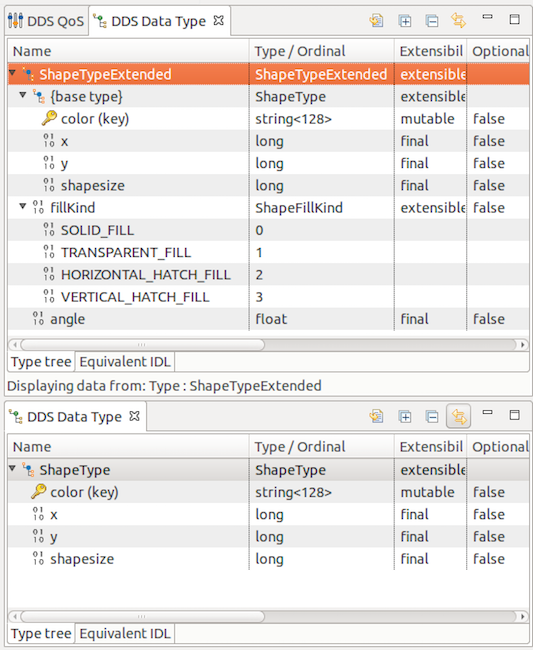
Tools: Admin Console, MonitorOne vendor reported that after a previous test they could see data from another application, but during the demo the data disappeared. Admin Console immediately identified a data‑type mismatch – two topics sharing the same name but defined with different IDL structures. Such mismatches can be hard to detect, especially for large, complex types. Admin Console leverages DDS’s data‑centric nature to introspect the data types understood by each participant, presenting both a simplified view and an “equivalent IDL” view for side‑by‑side comparison. This is invaluable when you don’t have the source IDL for every application.
In this case, the vendor was using an outdated IDL from an older GitHub commit. After pulling the latest files, running rtiddsgen generated updated type‑specific code, and a quick recompile restored full compatibility.
Problem: QoS mismatch
Tools: Admin Console, MonitorBeyond discovery, QoS mismatches are the most common integration issue for DDS users. With so many knobs to set, how do you ensure compatibility? The OpenFMB project encountered several QoS mismatches initially. Admin Console detects these quickly and highlights the conflicting settings. You can click the QoS name to jump straight to the documentation. QoS information exchanged during discovery allows Admin Console to flag mismatches automatically.

Problem: Verifying system performance
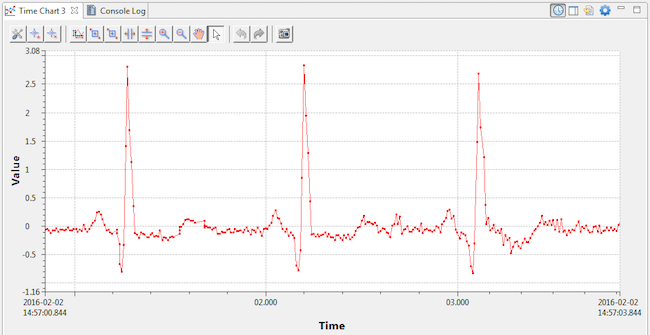
Tools: Admin Console, MonitorWhile Spy provides raw text output, visualizing data over time gives a clearer picture of system behavior. Admin Console’s built‑in data visualization helped us quickly assess overall system performance and scroll through historical data to trace the current state. For a short intro video, see this video, and for a deeper dive, watch this video.
Problem: Performance tuning
Tools: Monitor, Admin ConsoleFor performance tuning, Monitor is the tool of choice. It works with a special version of the DDS libraries that periodically publish real‑time performance metrics from your application. The debug libraries are minimally intrusive, and Monitor aggregates the data for analysis.
With Monitor you can inspect:
- Transmission and reception statistics
- Missed deadlines
- Cache high‑water marks
- QoS mismatches
- Data‑type conflicts
- Lost or rejected samples
- Liveliness loss
Many QoS settings are not advertised during discovery because they affect local resource management and performance tuning. Monitor lets you examine these as well. Watch this introductory video for a quick tour.
Problem: Transforming data in flight
Tools: Prototyper with Lua, DDS Toolkit for LabVIEWWe needed a large GUI to display microgrid state in real time. Oak Ridge National Labs volunteered to build the GUI in LabVIEW. The DDS Toolkit for LabVIEW lets you retrieve DDS data and use it within LabVIEW VIs. However, the Toolkit does not support arrays of sequences, which are part of the OpenFMB data model. We required a quick solution that could read these complex types.
Prototyper with Lua, a new feature in Connext DDS Pro 5.2, allows rapid creation of DDS‑enabled applications with minimal coding: define topics and domain participants in XML, add a simple Lua script, and you’re up and running on a DDS domain in minutes. (See Gianpiero’s blog post on Prototyper.)
That evening, I wrote a Lua script that instructs Prototyper to read the complex DDS topics containing arrays of sequences and republish them to a flattened topic for the LabVIEW GUI. I tested the script offline using previously recorded live data, which led to the next section.
Problem: Disconnected development
Tools: Record, Replay, Prototyper with LuaThe OpenFMB demo was built by a geographically dispersed team. Except for a few days in Knoxville, no one had simultaneous access to all microgrid components. How could each developer work on their piece of the puzzle without the rest of the system?
W
Internet of Things Technology
- Connext DDS in Industrial IoT: 5 Key Insights for Reliability, Security, and Scalability
- RTI Labs Launches Python‑Enabled Connector for Connext DDS—Now in the Connext Suite
- Connext DDS 5.3 Now Live: The First Connectivity Platform for Industrial IoT Systems of Systems
- Connext DDS Quick Start: Install, Build, and Run Hello World – Expert Video Guides
- Connext DDS 101: A Beginner’s Guide to Getting Started
- Leverage Live IoT Data in MATLAB with RTI Connext DDS Integration
- Advance Your IIoT Maturity with Machine Performance Analysis
- Eliminate Production Bottlenecks: 5 Proven Tools for Manufacturing Efficiency
- Master Market Volatility: Proactive Data Management Strategies for Stability and Growth
- 11 Proven Ways to Transform Manufacturing with Data