



Leverage Live IoT Data in MATLAB with RTI Connext DDS Integration

When analyzing sensor data, the typical workflow involves collecting raw data, converting it into a usable format, and then leveraging MATLAB’s powerful analytics capabilities. However, the data‑conversion step can be time‑consuming. With MathWorks’ recent integration, MATLAB can now directly subscribe to and publish data over DDS, the de‑facto middleware for IIoT communications. This allows developers to prototype and test real‑time analytics with minimal overhead.
Getting Started
Before you begin, ensure that MATLAB and RTI Connext DDS are installed. The following versions were used in the examples:
- MathWorks MATLAB R2016b
- MathWorks DDS Blockset 2.9.2
- RTI Connext DDS 5.2.3 (Linux & Windows)
- RTI Shapes Demo Application (installed with Connext DDS)
- Windows 10 PC
Watch the installation video to verify that all components are correctly configured: Installation Video.
Initialization
After installation, initialize DDS in MATLAB with the following steps:
- Import the IDL datatype(s) required for your project.
- Create a DDS Domain Participant.
- Create a DDS DataWriter.
- Create a DDS DataReader.
Importing an IDL file automatically generates the corresponding .m files for MATLAB. For example, to import ShapeType.idl:
> DDS.import('ShapeType.idl','matlab','f')
Once imported, the datatype is available for subsequent DataReader/DataWriter creation. Create a Domain Participant:
> dp = DDS.DomainParticipant;
Attach writers and readers for the ShapeType datatype on the Triangle and Square topics:
> dp.addWriter('ShapeType','Triangle')
> dp.addReader('ShapeType','Square')
Subscribing to Data in Shapes Demo
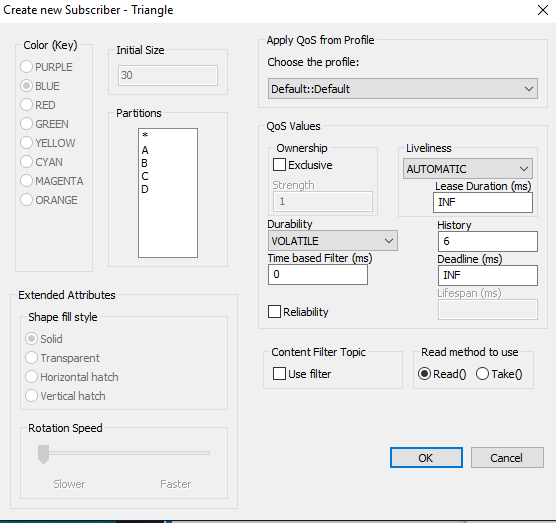
The RTI Shapes Demo provides pre‑configured topics for Square, Circle, and Triangle, all based on ShapeType. Use the demo to create a subscriber for the Triangle topic; leave QoS settings at their defaults.
Publishing Data from MATLAB
With the DataWriter configured, publish a green triangle:
%% Create an instance of ShapeType
myData = ShapeType;
myData.x = int32(75);
myData.y = int32(100);
myData.shapesize = int32(50);
myData.color = 'GREEN';

%% Write data to DDS
dp.write(myData);
The Shapes Demo displays a single green triangle as shown below:

Other publishing patterns:
%% Green triangles in a line at 1 Hz
for i=1:10
    myData.x = int32(20 + 10*i);
    myData.y = int32(40 + 10*i);
    dp.write(myData);
    pause(1);
end

%% Green triangles in a circle at 20 Hz
for i=1:1000
    angle = 10*pi * (i/200);
    myData.x = int32(100 + (50 * cos(angle)));
    myData.y = int32(100 + (50 * sin(angle)));
    myData.shapesize = int32(40);
    myData.color = 'GREEN';
    dp.write(myData);
    pause(0.05);
end
The demo visualizes these patterns as shown:


Publishing Data in Shapes Demo
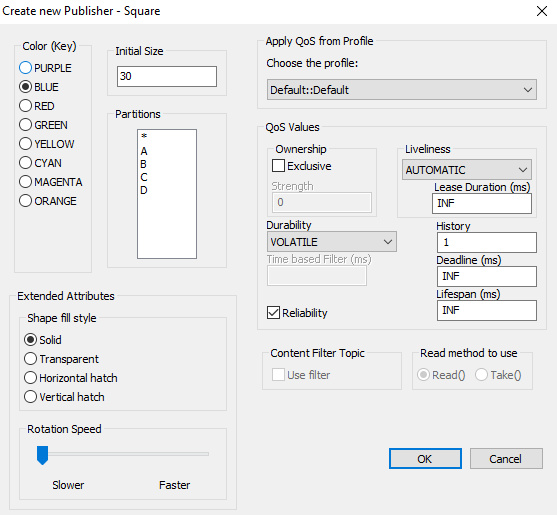
In the Shapes Demo, create a publisher for the Square topic. Select a color (e.g., orange) and keep QoS defaults. The demo will broadcast the square’s X,Y position every 30 ms.

Subscribing to Data in MATLAB
Use the Square DataReader to consume data from the Shapes Demo. Read ten samples at one‑second intervals:
%% Read data
for i=1:10
    dp.read()
    pause(1);
end
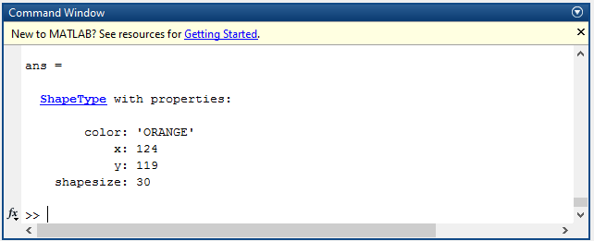
MATLAB outputs ten messages similar to the screenshot below:
Advanced Use Case: Transform and Visualize
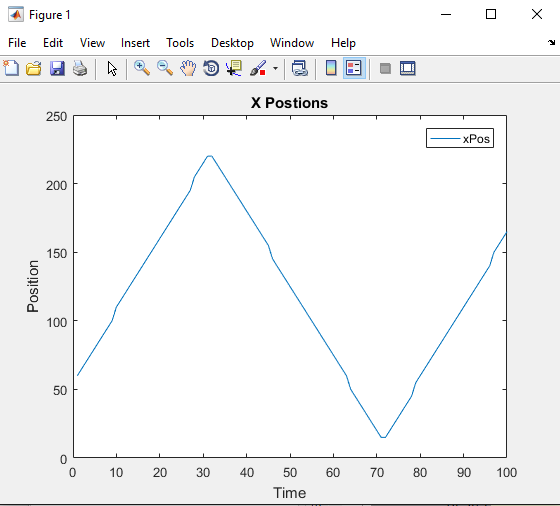
After establishing bidirectional communication, transform the received square data by swapping its X and Y coordinates, republish it as a red triangle, and plot the X positions over time. The MATLAB script below demonstrates this workflow:
%% Allocate array for 100 samples
xArray = zeros(1,100);

%% Collect, transform, and republish
for i=1:100
    [myData, status] = dp.read();
    if ~isempty(myData)
        x = myData(1).x;
        y = myData(1).y;
        xArray(i) = x;
        yArray(i) = y;
        myData(1).y = x;
        myData(1).x = y;
        myData(1).color = 'RED';
        dp.write(myData(1));
    end
    pause(0.05);
end

%% Plot X‑position
t = 1:100;
plot(t,xArray);
legend('xPos');
xlabel('Time'); ylabel('Position');
title('X Positions');
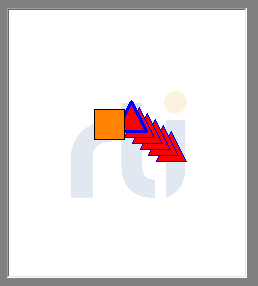
The Shapes Demo now shows a red triangle mirroring the orange square, while MATLAB renders the X‑position plot:
Integrating DDS with MATLAB streamlines data ingestion, injection, and analysis. While this demo uses the simple Shapes application, the same approach works for any DDS‑based IoT data source. For deeper insight into MATLAB’s DDS integration, visit the MATLAB DDS Integration page on MathWorks. To explore Connext DDS further, access the developer resources here.
Internet of Things Technology
- MQTT vs. DDS: Choosing the Right M2M Protocol for IoT
- Connext DDS in Industrial IoT: 5 Key Insights for Reliability, Security, and Scalability
- Turning IoT Data into Actionable Insights: A Proven Data Strategy Framework
- Is Your Manufacturing Facility Ready for IoT? A Practical Guide
- Turning IoT Data into Business Value: A Practical Guide
- Harnessing IoT Data for Manufacturing Excellence
- Capture & Visualize Environmental Data with Arduino MKR WiFi 1010 on IoT Cloud
- Why Your Connected Devices Need an IoT Framework: 5 Key Benefits
- Unlock IoT Success with Edge Intelligence
- Unlocking IoT Success Through Digital Threading