



Master the Siemens Sinumerik 808D Operator Panel: Features & Functions
Introduction of Siemens Sinumerik 808D Operator Panel.
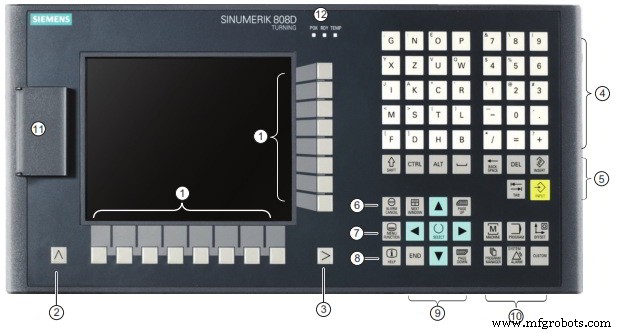
Sinumerik 808D Operator Panel
1 – Vertical and horizontal softkeys (Calls specific menu functions).
2 – Return key (Returns to the next higher-level menu).
3 – Menu extension key (Reserved for future use.
4 – Alphabetic and numeric keys.
5 – Control keys.
6 – Alarm cancellation key (Cancels alarms and messages that are marked with this symbol).
7 – On-board assistant key (Provides step-by-step guides on basic commissioning and operation procedures).
8 – Help key (Calls help information).
9 – Cursor keys.
10 – Operating area keys.
11 – USB interface.
12 – Status LEDs.
Sinumerik 808D CNC Lathe: Step‑by‑Step Tool Offset Setup – Video Tutorial Part 7
Mastering Sinumerik 808D: CNC Coordination Systems Explained – Turning Series Part 6
CNC Machine
- Allen Keys Explained: How to Use and Maintain Hexagonal Socket Fasteners
- Master the Sinumerik 840D Operator Panel: A Comprehensive Guide
- Free Siemens SINUMERIK 808D PC Software Download – Comprehensive Training
- Download Free Siemens Sinumerik 808D CNC Control Manuals
- Master the SINUMERIK 808D Control Panel: Video Tutorial – Part 3
- Overview of Siemens Sinumerik 808D Milling CNC: Optimized for Simple Milling Machines
- Siemens Sinumerik 808D Turning CNC – Advanced Precision & Performance
- Master SINUMERIK 808D: Beginner Video Tutorial – Turning Part 1
- Mastering Sinumerik 808D: CNC Coordination Systems Explained – Turning Series Part 6
- Understanding the Reset Button on a CNC Operator Panel: Function and Use