



Master the SINUMERIK 808D Control Panel: Video Tutorial – Part 3
This video from Siemens briefly describes the keys and screen areas of Sinumerik 808D control panel.
After watching this video a CNC machinist can easily distinguish different areas of CNC machine control panel.
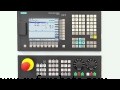
Control Panel Introduction SINUMERIK 808D
Sinumerik 808D Screen introduction
Active mode.
Time and date.
Loaded program.
Axis data.
Keyboard Introduction
Operating area buttons.
Program editing keys.
Machine Control Panel Introduction
Emergency stop button.
Axis Direction Keys.
Feed override and Speed override.
CNC machine Modes like
JOG mode.
Auto mode.
Single block mode.
MDI mode.
Master Workpiece Setup on SINUMERIK 808D: Drawing, Fixing, and Cutting Strategies – Part 4
Overview of Siemens Sinumerik 808D Milling CNC: Optimized for Simple Milling Machines
CNC Machine
- Master the Sinumerik 840D Operator Panel: A Comprehensive Guide
- Turning with SINUMERIK 808D: How to Power On and Set Axis Reference Points
- Master Workpiece Setup on SINUMERIK 808D: Drawing, Fixing, and Cutting Strategies – Part 4
- Siemens Sinumerik 808D Turning CNC – Advanced Precision & Performance
- SINUMERIK 808D CNC Control: Switch‑On & Axis Referencing – Video Tutorial (Part 2)
- Master SINUMERIK 808D: Beginner Video Tutorial – Turning Part 1
- Sinumerik 808D CNC Lathe: Step‑by‑Step Tool Offset Setup – Video Tutorial Part 7
- Master the Siemens Sinumerik 808D Operator Panel: Features & Functions
- Mastering Sinumerik 808D: CNC Coordination Systems Explained – Turning Series Part 6
- Master Tool Setup on Sinumerik 808D CNC Lathe – Video Tutorial (Part 5)