



Master the Sinumerik 840D Operator Panel: A Comprehensive Guide
An introduction to the Operator Panel of the Sinumerik 840D cnc control.
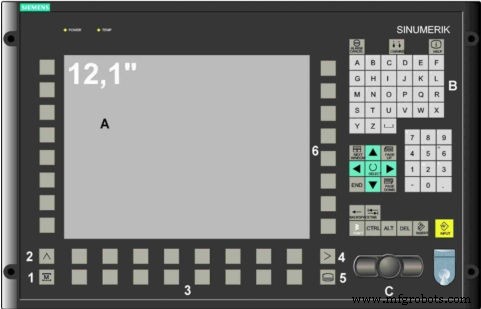
Sinumerik 840D Operator Panel Introduction
A : Display
B : Alphanumeric key pads. Correction / Cursor keys.
C : Mouse and Mouse keys.
1 : Machine area key.
2 : Recall
3 : Soft bar (Horizontal).
4 : ETC key (Menu extension).
5 : Area changeover key.
6 : Soft bar (Vertical).
Kennametal GOmill Short‑Shank End Mills – Superior Stability & Productivity for Short‑Location & Multi‑Axis Milling
Kennametal Master Catalog 2013 – Free PDF Download of 2,100+ Tooling Pages
CNC Machine
- Mastering Sinumerik 840D System Variable Naming: Tips & Best Practices
- Mastering WHILE Loops in SINUMERIK 840D CNC Programming
- Mastering Sinumerik 840D CNC Programming: Expert Guide to Advanced Threading Cycles
- Unlocking Sinumerik 840D: Master $TC_DP Tool Data Variables for Precise CNC Programming
- How to Use the Sinumerik MSG Command to Communicate with CNC Operators
- Master the SINUMERIK 808D Control Panel: Video Tutorial – Part 3
- Master SINUMERIK 808D: Beginner Video Tutorial – Turning Part 1
- CYCLE81 Drilling Cycle on Sinumerik 840D Turning – Expert Guide
- Master the Siemens Sinumerik 808D Operator Panel: Features & Functions
- Understanding the Reset Button on a CNC Operator Panel: Function and Use