



Master Fanuc Circular Interpolation (G02/G03) with Practical Code Example
Fanuc Circular Interpolation
Fanuc Circular Interpolation commands (G02, G03 G Codes) are used to move a tool along a circular arc.
G02 – Circular Interpolation Clockwise.
G03 – Circular Interpolation Anti-Clockwise.
How to Program Circular Interpolation?
On CNC lathe machines with Fanuc control Clockwise Circular Interpolation (Arc) can be programmed in following ways.
N10 G02 X Z R
or
N10 G02 X Z I K
Explanation
N10 G02 X Z R
X – Arc end-point in X-axis
Z – Arc end-point in Z-axis
R – Arc Radius.
N10 G02 X Z I K
X- Arc end-point in X-axis.
Z – Arc end-point in Z-axis.
I – Distance from arc-start-point to arc-center-point in X-axis.
K – Distance from arc-start-point to arc-center-point in Z-axis.
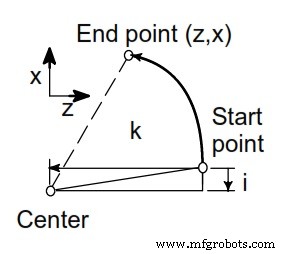
Fanuc Circular Interpolation G02
Fanuc Circular Interpolation G02 G Code Example
The following Fanuc circular interpolation program example is programmed in multiple different ways.
CNC programmers/machinists can use G02/G03 X Z R method or G02/G03 X Z I K method if control allows.
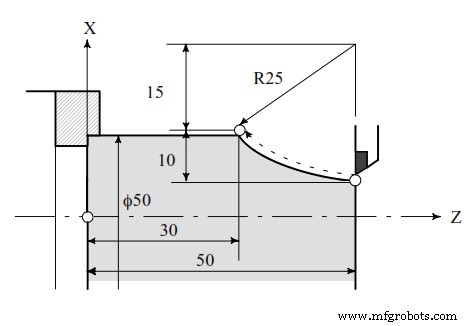
Fanuc Circular Interpolation G02 G Code Example
(Diameter programming)
G02 X50 Z30 I25 F0.3
G02 U20 W-20 I25 F0.3
G02 X50 Z30 R25 F0.3
G02 U20 W-20 R25 F0.3
CNC Machine
- CNC G02 Circular Interpolation (Clockwise) – Practical G‑Code Programming Example
- Master G02/G03 Circular Interpolation in CNC: Step‑by‑Step Example
- CNC Circular Interpolation Tutorial: Master G02 & G03 G‑Codes
- CNC Milling Circular Interpolation: Practical G02/G03 G‑Code Program Example
- Master CNC Milling: G02 & G03 Circular Interpolation Programming Guide
- Master Circular Interpolation: Step-by-Step Programming Example #2
- Master Circular Interpolation: Programming Example 1
- Master G02 & G03 Circular Interpolation: CNC Mill Example Program
- Fanuc G07.1 Cylindrical Interpolation Program Example: Step-by-Step CNC Code
- Fanuc G07.1 Cylindrical Interpolation: A Step‑by‑Step CNC Programming Example