



Leveraging Arm TrustZone Security in the LPC5500 MCU Series
Learn how Arm TrustZone enhances security in NXP’s LPC5500 microcontrollers and how to implement secure and non‑secure applications.
As connected devices proliferate, so do sophisticated threats. NXP has addressed this by embedding robust security primitives in the LPC5500 MCU family, including a FIPS‑compliant random number generator, the “Prince” encryption engine for executing encrypted code, and a 4096‑bit on‑chip key generated via PUF technology. Coupled with the on‑chip cryptographic accelerator “CASPER,” these MCUs are ideal for edge‑of‑the‑network IoT deployments that demand end‑to‑end key provisioning and resilient cyber‑security.
Central to this capability is Arm TrustZone for Cortex‑M. The following sections walk you through its fundamentals and how to harness them in your projects.
Arm TrustZone for Cortex‑M
TrustZone creates two isolated execution contexts: a secure world that hosts proprietary or sensitive code, and a non‑secure world for user applications. The manufacturer’s proprietary libraries can reside in ROM, protected from reverse engineering, while still being callable by application code via a controlled interface.
Figure 1 illustrates the coexistence of secure ROM and non‑secure user code on the same silicon.
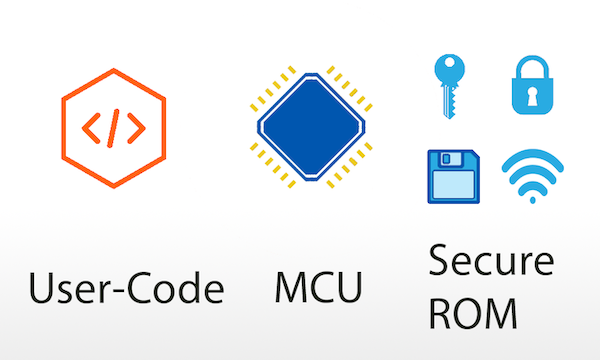
Transitions between the two worlds are governed by TrustZone’s security extension, ensuring that a non‑secure application can only invoke exposed secure functions, never accessing secure memory directly.
Processor Modes with TrustZone
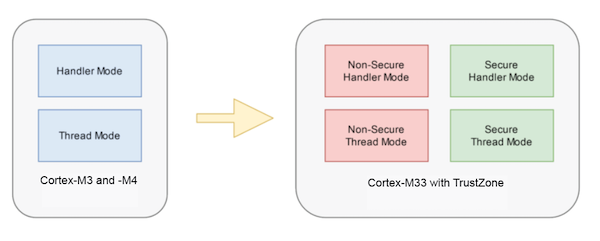
While Cortex‑M3 and M4 cores offer thread and handler modes with privileged/unprivileged levels, the Cortex‑M33 adds TrustZone, yielding four modes: non‑secure thread, secure thread, non‑secure handler, and secure handler. This split also introduces separate SysTick timers for each domain.
Memory Partitioning
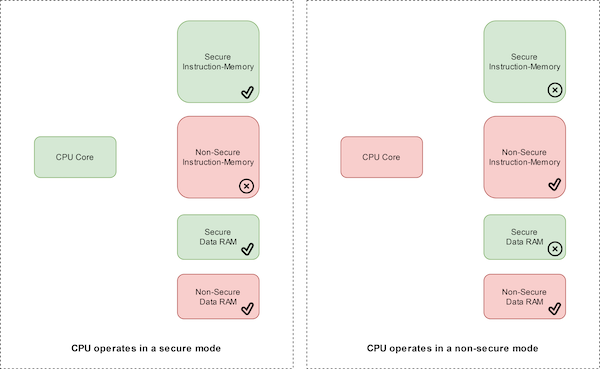
TrustZone assigns security attributes to address ranges: Secure (S), Non‑Secure (NS), and Non‑Secure Callable (NSC). Access to each area depends on the core’s current state. The LPC55S69, for instance, treats addresses with bit 28 low as non‑secure and the rest as secure, except for program memory which is configurable via the Security Attribution Unit (SAU).
Building a Secure Application
Secure code does not expose its internals directly. Instead, it publishes a veneer table – a thin layer of non‑secure callable functions that forward calls into the secure world. The veneer table resides in NSC memory, while the real implementations live in secure memory.
Typical secure projects are compiled into an object library and a header file that declares the veneer functions. The non‑secure application includes only the header; at runtime the veneer table mediates calls to secure services.
Transitioning Between Worlds
Two special instructions manage the state switch:
SG– switches the core to secure mode.BXNS– returns control to non‑secure mode.
A non‑secure call sequence looks like this:
    // Non‑secure code
    SG();            // Enter secure world
    SecureFunc();    // Call secure service via veneer
    BXNS();          // Return to non‑secure
Any illegal access triggers a Secure Fault exception, preserving system integrity.
Secure Hello World Example
The LPCXpresso55S69 SDK includes TrustZone demos that split the build into a secure and a non‑secure project. The secure project begins with an early initialization call:
__attribute__((cmse_nonsecure_entry)) void BOARD_InitTrustZone(void);
This function configures the SAU, IDAU, and memory partitioning. The non‑secure main function remains concise because all setup is handled in the secure domain:
int main(void) {
    // Minimal non‑secure code
    return 0;
}
When the non‑secure side needs a secure service, it invokes a veneer function, e.g., PRINTF_NSE():
void PRINTF_NSE(const char *format, ...) __attribute__((cmse_nonsecure_entry));
The corresponding secure implementation resides in the secure project and is exported to the veneer table.
Memory Partitioning Tools
Within MCUXpresso, the TEE perspective offers a visual editor for SAU and IDAU configuration:
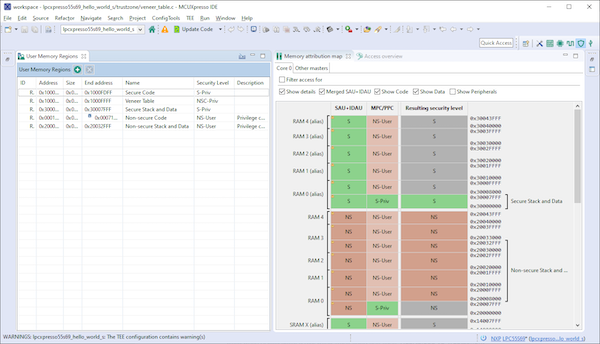
Use the left‑hand table to set the security level for each region, and the right‑hand map will reflect the resulting partitioning.
Why TrustZone Matters for LPC5500
TrustZone gives the LPC5500 a clear separation of concerns: the secure world protects proprietary code and cryptographic keys, while the non‑secure world hosts user applications. The hardware guarantees that illegal memory accesses are blocked, and the software infrastructure (veneer tables, SG/BXNS instructions, and the TEE tools) simplifies secure application development.
For deeper insights, watch the NXP webinar TrustZone: Calling the Secure World or explore the official documentation.
Industry Articles are a form of content that allows industry partners to share useful news, messages, and technology with All About Circuits readers in a way editorial content is not well suited to. All Industry Articles are subject to strict editorial guidelines with the intention of offering readers useful news, technical expertise, or stories. The viewpoints and opinions expressed in Industry Articles are those of the partner and not necessarily those of All About Circuits or its writers.
Cloud Computing
- Maximizing ROI and Security with Public Cloud Adoption
- Secure IoT: Best Practices for Building Trustworthy Connected Products
- Securing the 20th Anniversary of the Internet of Things: Protecting Our Hyperconnected Future
- Accelerating COVID-19 Vaccine Distribution: Strategies for Effective Rollout
- Strengthening Industrial IoT Security: Proven Strategies & Best Practices
- Master the ADS1115: Features, Pinouts, and Arduino Integration Guide
- STM32 Nucleo: Features, Connectivity, and PC Integration
- Ensuring Data Security in the Cloud: Protecting Your Information with Confidence
- How Secure Is Cloud Storage? A Guide to Protecting Your Data
- Choosing the Right Industrial Robot Arm for Your Automation Needs