



Building a Robust Time‑Series Monitoring System: Integrating RTI Connext DDS with Telegraf and InfluxDB
Why Combine DDS, Telegraf, and InfluxDB?
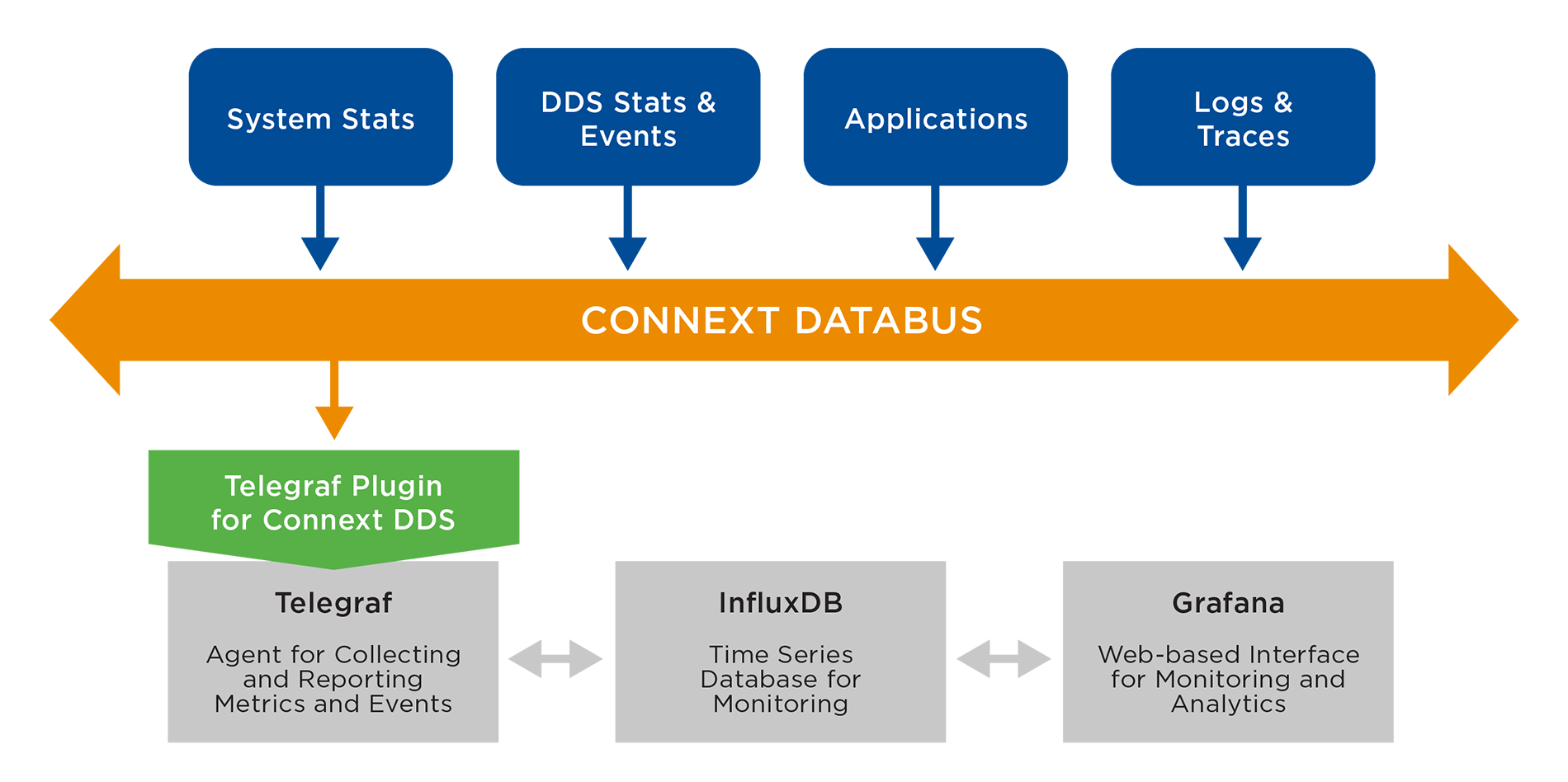
In industrial IoT, real‑time visibility into device telemetry is critical. RTI Connext DDS delivers low‑latency, scalable data distribution, while InfluxDB excels at storing and querying time‑series metrics. Telegraf, the lightweight metrics collector from InfluxData, bridges the two by ingesting DDS data and forwarding it to InfluxDB (or other destinations). This architecture offers a flexible, high‑performance monitoring pipeline that can be adapted to any IIoT deployment.
Introducing the Telegraf Connext DDS Input Plugin
Until recently, Telegraf lacked a native DDS input plugin, limiting its ability to consume data from Connext DDS directly. The dds_consumer plugin fills that gap. It runs as a background service, listening for DDS messages via WaitSets, and pushes parsed metrics into Telegraf’s internal buffer for downstream processing.
Key Features
- Service‑style operation: automatically forwards incoming DDS samples without polling.
- Supports JSON data format, the most common serialization for DDS demos.
- Configurable tags, measurement names, and field mappings.
- Compatible with Telegraf’s built‑in processors and aggregators for advanced metric handling.
Plugin Development Overview
Telegraf’s plugin framework defines a set of interfaces. An input plugin implements Sample and SampleSet methods, while a service plugin adds Start and Stop functions to manage background threads. The dds_consumer plugin leverages these to spawn a listener that reacts to DDS arrivals.
Getting Started: Configuration Basics
Telegraf configuration files are written in TOML. The plugin requires an additional XML file that describes DDS entities (Participant, Publisher, Subscriber, Reader, etc.). Below is a minimal example that reads a DDS Square topic published by the RTI Shapes demo and writes metrics to a local file.
[[inputs.dds_consumer]]
  ## Path to the DDS XML description
  config_path = "example_configs/ShapeExample.xml"

  ## DDS Participant configuration name
  participant_config = "MyParticipantLibrary::Zero"

  ## DDS DataReader configuration name
  reader_config = "MySubscriber::MySquareReader"

  ## Tag keys extracted from the DDS payload
  tag_keys = ["color"]

  ## Override default measurement name
  name_override = "shapes"

  ## Expected data format
  data_format = "json"
To generate a full Telegraf configuration that includes this input and a file output, run:
$ telegraf --input-filter dds_consumer --output-filter file config > dds_to_file.conf
$ telegraf -config dds_to_file.conf
After publishing a Square sample in the Shapes demo, metrics will appear in /tmp/metrics.out.
Switching to InfluxDB Output
Replace the file output with InfluxDB by regenerating the config:
$ telegraf --input-filter dds_consumer --output-filter influxdb config > dds_to_influx.conf
$ telegraf -config dds_to_influx.conf
Enhancing Your Metrics Pipeline
Telegraf’s ecosystem includes several built‑in plugins that add value:
Aggregators
Calculate statistics such as mean, min, max, and standard deviation over time:
[[aggregators.basicstats]]
  period = "10s"
  drop_original = false
Processors
Rename or transform fields before storage:
[[processors.rename]]
  [[processors.rename.replace]]
    field = "x"
    dest = "y_trans"
  [[processors.rename.replace]]
    field = "y"
    dest = "x_trans"
These tools enable you to tailor the data model to your monitoring needs, whether you need raw samples, aggregated summaries, or custom field names.
Resources and Community Support
The plugin is part of RTI Labs, a free program that gives early access to RTI technology. Find the source code, documentation, and example configurations on GitHub:
For questions, feedback, or feature requests, visit the RTI Community forum or open an issue on GitHub.
Conclusion
The Telegraf Connext DDS plugin unlocks a powerful, low‑overhead pipeline for ingesting DDS telemetry into InfluxDB. By combining Telegraf’s extensible architecture with RTI’s DDS middleware, you can build a scalable, trustworthy time‑series monitoring solution for any IIoT scenario.
Internet of Things Technology
- RTI Perftest 2.4 Released: Enhanced Performance Testing for Connext DDS
- RTI Labs Launches Python‑Enabled Connector for Connext DDS—Now in the Connext Suite
- Connext DDS 101: A Beginner’s Guide to Getting Started
- Top 2016 Resources for Connext DDS Developers and Engineers
- Connext DDS Users Group in Chengdu: Real Feedback Drives Our Roadmap
- Connext DDS on Android: Empowering Industrial IoT with Reliable Publish/Subscribe
- Free, Powerful, and Ready for Research: RTI Connext DDS University Licensing
- Cisco Launches Cloud‑Managed IoT Monitoring for IT & OT Environments
- Industry 4.0: Transforming Asset Condition Monitoring for Unmatched Efficiency
- Maximize Energy Savings with Central Controllers & Remote Monitoring