



IXON Cloud 2 FAQ: Key Changes, Migration, and Customization
With the launch of IXON Cloud 2, many of our customers have questions about the new platform, its features, and how to transition from the legacy system. This FAQ provides concise, authoritative answers to help you get up and running quickly.
What are the main differences between the legacy platform and IXON Cloud 2?
IXON Cloud 2 introduces a modern, modular design that splits the experience into four dedicated applications: Admin, Fleet Manager, IXON Studio and Portal. This architecture separates responsibilities—administration, device management, portal customization, and user‑facing overview—making each app more focused and intuitive.
Key new capabilities include:
- Role‑based access control that lets you assign users to roles and group devices.
- IXON Studio, a powerful portal builder for custom dashboards, machine cards, and widgets.
Both legacy and new platforms run on the same secure infrastructure, ensuring data integrity and reliability.
Can I still create sub‑companies?
Sub‑companies are no longer a first‑level entity. Instead, you can define categories and roles through the advanced user management system, effectively replicating the previous sub‑company structure.
How do I start using IXON Cloud 2?
To access IXON Cloud 2 you first need a new account. Existing IXON Cloud users can migrate their data using the Migration Wizard—see our Migration Wizard guide for step‑by‑step instructions. Don’t forget to download the new IXON mobile app for iOS and Android.
How does the Migration Wizard work?
The wizard guides you through preparing your data, mapping devices, and confirming the transfer. It also lists exactly which objects—users, roles, devices, dashboards—are moved.
Do IXrouters or IXagents need updates?
Both IXrouter and IXagent are fully compatible with IXON Cloud 2. After migration, simply add the devices to the Fleet Manager app. Existing dashboards from the old platform may need to be recreated in IXON Studio.
Why is the platform split into multiple apps?
Segmenting the platform allows each user group—machine builders, service engineers, and customers—to focus on the tools they need without clutter. The apps are tightly integrated but maintain distinct responsibilities:
- Admin – configure company identity, roles, and groups.
- Fleet Manager – add, configure, and monitor devices.
- IXON Studio – design your portal, dashboards, and machine cards.
- Portal – a consolidated view of all devices and users.
For a deeper dive, read our detailed platform architecture blog.
What’s new in user management?
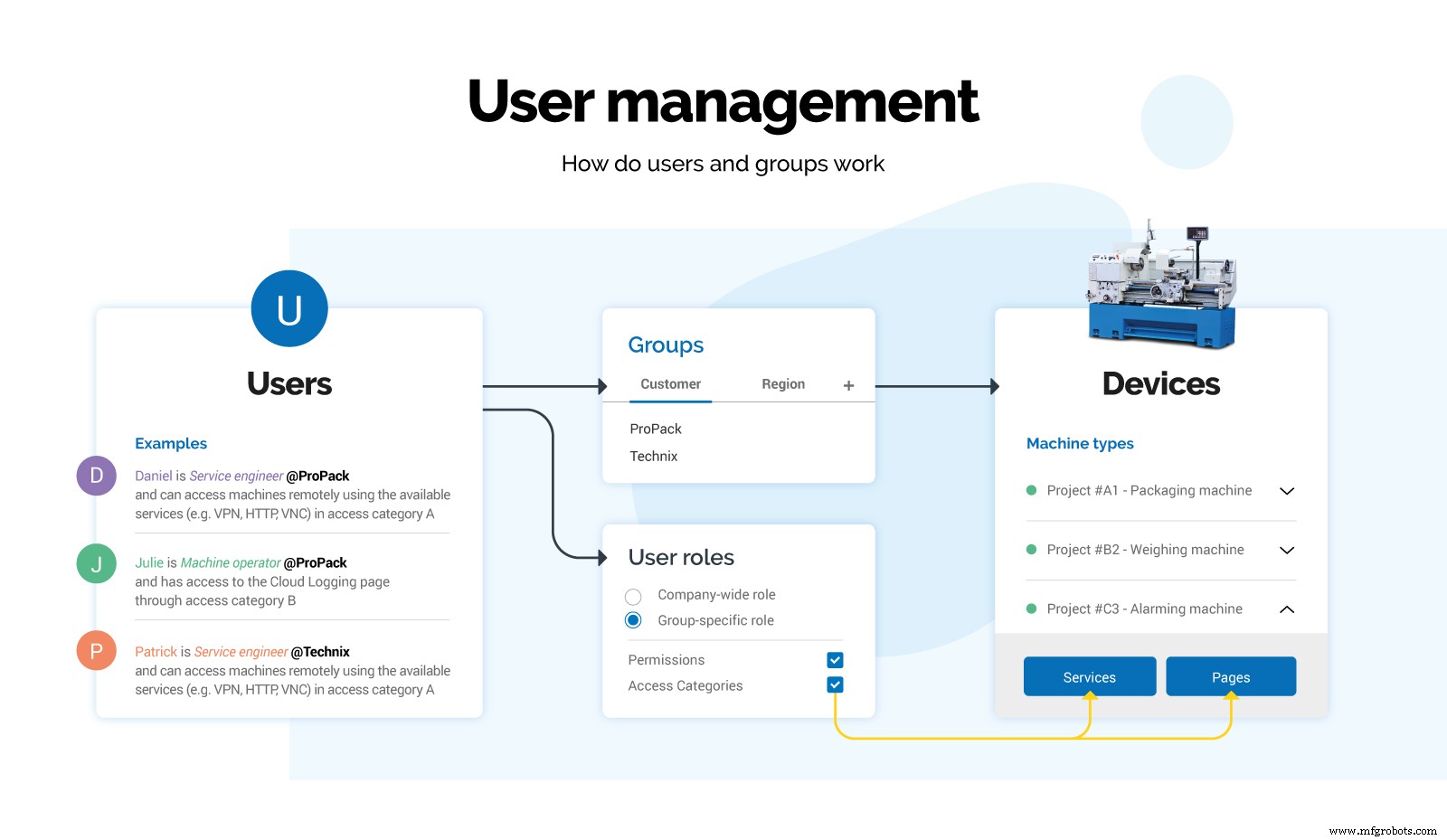
The expanded system offers granular role‑based access control. While it may appear more complex, you can start with default settings and incrementally enable advanced features as you grow.
Roles vs. Access Categories
Roles group users and devices, whereas access categories define permissions for specific services (e.g., VNC, HTTP) and pages within a role. See the infographic below for a visual breakdown.
How can I customize the IXON Cloud portal?
Start by branding the portal in the Admin app: set your company name, logo, and color scheme. For full control, consider our premium branding package, which lets you:
- Use a custom IXON Cloud URL.
- Brand IXrouters with stickers.
- Launch a branded mobile app.
With IXON Studio, you can build pages, dashboards, widgets, and machine cards tailored to your operational needs. Learn more in our IXON Studio guide.
Visualizing machine data in IXON Cloud 2
IXON Cloud 2 supports rich data visualization:
- Create custom pages in IXON Studio and add widgets such as tables, meters, graphs, or VueJS‑based custom widgets.
- Embed remote‑access and cloud‑logging components on the same dashboard for real‑time monitoring.
- Design machine cards with key performance indicators that appear in the Portal app for at‑a‑glance insights.
How long will the legacy IXON Cloud remain available?
We have no plans to sunset the legacy platform immediately. It will remain operational until the end of 2021, after which we will reassess its status and notify users at least one year in advance. Note that the legacy platform will no longer receive new features.
Got more questions?
Visit our support portal for additional resources, troubleshooting guides, and live assistance.
Get Started
Ready to experience the next generation of IIoT? Create a free IXON Cloud 2 account today.
[[Create your account]]
Related Articles
- IXON launches new IXON Cloud 2 platform with major upgrade
- Introducing the new IXON Cloud 2 interface
- Advanced user‑based access control
- Customise your IIoT Portal with IXON Studio
Internet of Things Technology
- Remote Access Webinar FAQs – Comprehensive Answers
- IXON Cloud FAQs: Pricing, Features, Security & More
- 10 Frequently Asked Questions About CNC Router Machines – Expert Answers
- Top 5 Cybersecurity Questions Manufacturers Ask About Government Compliance
- Wire EDM Machining FAQs – Expert Answers and Insights (Part 2)
- Wire EDM Machining FAQs: Expert Answers for Precise Cutting
- Boron (B): Discovery, History, and Key Facts
- Sand Casting FAQs: Expert Answers to Your Most Common Questions
- Your Ultimate Guide to CNC Turning: 3 Common Questions Answered
- Your Comprehensive Guide to Structural Steel Fabrication: Expert FAQs