



Secure Collaboration with Advanced Role‑Based Access Control in IXON Cloud 2
Machine builders strive to extract maximum performance from their equipment, services, and processes—faster, more efficient, and more productive. In this context, collaboration has become essential. By securely sharing data with colleagues, customers, and service engineers, you can continuously optimize your machines. IXON Cloud 2’s sophisticated role‑based access control ensures that collaboration happens safely and efficiently.
Role‑Based Access Control
IXON Cloud 2 builds on the solid foundation of its predecessor, expanding group creation and permission management based on real user feedback. Now you can fine‑tune roles and groups to match your exact operational needs, enabling clear distinctions between customers, partners, and service teams.
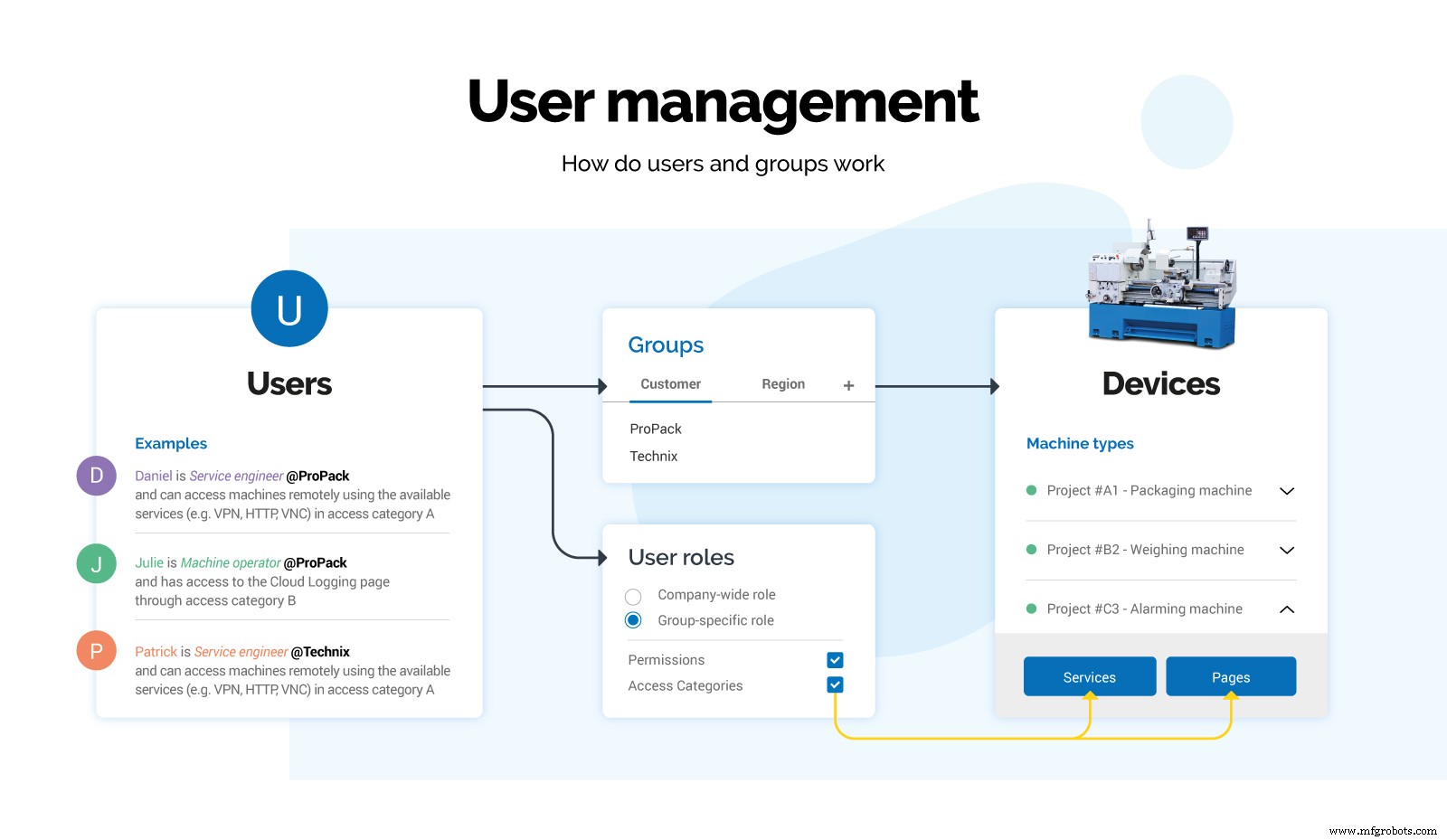
Role‑based access control in IXON Cloud
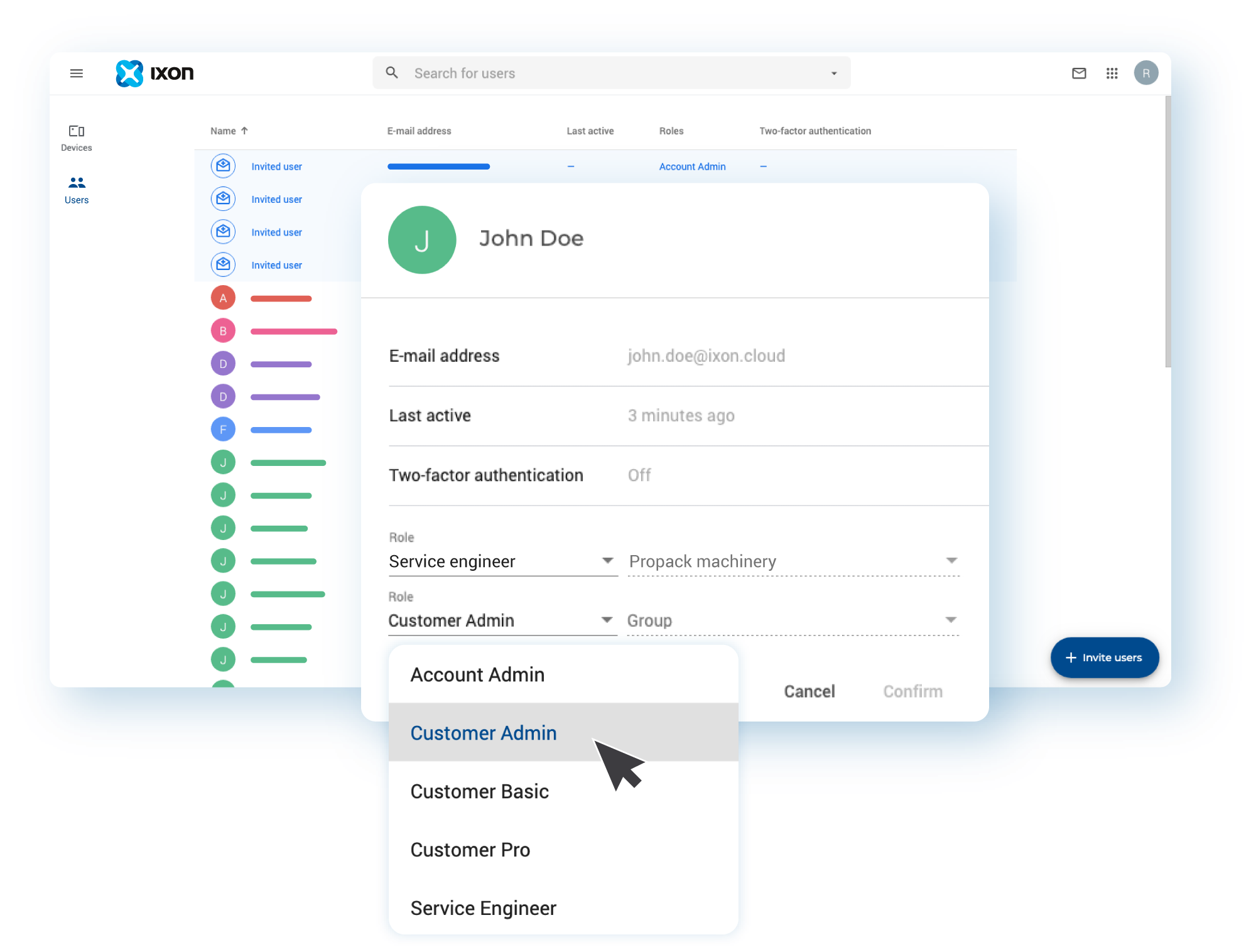
User Roles
In the new IXON Cloud 2 user‑management system, every user must be assigned a specific role—such as service engineer or machine operator. Administrators can create custom roles with tailored access rights, then assign users to these roles via the Admin app. Role managers also handle group definitions and user invitations.
Access Categories
Access categories let you control which users can view particular machine data and which services they can use—VPN, VNC, HTTP, or WebSockets. For instance, a production dashboard might grant operators HMI panel access, while a maintenance page could provide service engineers VPN and HTTP connectivity.
Groups
Groups provide a flexible structure for granting device access. Define groups based on customer, region, or machine type to streamline permissions across your fleet.
Permissions
IXON Cloud 2 prioritizes security. You can prevent customers from altering advanced settings and restrict partner remote access as needed. Assign categories to users or set permissions at the individual level. For example, block customers from managing pages and cards, while allowing engineers to view audit trails and licenses. Two‑factor authentication can also be enforced to further protect your account.
Once configured, each user sees only the information and controls relevant to their role—eliminating clutter and enhancing focus. This streamlined experience boosts collaboration, protects critical settings, and maximizes machine value without compromising security.
User Management Explainer Video
Watch our video for a detailed walkthrough of IXON Cloud 2’s advanced role‑based user management system.
Get Started with IXON Cloud
Sign up for a free IXON Cloud 2 account to explore the platform and experience its capabilities firsthand.
If you’re already using IXON Cloud, learn how to migrate to IXON Cloud 2 with our Migration Wizard guide.
Related Articles
- IXON launches new IXON Cloud 2 platform with major upgrade
- Introducing the new IXON Cloud 2 interface
- Customise your IIoT Portal with IXON Studio
- Frequently asked questions about IXON Cloud 2
Internet of Things Technology
- How to Structure Your IXON Cloud Account: A Step-by-Step Guide
- IXON Cloud 2 FAQ: Key Changes, Migration, and Customization
- Begin with IXON Cloud: Fast, Secure Remote Access for Industrial Equipment
- IXON Cloud Brochure – Download the Latest Edition (English, German, Dutch, Italian, French, Spanish, Portuguese)
- Secure Remote Access & Control for Universal Robots via IXON Cloud
- IXON Debuts the World’s First No‑Code IIoT Platform at SPS Nürnberg 2019
- IXON Cloud Connector on PLCnext Store: Seamless Remote Access & Industrial IoT Integration
- IXON Cloud: Comprehensive IIoT Solution for Industrial Connectivity
- Secure and Real‑Time Machine Data Logging with IXON Cloud
- Cloud Monitoring: Remote Control System for Real-Time Asset Management