



Reduce 3D Printer Noise: Proven Techniques to Keep Your Workspace Quiet
3D printers can be a nuisance to you and the next room neighbors due to the noise they produce.
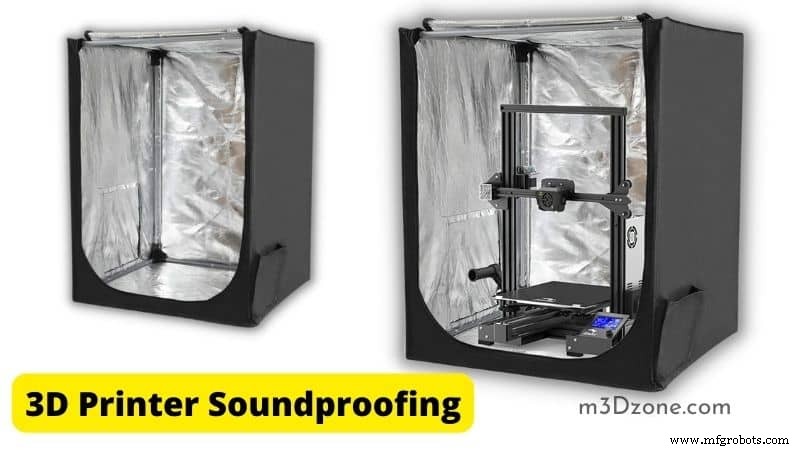
However, the good news is that you can improvise and reduce unwanted noise through a simple solution.
This article looks at effective solutions and techniques you can apply and eliminate your 3D printer noise. We will also answer all those questions that have bothered you for a long time. So, stick around.
Do 3D Printers Make a Lot of Noise?
Just how loud is the average 3D printer?
Cheap and low-quality printers can produce noise levels up to 75 decibels, while good printers have lower noise levels to a value of 40 decibels.
You may want to know how loud the sound is when represented by a decibel value.
In simple terms, 75 decibels are equivalent to a hairdryer’s sound, while 40 decibels are equivalent to a normal conversation.
Are Resin Printers Silent?
You are probably asking this because you have heard resin printers are better for taming noise.
The answer is yes simply because they have fewer fans and motors than Fused Deposition Models (FDM), which have several stepper motors.
The sound reduction in resin printers is also efficient because they have an enclosure. They are enclosed because of protecting the photo-curing resin. That is in comparison to FDM printers which are open.
However, regardless of the type or condition of the printer, there are steps you can take to reduce noise and stop being a nuisance to your neighbors.
Why Is My 3D Printer Making Noise?
The following reasons could be responsible for the noise.
- Your printer could be a cheap, poor model.
- Your printer could be a noisy FDM printer because of many moving parts.
The following components generate the noise coming from your 3D printers:
- Stepper motor
- Cooling fan
- Printer’s frame vibrations
- Bearings
- Pulleys
- Belts
- Linear rods
Now that you know the noise source, it is easier for you to find the solution to reduce or get rid of it.
How Can I Make My 3D Printer Quieter?
To reduce the noise coming from your printer, you begin by identifying the source of the noise. For example, if the source is the fan, you fix it individually.
The following are the simple solutions you can take to fix each source and have a quiet printer.
Adjust Your 3D Printer Stepper Motor Dampers and Bolts
The adjustment involves the options detailed below:
Vibration Dampers
The stepper motor vibration dampers are installed on each stepper motor between the motor and printer frame.
The technique applies only to FDM printers since most noise comes from the fan for resin printers. The following is how it works to reduce noise:
- The damper brass plates are attached to the printer frame and the stepper.
- The rubber spacer sandwiched in the two brass plates will absorb vibration from the motors.
- By absorbing the vibrations, the printer frame cannot resonate and amplify the sounds.
- When printing, the 3D printer vibrations are reduced by the dampers.
The vibration dampers technique is effective since it deadens the noise produced by the moving components of the printer.
Consider Adjusting Stepper Motors Bolts
You should apply a standard pressure on stepper motor bolts for this method to work. Don’t overtighten or leave the bolts too loose, increasing the vibrations.
Upgrade the Printer’s Main Board to Silent Mode
Silent mainboards have modern motor drivers that reduce the noise by regulating the input current.
It will be more efficient if you change the drivers without simply replacing the whole mainboard. However, it will be far more effective to combine the two.
Adjusting the Printer Speed Will Lower Your 3D Printer Noise Levels
Lower printing speed will cause your printer to produce louder noise, and Likewise, the nozzle’s fast print speed results in higher printer sound.
It is recommended not to increase or lower the 3d printer speed as that will have a quieter printer during printing and better print quality.
Use Decoupling to Reduce Your 3D Printer Noise
Decoupling your printer from the floor will reduce loud noise by preventing amplifying and resonating of printer noise.
The best way to decouple your printer is by putting foam blocks and a concrete paver. You do this by placing a rubber mat, a thick yoga mat, or thick foam (check at Amazon) between the printer and the surface it sits on.
Act to Reduce the Cooling Fan Noise
These steps will help you reduce the fans noise:
- Small cooling fans are noisy due to their high speed. Some manufacturers deliberately install small and cheaper fans to save on resources, causing you problems.
If you want to reduce the fan speed, the solution is to install larger fans that spin slowly and give you the same cooling effect.
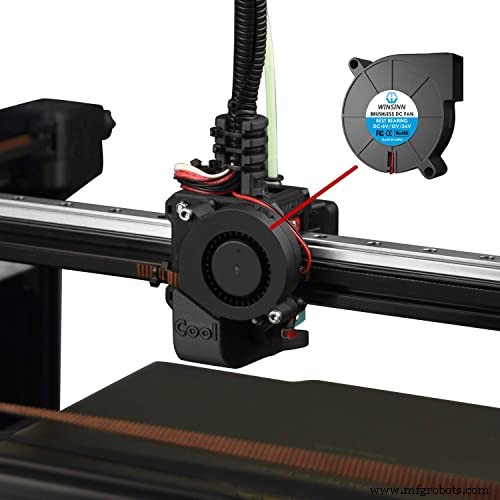
- You may replace the noisy fans with silent mode ones. However, there is a concern that silent fans don’t push enough currents; hence you should be keen on the model.
Cheap and poor model fans may also be poorly designed, generating excess sound. You may consider replacing them with quieter fans that have a better design.
Ensure the Moving Parts Are Well Lubricated and Loose Bolts Tightened
Ensure that all the moving parts are sufficiently lubricated to prevent friction in your regular maintenance routine. You may want to check the following:
- Examine all parts threaded rods in your 3d printers and ensure they are well oiled. That includes areas where bearings move over linear rods. Clean these areas by wiping them with lint-free fabric to eliminate any debris.
- Ensure X, Y, And Z-Axis are well lubricated. Note that the X and Y axis point of contact varies depending on your 3D printer model. That calls you to consider the type of lubricant you use.
- Loose parts of your 3d printers are among the primary causes of loud noise. Make sure loose nuts, screws, and bolts are tightened, and no loose parts are left.
Install an Enclosure for Your Printer
Enclosures will help to absorb and dampen the noise generated by your printer. An enclosure is a box that separates the print area and the ambient air.
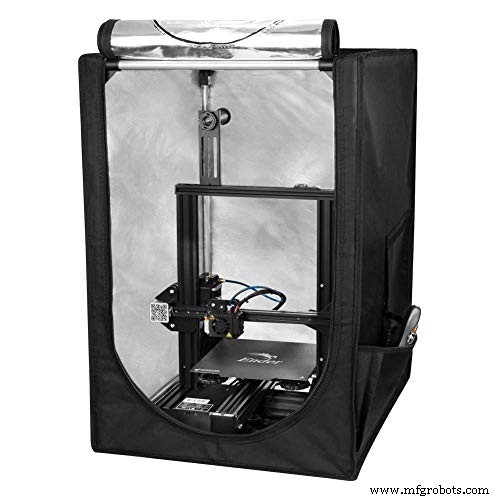
The separation by the enclosure absorbs the sounds coming from the print area hence getting rid of loud noise.
What Is the Best Way to Soundproof a 3D Printer?
The standard way to soundproof your 3D printer is to place it in an enclosure or cabinet. You can do that after you have made the necessary noise reduction adjustments.
Placing your printer in the cabinet can give you up to 10 decibels that can be correctly termed soundproof.
That makes it so effective that even the person in the same room cannot hear it. However, keep the following in mind as you apply this technique:
- You should not use combustible material in building your cabinet walls. The best material to use is thick plywood (check at Amazon) or steel since they won’t easily catch fire
- You should be able to open your cabinet from all sides for maintenance purposes.
- Your cabinet does not need ventilation.
However, although we have noted you don’t need ventilation, there are steps you should take to secure the health of your 3D printer. That is because you shouldn’t expose the printer to high temperatures.
The following adjustments can give the solution to that:
- Remove the filament and install it outside the cabinet. You will drill a hole through which the filament will feed.
- You may consider installing the stepper motors outside. That is because they are supposed to need cool air all the time.
Conclusion
The most crucial factor you should consider above all is quality when buying your 3D printer. Although there are options available to reduce the noise, the efficiency of the methods you apply will be dependent on the printer model.
It will be easier to achieve soundproof results with a good 3d printer than poor printers that will need a lot of fixing.
3D printing
- Maintaining Your 3D Printer’s Extruder: Best Practices for Optimal Performance
- Step‑by‑Step Guide to Replacing Nozzle Tips on Your Stratasys 3D Printer
- Connecting GrabCAD Print to Your Stratasys 3D Printer – A Step‑by‑Step Guide
- Beyond Prototypes: Real‑World Innovations Made with 3D Printing
- Can You Safely Leave Your 3D Printer Running Overnight?
- How Loud Are 3D Printers? Find Quiet Models & Reduce Noise
- Master ABS 3D Printing: Proven Settings for Superior Quality
- Effective 3D Printer Ventilation: Safeguard Against VOCs & UFPs
- Recycling PLA Filament: How to Reuse Your 3D Printer Plastic Safely
- Check If Your 3D Printer Supports Advanced Materials