



Essential Hotend Care: A Comprehensive Guide to 3D Printer Maintenance
The hotend is one of the most important components of a FFF 3D printer and the one that suffers the most wear and tear. It is essential to carry out proper maintenance and check it periodically to check its condition.
There are multiple types of hotends, both stand-alone (e.g. E3D V6) and integrated in compact heads (e.g. Hemera, LGX FF), but they all have a number of common components.
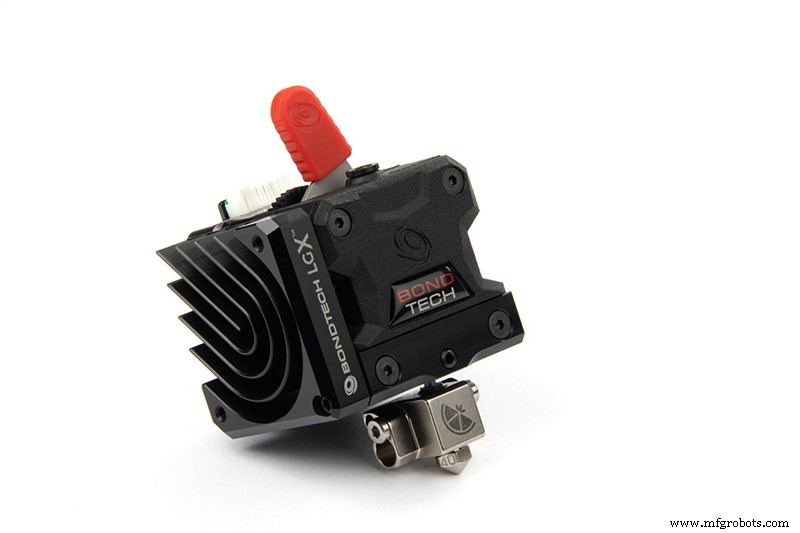
Image 1: Hotend integrated in the LGX compact head. Source: bondtech.se
The following components can be found in any hotend:
- Nozzle: This is the element through which the molten material is extruded.
- Heating cartridge: It consists of a resistance whose function is to heat the heating block.
- Temperature sensor: It can be of different types: thermistor, thermocouple, PT100,.... Its function is to measure the temperature of the heating block.
- Heating block: It is the element in charge of transmitting the temperature to the nozzle and to the hot zone of the heatbreak.
- Heatbreak: This is the thermal break element. Its function is to guide the filament to the nozzle preventing it from melting prematurely. It consists of a hot and a cold zone and its thermal performance is essential for the correct functioning of the hotend. There are two different types: All metal and Teflon insert. The all metal heatbreak can withstand high temperatures, but is prone to heat creep when its thermal performance is not optimal. The hotend with teflon insert prevents the filament from melting inside the heatbreak and minimises friction inside the heatbreak, however it is not recommended for materials requiring temperatures above 265°C.
- Heatsink: This is the element in charge of cooling the heatbreak, keeping the hot and cold zones separate. It can be passive or active.
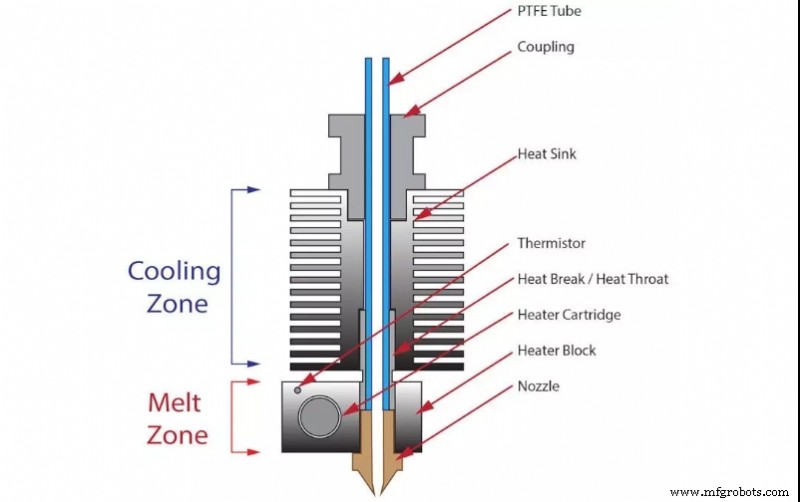
Image 2: Parts of a hotend. Source: cults3D.com
To ensure the correct functioning of the hotend, it is necessary to check the condition of each of the elements as well as the assembly of all of them.
Nozzle
It is a consumable element and therefore has a limited lifetime. Wear of the nozzle will result in an increase in nozzle diameter and a reduction in nozzle length. This will be reflected in an inconsistent extrusion that will deteriorate the finish of the parts.
There are several factors that accelerate the wear of a nozzle. The most common is the use of composite materials. The presence of fibres or particles in the filament causes high abrasion on the nozzle walls. Particularly abrasive are glass or carbon fibre filaments, filaments loaded with ceramic or metallic particles and phosphorescent filaments.
On the other hand, the material from which the nozzle is made will also define the durability of the nozzle. The most common materials are the following:
- Brass: They have a very limited durability, even with non-abrasive filaments. It is advisable to replace them often to ensure maximum print quality.
- Brass or copper with nickel coating: The nickel coating gives a higher surface hardness to the nozzle and therefore a higher resistance to abrasion. Its durability is very high with non-abrasive filaments and moderate with abrasive filaments.
- Stainless steel: These nozzles are developed for medical and food contact applications, but have good durability with non-abrasive filaments. Although they have moderate durability with abrasive filaments, they are not the recommended choice.
- Hardened steel and similar: They have good durability when used with abrasive materials and very good durability with non-abrasive filaments. In general the print quality is not as good as in the previous cases due to the roughness of the material and its adhesion with the molten plastic, however some incorporate special coatings that solve this problem.
- With ruby tip: Ruby is one of the hardest materials and the one that suffers the least wear, however only the tip of the nozzle is made of this material, which is crimped on a brass nozzle. It has a high durability with non-abrasive materials and its main advantage is that it does not lose quality during its lifetime. Over time, the brass part wears down to the point where the ruby tip comes off. With very abrasive materials it is recommended to use hardened steel nozzles.
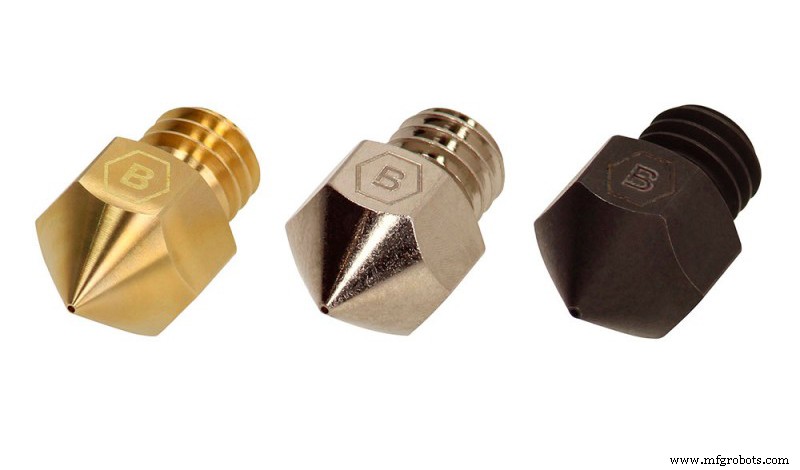
Image 3: Nozzles made of brass, nickel-plated copper and hardened steel. Source: Brozzl.com
It is difficult to make an estimate of how often a nozzle should be replaced, as it depends largely on the material used and the temperature, however, as a guide, the following values can be estimated:
- Brass nozzle:
- With non-abrasive materials: Change every 200 hours of use.
- With abrasive materials: not recommended.
- Nickel-plated brass nozzle
- With non-abrasive materials: Change every 1000 h of use.
- With abrasive materials: Change every 100 h of use.
- Stainless steel:
- With non-abrasive materials: Change every 1000 h of use.
- With abrasive materials: 100 h.
- Hardened steel:
- With non-abrasive materials: not recommended for use.
- With abrasive materials: 400 h.
- With ruby tip:
- With non-abrasive materials: when the ruby comes off.
- With abrasive materials: when the ruby comes off.
Heating cartridge
The most frequent failure related to the heating cartridge is due to a problem with the connection. The wires going into the cartridge are usually protected with two temperature resistant plastic sheaths. These sheaths tend to degrade with use, exposing the metal wire. As soon as wear is evident, the heating cartridge should be replaced, as loss of insulation on the wires can cause a short circuit, fire or serious injury to the user.
Temperature sensor
As with the heating cartridge, the most delicate point is the cable connection. Damage to the cable or its connection will cause erroneous and erratic temperature measurements. If the cable is completely broken, the temperature value will remain fixed at its maximum value. It is recommended to check the condition of the connections frequently.
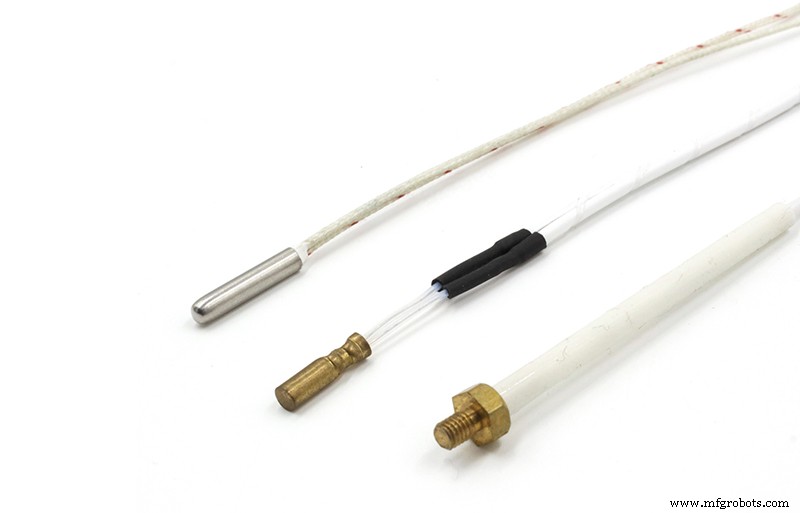
Image 4: Different NT100 thermistor formats. Source: alibaba.com
Heating block
Although it does not require any specific maintenance, it is very important to keep it as clean as possible. Accumulated plastic debris can detach and adhere to the part during printing, causing aesthetic defects or even printing failures. The use of silicone sleeves or plastic repellent paints can help to keep the block clean, especially when printing with materials such as petg. If silicone sleeves are used, it is advisable to remove and clean them regularly and replace them as soon as they start to degrade. In the case of non-stick paint, it is recommended to reapply every 2 or 3 prints.
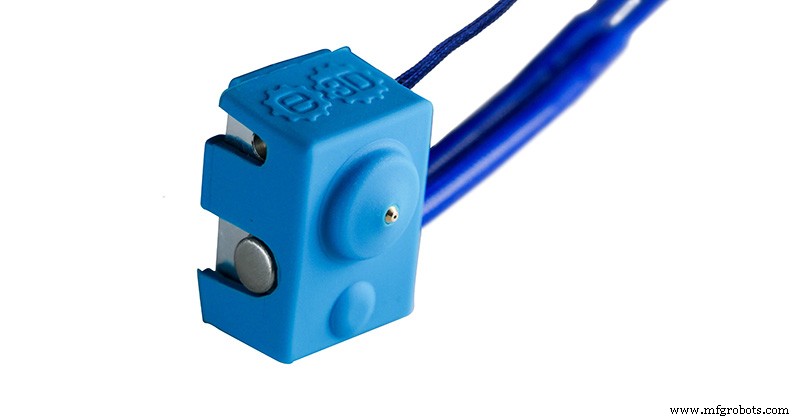
Image 5: E3D silicone case. Source: e3d-online.com
Heatbreak
With all-metal heatbreaks, no special maintenance is required. If abrasive materials are regularly printed, it is recommended to disassemble the heatbreak every 500 hours of use to check the wear of the internal throat. As soon as signs of wear begin to show, the heatbreak should be replaced.
In the case of heatbreaks with Teflon inserts, the wear and tear is directly on the insert. The insert should be replaced every 500 hours of use with PLA, every 300 hours of use with ABS or PETG and every 80 hours of use with abrasive filaments.
Heatsink
The heatbreak is usually anchored directly to a heatsink element. It can be passive (finned heatsink) or active (finned heatsink + fan). Its ability to dissipate heat from the cold zone of the heatbreak is critical to avoid problems. Excessive heating of the cold zone can cause the filament to soften and compress, causing a jam. This phenomenon is known as heat creep and is common when printing PLA on a metal heatbreak hotend.
To ensure optimum heat dissipation, it is necessary to apply thermal paste in the area where the heatbreak meets the heatsink. It is advisable to use thermal pastes with non-stick properties, such as boron nitride, to make it easier to disassemble the heatsink in future revisions.
In the case of active heatsinks, it should be checked at the beginning of each print that the fan is working properly. Some printers thermostatically control this fan, so it may remain off until the hotend reaches 50 ºC or 100 ºC.
Assembly
As each hotend element is made of a different material and their thermal expansion coefficients are also different, it is common that the joint between them loosens due to sudden temperature changes.
It is very important to check every 2-3 weeks that all hotend elements and bolts are correctly tightened.
In the event that the nozzle has loosened, it must be retightened while hot. It is very important that the heatbreak and nozzle are tight and in contact with each other, as a small gap between the two will cause melt leakage and damage the hotend.
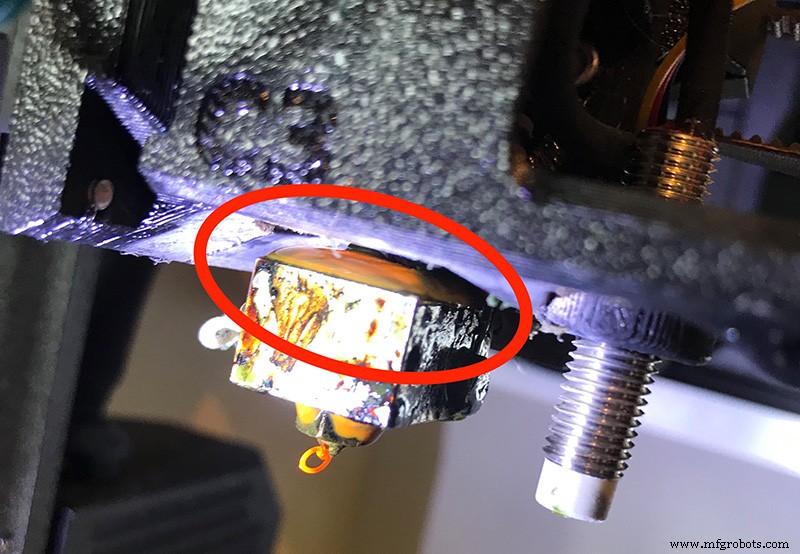
Image 6: Plastic leakage caused by a bad hotend tightening. Source: forum.prusaprinters.org
The manufacturer should be consulted for the optimum torque for each hotend, as excessive torque will damage the heating block threads. As a reference, E3D recommends a torque of 3 n-m for their hotends, while slice engineering uses 1.5 n-m. If no manufacturer's reference value is available, a torque in the range 1-2 n-m can be chosen.
It is also important to check the screws that hold the heater cartridge and the temperature sensor.
Mixed systems
Always use original spare parts or at least parts from the same system. Although it may often appear that there is compatibility between components of different systems, as they have the same thread type, the length and dimensions of each element are also very important. The different components of a hotend are designed to work well together, and mixing components that are not part of the same system can lead to malfunction or even damage to the hotend.
Material changes
When a filament is removed from the hotend, there are always remnants left inside. When a new material with a lower printing temperature is loaded, it will carry the unmelted residues of the previous material with it, causing a jam. This is why the hotend must always be cleaned with a cleaning filament whenever a material change is made. For this purpose, 500 to 800 mm of cleaning filament will be extruded at a temperature 10°C higher than that of the last material used.
The fan coater
Although the layer fan is not an element of the hotend itself, it is usually located next to the hotend. An incorrectly positioned layer fan can direct the air directly to the block, causing it to cool down. This causes the hotend not to reach the set temperature or the temperature to fluctuate a lot, which often results in a temperature error in the printer. In these cases it is advisable to test the same printout with the layer fan deactivated to verify if it is a fault in the temperature sensor or if it is the effect of a bad position of the layer fan.
Filament inlet
One entry point for dirt inside the hotend is the filament inlet area. In Bowden systems, where the filament is guided through a PTFE tube to the hotend, the inlet is protected and it is not usual for dust to enter, however in direct extruder printers, the filament inlet can be exposed to the air, facilitating the entry of dust inside the hotend. In these cases it is advisable to guide the filament from the spool to the extruder through a PTFE tube whenever possible. Dust and dirt entering the hotend is a common cause of clogging.
Likewise, it is recommended to keep the filament spools clean and to prevent dust from settling on them, so avoid leaving them on the printer stand if it is not protected and store them in closed bags or boxes.
Printers with multiple hotends
When you have a printer with multiple hotends, you have to calibrate the relative position of the hotends.
First check that the distance of the hotends to the printing surface is the same. For this purpose, the main hotend must be fixed and the printing base must be levelled with respect to it. Then the height of the other hotends has to be adjusted with respect to the main hotend. The way to adjust the height varies from printer to printer, so consult the manual of the equipment or the manufacturer if you do not know how to do it.
Once the height of the hotends has been set, it is necessary to know the relative XY position of each hotend with respect to the main hotend. In general, each manufacturer provides a print file that allows you to calibrate the XY offset of each hotend, although there are also many other options in well-known file repositories. In this case, the XY position of the hotends cannot be altered, so the offset values will be entered into the firmware to compensate for the position during printing.
The height of the hotends should be checked every 2 weeks, while XY calibration should only be performed when offset or overlapping of the printed parts with each hotend is detected.
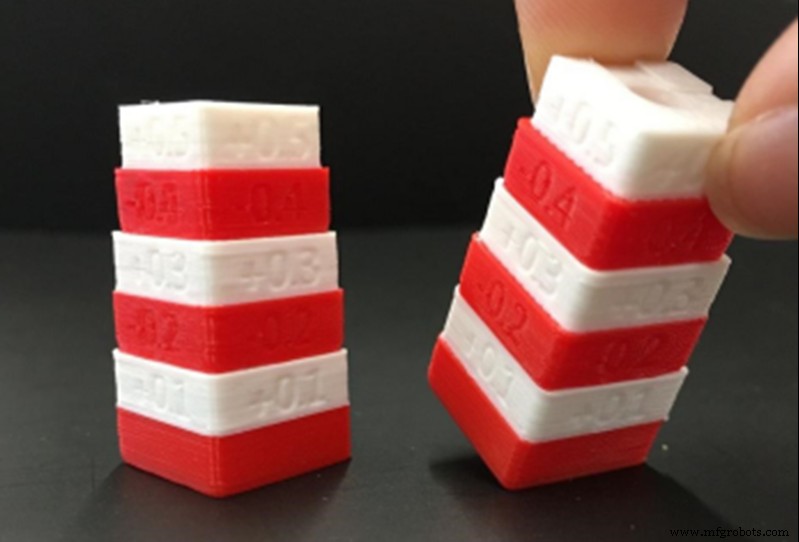
Image 7: Dual extruder calibration pattern for Raise Pro2 printers. Source: Raise3D.com
The hotend is probably the most maintenance-intensive part of the printer, but it is very important to keep it in good condition to ensure good print quality and minimise the risk of failure.
Note: This guide discusses concepts in a general way and does not focus on a specific make or model, although they may be mentioned at some point. There may be important differences in calibration or adjustment procedures between different makes and models, so it is recommended that the manufacturer's manual be consulted before reading this guide.
3D printing
- Cut Maintenance Time by 50%: How Optimizing Spray Systems Drives Cost Savings
- Solvay Boosts Maintenance Productivity by 15% Using Emerson's AMS Suite
- Lockheed Martin Boosts Competitiveness by Outsourcing Maintenance to MAG Technologies
- How Effective Hotel Maintenance Boosts Profits and Guest Satisfaction
- Essential Tools for Industrial Maintenance: A Technician’s Guide
- Condition‑Based Maintenance: How It Works and Its Benefits
- CMMS vs Plant Maintenance Software: Key Differences Explained
- Corrective Maintenance: Key Traits and Goals Explained
- Essential Skid Steer Maintenance Guide for Optimal Performance
- Mastering Lamination: Essential Parameters for Professional Printing