



Adaptive Bed Leveling: Revolutionizing First Layer Accuracy on the Mark X
The first layer is the most critical part of any FFF print. Common failures—warping, nozzle clogging, poor bed adhesion—originate here. To boost reliability, we introduced a pre‑print bed scan for the Mark X that guarantees a level surface before each job. Adaptive Bed Leveling in Eiger takes this one step further by using laser‑scanned bed topography to adjust the Z‑axis in real time. Standard point‑based leveling can’t fully compensate for subtle bed irregularities. Even a perfectly leveled bed may produce an uneven first layer. Adaptive Bed Leveling corrects this by dynamically responding to the actual bed surface measured by the laser scanner. During the pre‑bed scan, the Mark X maps the entire bed with its on‑head laser scanner. It checks the topography for flatness; if the bed isn’t level enough, the machine prompts the user to re‑level using the stage thumbscrews. Once verified, the printer draws a calibration line on the left side of the bed. With a calibrated topography, the machine makes minute Z‑axis adjustments during the first layer, producing a consistently adhered and defect‑free surface. For existing Mark X owners, activation is simple: download the latest firmware update, rebuild your G‑code files in Eiger, and enable “Scan Before Printing” on the touchscreen. The process is fully automated and requires no extra steps, yet it delivers measurable improvements in print quality. Curious to see it in action? Request a demo or try the feature on your own Mark X. Follow us on Facebook, Twitter, Instagram, and LinkedIn for more updates!The First Layer
Limitations of Traditional Bed Leveling
Bed Topography & Calibration
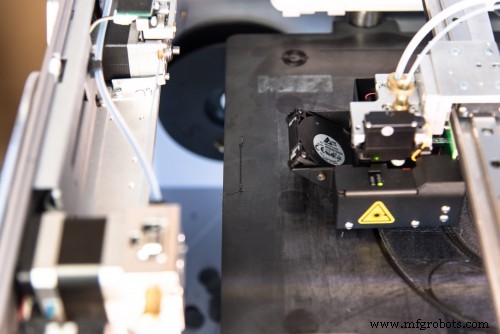
How to Enable Adaptive Bed Leveling
3D printing
- Introducing Inconel 625 for 3D Printing – A Game‑Changing Nickel‑Based Superalloy
- Blacksmith: The Adaptive Platform Driving Innovation in Additive Manufacturing
- Introducing Onyx ESD: The Next‑Generation ESD‑Safe 3D‑Printed Material
- Top Bed Leveling Sensors for 3D Printers: Precision, Durability & Versatility
- Fix Ender 3 Bed Leveling Issues: A Step-by-Step Guide
- Master Bed Leveling on the Ender 3: Step‑by‑Step Guide to Smooth Prints
- Master 3D Printer Bed Leveling: Feeler Gauge vs Paper – Which Wins?
- Top 3D Printers with Built-in Automatic Bed Leveling for Easy, Precise Printing
- Upgrade Your Ender 3 with Auto Bed Leveling: Benefits & How‑to
- Why BLTouch and Auto Bed Leveling Are Worth the Investment for 3D Printing Success