



Implementing Secure SFTP Uploads in IEC 61131-3 Using Curl
Some weeks ago, I received following question. You need to upload a logging file towards a SFTP server, by using a program which runs in the ESM.
The SSH File Transfer Protocol (also Secure File Transfer Protocol, or SFTP) is a network protocol that provides file access, file transfer, and file management over any reliable data stream. It was designed by the Internet Engineering Task Force (IETF) as an extension of the Secure Shell protocol (SSH) version 2.0 to provide secure file transfer capabilities.
SFTP is included in the PLCnext firmware, so this shouldn’t be a problem.
Step 1: I started to create a logging file by using structured text. Examples how to do this, can be found here:
https://www.plcnext-community.net/en/hn-makers-blog/438-datalogging-in-iec-61131-3-the-basic-principle.html https://www.plcnext-community.net/en/hn-makers-blog/447-datalogging-in-iec-61131-3-create-your-own-file-manager.htmlStep 2: I needed some SFTP server to test my PLC application. I’ve used CrushFTP, which I installed in a virtual machine which was running on my laptop.
After the installation of the software, you need to create an admin user for the web interface. Once this is done, you can create a user for the PLC access.
For this example: user = PLCnext, password = 123456789
Step 3: Upload a file using the command line.
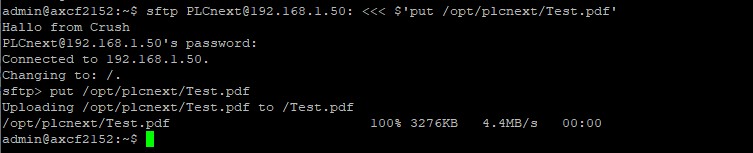
In the above screenshot you can see that we first give a command and in a second step we enter the password. If we want to automate this procedure by using the “PBCL_SysLinuxShell_1” FB, we need a single line command.
This FB can be found in the PLCnextBase library. (https://www.plcnextstore.com/#/720)
So, we need another command to perform the file upload. Let’s have a look to Curl.

The version which is installed with firmware 2020.6.1 doesn’t support SFTP. Thanks to Oliver Warneke, I was able to install another version of Curl. We will not go through the complete installation process, but the result is a version which support SFTP. With firmware 2021.0.0 LTS, you will be able to use following version.

Thanks to Curl, we can use another command now.
curl -k -sS –key ~/.ssh/id_rsa –max-time 25 –connect-timeout 10 “sftp://192.168.1.50:22/test/Upload/” –user “PLCnext:12345679” -T “/opt/plcnext/Test.pdf” –ftp-create-dirs
When you are using this command for the Shell FB, you can see the result in following logging file to check your program.
/opt/plcnext/PLCnextBase.ServiceProvider.log
Some explanation about the arguments:
-k, –insecure
(TLS) By default, every SSL connection curl makes is verified to be secure. This option allows curl to proceed and operate even for server connections otherwise considered insecure. The server connection is verified by making sure the server’s certificate contains the right name and verifies successfully using the cert store.
-S, –show-error
When used with -s, –silent, it makes curl show an error message if it fails.
-s, –silent
Silent or quiet mode. Don’t show progress meter or error messages. Makes Curl mute. It will still output the data you ask for, potentially even to the terminal/stdout unless you redirect it. Use -S, –show-error in addition to this option to disable progress meter but still show error messages.
–key <key>
(TLS SSH) Private key file name. Allows you to provide your private key in this separate file. For SSH, if not specified, curl tries the following candidates in order: ‘~/.ssh/id_rsa’, ‘~/.ssh/id_dsa’, ‘./id_rsa’, ‘./id_dsa’.
-m, –max-time <seconds>
Maximum time in seconds that you allow the whole operation to take. This is useful for preventing your batch jobs from hanging for hours due to slow networks or links going down.
–connect-timeout <seconds>
Maximum time in seconds that you allow curl’s connection to take. This only limits the connection phase, so if curl connects within the given period it will continue – if not it will exit.
-T, –upload-file <file>
This transfers the specified local file to the remote URL. If there is no file part in the specified URL, curl will append the local file name.
–ftp-create-dirs
(FTP SFTP) When an FTP or SFTP URL/operation uses a path that doesn’t currently exist on the server, the standard behavior of curl is to fail. Using this option, curl will instead attempt to create missing directories.
References:
https://en.wikipedia.org/wiki/SSH_File_Transfer_Protocol https://www.crushftp.com/index.html https://curl.se/docs/manpage.htmlIndustrial Technology
- Using the Command-Line Interface with SPICE
- Unlock Growth: How eCommerce Can Propel Your Business Forward
- Understanding Brownouts vs. Blackouts: Key Differences and Business Impact
- Discover How Energy Monitoring Drives Efficiency in Industry 4.0 – Join Our Expert Webinar
- Boost Factory Efficiency: Mastering Teamwork for Superior Management
- Choosing the Right LED Power Supply: A Comprehensive Guide
- Single-Phase vs Three-Phase Power: Key Differences Explained
- AC-DC Converters: Your Reliable Source for Consistent DC Power
- Wireless Power Transfer: Fundamentals and Benefits
- Industry 4.0: Harnessing Automation to Transform Manufacturing