



Unlock Precision & Profit with 4‑Axis Machining in Autodesk Fusion for Manufacturing
Explore how 4‑axis machining in Autodesk Fusion for Manufacturing delivers superior precision, cuts tool deflection, minimizes setups, and boosts efficiency.

Elevate your design and manufacturing processes with Autodesk Fusion
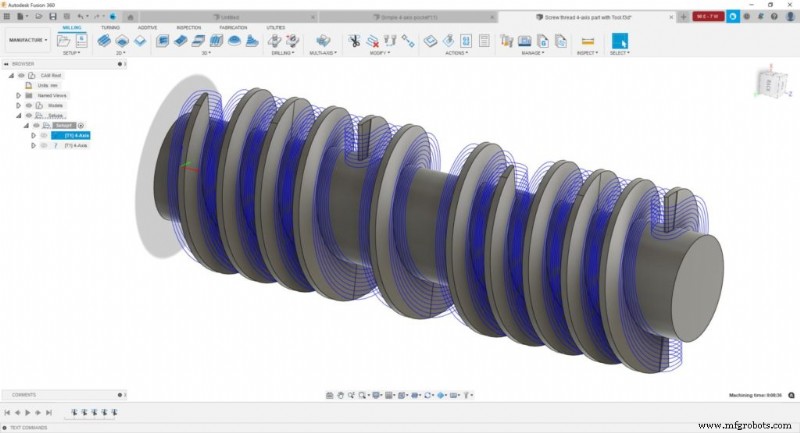
What is 4‑axis machining?
4‑axis machining expands traditional CNC by adding a rotary axis—usually the A‑axis rotating around the X‑axis or the C‑axis around the Z‑axis—to the standard X, Y, and Z axes. This allows the cutting tool to engage the workpiece from multiple angles while the part itself rotates, eliminating the need for manual re‑clamping and enabling complex geometries to be produced in a single setup.
Benefits of 4‑axis machining
- Shorter tooling: The additional rotary axis lets you use shorter, stiffer cutting tools, which permits higher feeds and speeds. This can shave 20–40% off cycle times.
- Reduced tool deflection: Shorter tools stay more rigid under load, improving dimensional accuracy and surface finish while cutting the need for costly post‑machining polish.
- Fewer setups and lower human error: 4‑axis machining can cut the number of setups by 50% or more, cutting setup time, boosting throughput, and reducing operator‑related mistakes.
- Higher part quality and lower cost: With fewer repositioning steps, you reduce the chance of mis‑alignment and the need for expensive repair or hand finishing.
- Increased profitability: The ability to tackle more complex, high‑value parts gives you a competitive edge and opens new revenue streams.
3‑axis vs. 4‑axis vs. 5‑axis machining comparison
| Feature | 3‑axis | 4‑axis (incl. 3+1) | 5‑axis |
|---|---|---|---|
| Axes of movement | X, Y, Z | X, Y, Z + 1 rotary | X, Y, Z + 2 rotary |
| Setup requirements | Multiple setups for complex parts | Reduced setups | Minimal setups |
| Part complexity | Simple to moderate | Moderate to complex | Highly complex |
| Typical use cases | Flat surfaces, pockets, drilling | Cylindrical parts, turbine blades, impellers | Aerospace components, medical implants, molds |
| Relative cost | Lower | Moderate | Higher |
4‑axis machining capabilities in Fusion for Manufacturing
- 3+1 machining: The simplest form of 4‑axis, where the rotary axis indexes the part and the toolpath is generated with standard 3‑axis strategies. After each feature is machined, the part rotates to the next position.
- Simultaneous 4‑axis machining: All four axes move concurrently, enabling efficient cutting of free‑form and cylindrical shapes that are impossible with 3‑axis or 3+1 alone.
- Automated deburring: Fusion can automatically remove sharp edges from 3‑, 4‑, or 5‑axis parts, streamlining workflow, saving time, and enhancing safety.
- Collision checking: Full machine simulation and collision avoidance detect potential conflicts, automatically adjusting toolpaths for safe and efficient machining.
By leveraging these features, 4‑axis machining in Fusion for Manufacturing delivers improved tooling setup, reduced deflection, fewer setups, higher part quality, lower costs, and a stronger competitive advantage.
Fusion vs Fusion for Manufacturing – Capabilities
Note: Fusion and Fusion for Manufacturing share core CAD, CAM, CAE, PCB, and data‑management tools. Fusion for Manufacturing adds advanced manufacturing capabilities.
| Capability | Fusion | Fusion for Manufacturing |
|---|---|---|
| Drilling Hole drilling (3‑axis) | Yes | Yes (automatic hole recognition & drilling) |
| Milling 2D/2.5‑axis milling | Yes | Yes |
| 3‑axis milling | Yes | Yes |
| 3+1 & 3+2 positional milling | Yes | Yes |
| Machine simulation | Yes | Yes |
| Automated whole‑part strategies (3‑axis + multi‑axis) | No | Yes |
| 4‑ & 5‑axis simultaneous milling | No | Yes |
| Multi‑axis collision avoidance | No | Yes |
| Turning 2‑axis turning | Yes | Yes |
| Turn‑mill machining | Yes | Yes |
| Toolpath modifications (trim, delete passes, etc.) | No | Yes |
| Inspection & Part Alignment Work coordinate system probing | Yes | Yes |
| Manual inspection | Yes | Yes |
| Geometry probing | No | Yes |
| Surface inspection | No | Yes |
| Part alignment | No | Yes |
| Post processing (generate NC code) | Yes | Yes |
| Sheet‑based nesting Basic single‑sheet nesting | Yes | Yes |
| Associative nesting updates | Yes | Yes |
| Advanced nesting (multi‑sheet, auto detection) | No | Yes |
| Advanced part and material controls | No | Yes |
| Process material library | No | Yes |
| Custom nest reports | No | Yes |
| Part labeling | No | Yes |
| Sheet‑based fabrication Toolpath generation (laser, plasma, router, waterjet) | Yes | Yes |
| Workflow automation | No | Yes |
| Automatic remnant cutting | No | Yes |
| DXF export with layer mapping | No | Yes |
| Additive manufacturing 2D/3D part nesting and arrangement | Yes | Yes |
| FDM and binder jetting | Yes | Yes |
| 3MF file export | Yes | Yes |
| Metal Powder Bed Fusion (MPBF) | No | Yes |
| Directed Energy Deposition (DED, multi‑axis) | No | Yes |
| MPBF process simulation | No | Yes |
Frequently asked questions
- What is 4‑axis machining used for? 4‑axis machining excels at producing parts with cylindrical features, angled surfaces, and intricate geometries—common in aerospace, automotive, medical devices, and energy sectors.
- When should I use 4‑axis instead of 3‑axis? Opt for 4‑axis when parts demand multiple setups on a 3‑axis machine, feature multiple faces, or contain wrapped geometries that benefit from rotary movement.
- Do I need the Fusion Machining Extension for 4‑axis work? If you lack a Fusion subscription, subscribe to Fusion for Manufacturing. If you already own Fusion, add the Fusion Manufacturing Extension to unlock 4‑axis and 5‑axis capabilities.
- Which industries benefit most from 4‑axis machining? Aerospace, automotive, medical device manufacturing, energy, and mold‑making industries gain the most due to their need for complex shapes, tight tolerances, and high‑value components.
Key takeaways
- 4‑axis machining adds a rotary axis to standard 3‑axis CNC, enabling complex parts to be machined with fewer setups.
- Shorter tools and reduced deflection improve surface finish quality and dimensional accuracy.
- Fewer setups translate to lower cycle times, reduced labor costs, and minimized human error.
- Simultaneous 4‑axis machining allows production of free‑form and cylindrical shapes impossible with 3‑axis alone.
- Fusion for Manufacturing and the Fusion Manufacturing Extension deliver full 4‑axis capabilities, including collision avoidance and automated toolpath optimization.
Industrial Technology
- Reduce PCB Design Errors: Proven Strategies for Faster, Cost‑Effective Production
- Step‑by‑Step Automatic UPS Wiring for Partial Loads with Main Power Backup
- CNC Programming Demystified: G‑Code vs M‑Code
- Sodium Silicate: Enhancing Efficiency and Quality in Casting Production
- HP Multi‑Jet Fusion Design Guidelines: Expert Checklist for Optimal Parts
- Deciding When to Repair or Replace Assets for Optimal ROI
- Arduino Pro Mini vs Nano: Detailed Feature Comparison for Smart Projects
- Rethinking Inventory Management: Modern Strategies for Manufacturers
- Why Brands and Retailers Are Embracing 3‑D E‑Commerce
- Unlock 5 Key Benefits of a Supply-Chain Audit for Your Warehouse