



AR Drone 2.0 + 1Sheeld: Real-Time Flight Data Streaming to PC
Components and supplies
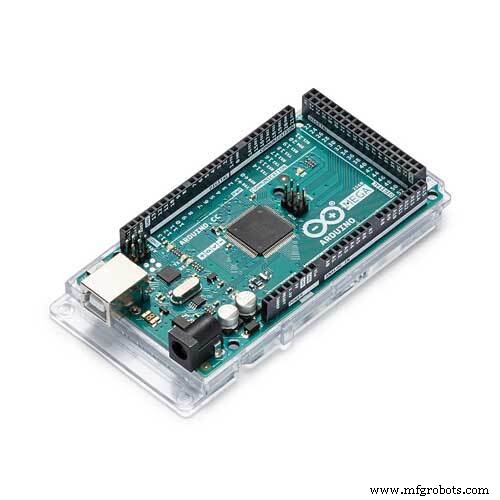 |
| × | 2 | |||
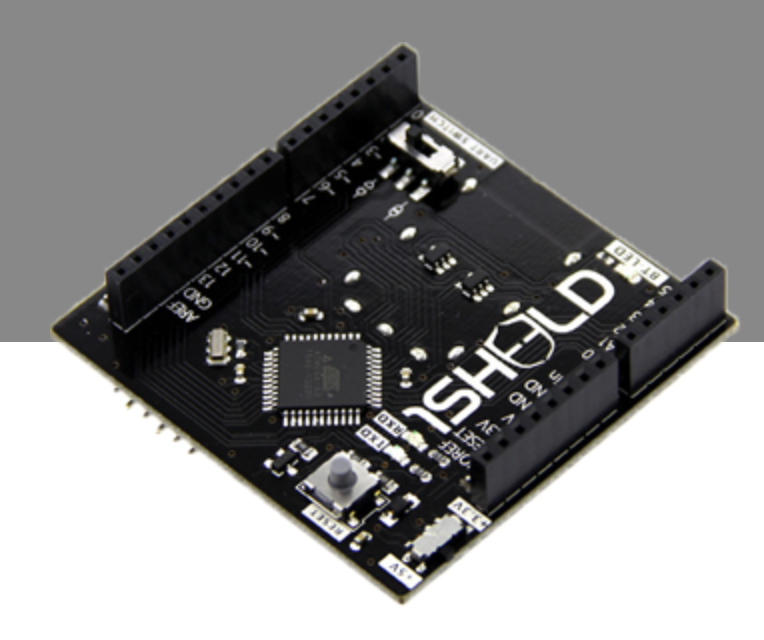 |
| × | 1 | |||
| × | 1 | ||||
| × | 2 |
About this project
Our project see the control of various flight data recorded by a smartphone and transmitted in real-time to your pc, like accelerometer sensor, gps position,noise drone, orientation, gyroscope and more.
We use two Arduino for data control,one mounted to the drone, and one to the computer, two xBee to communicate remote data of the 1sheeld to your pc.
A fun and easy way to take advantage of all the features and sensors of the smartphone, and also to take some nice pictures ;)
Code
- Master Code
- Slave
Master CodeC/C++
This code is loaded on arduino that is connects to the PC, to control the Arduino on dronefirst you need to download library https://www.pjrc.com/teensy/td_libs_AltSoftSerial.html
#include <AltSoftSerial.h>

int verifica=0;
AltSoftSerial xBee;
char c;
char h;
char stop='s';
void setup() {
  Serial.begin(115200);
  Serial.println("Master OK");
  Serial.println();
  Serial.println("Digit for:");
  Serial.println("'o' orientation sensor value");
  Serial.println("'a' acceleration sensor value");
  Serial.println("'b' brightness sensor value");
  Serial.println("'g' GPS position");
  Serial.println("'m' microfone noise");
  Serial.println("'p' take a picture");
  xBee.begin(9600);
}
void loop() {

  Serial.flush();

  if (Serial.available()>0) {
    c = Serial.read();
    if(c=='o'||c=='a'||c=='m'||c=='g'||c=='b'||c=='p'){
      //----------Orientament-----------------------------------------
      if(c=='o'){
        Serial.println("Orientament");
        c='1';
        xBee.print(c);
        for(int i=0; i<10;i++){
          delay(20);
          c='o';
          xBee.print(c);

          do{
            h=0;
            h=xBee.read();
            Serial.print(h);
          }
          while(xBee.available()>0);
          delay(100);
          i=i-1;
          if(Serial.available()>0);
          if(stop==Serial.read()){
            Serial.println("Analysis Stopped");
            c='0';
            Serial.println();
            Serial.println("Digit for:");
            Serial.println("'o' orientation sensor value");
            Serial.println("'a' acceleration sensor value");
            Serial.println("'b' brightness sensor value");
            Serial.println("'g' GPS position");
            Serial.println("'m' microfone noise");
            Serial.println("'p' take a picture");
            xBee.print(c);
            i=11;
          }
        }
      }
      //----------Acceleration-----------------------------------------
      if(c=='a'){
        Serial.println("Acceleration");
        c='2';
        xBee.print(c);
        for(int i=0; i<10;i++){
          delay(20);
          c='a';
          xBee.print(c);
          do{
            h=0;
            h=xBee.read();
            Serial.print(h);
          }
          while(xBee.available()>0);
          delay(100);
          i=i-1;
          if(Serial.available()>0);
          if(stop==Serial.read()){
            Serial.println("Analysis Stopped");
            c='0';
            Serial.println();
            Serial.println("Digit for:");
            Serial.println("'o' orientation sensor value");
            Serial.println("'a' acceleration sensor value");
            Serial.println("'b' brightness sensor value");
            Serial.println("'g' GPS position");
            Serial.println("'m' microfone noise");
            Serial.println("'p' take a picture");
            xBee.print(c);
            i=11;
          }
        }
      }
      //----------Brightness----------------------------------------
      if(c=='b'){
        Serial.println("Brightness");
        c='3';
        xBee.print(c);
        for(int i=0; i<10;i++){
          delay(20);
          c='b';
          xBee.print(c);
          do{
            h=0;
            h=xBee.read();
            Serial.print(h);
          }
          while(xBee.available()>0);
          delay(50);
          i=i-1;
          if(Serial.available()>0);
          if(stop==Serial.read()){
            Serial.println("Analysis Stopped");
            c='0';
            Serial.println();
            Serial.println("Digit for:");
            Serial.println("'o' orientation sensor value");
            Serial.println("'a' acceleration sensor value");
            Serial.println("'b' brightness sensor value");
            Serial.println("'g' GPS position");
            Serial.println("'m' microfone noise");
            Serial.println("'p' take a picture");
            xBee.print(c);
            i=11;
          }
        }
      }
      //----------GPS-----------------------------------------
      if(c=='g'){
        Serial.println("Posizione GPS'");
        c='4';
        xBee.print(c);
        for(int i=0; i<10;i++){
          delay(20);
          c='g';
          xBee.print(c);
          do{
            h=0;
            h=xBee.read();
            Serial.print(h);
          }
          while(xBee.available()>0);
          delay(500);
          i=i-1;
          if(Serial.available()>0);
          if(stop==Serial.read()){
            Serial.println("Analysis Stopped");
            c='0';
            Serial.println();
            Serial.println("Digit for:");
            Serial.println("'o' orientation sensor value");
            Serial.println("'a' acceleration sensor value");
            Serial.println("'b' brightness sensor value");
            Serial.println("'g' GPS position");
            Serial.println("'m' microfone noise");
            Serial.println("'p' take a picture");
            xBee.print(c);
            i=11;
          }
        }
      }
      //----------MICROFONO-----------------------------------------
      if(c=='m'){
        Serial.println("Microphone");
        c='5';
        xBee.print(c);
        for(int i=0; i<10;i++){
          delay(20);
          c='m';
          xBee.print(c);
          do{
            h=0;
            h=xBee.read();
            Serial.print(h);
          }
          while(xBee.available()>0);
          delay(100);
          i=i-1;
          if(Serial.available()>0);
          if(stop==Serial.read()){
            Serial.println("Analysis Stopped");
            c='0';
            Serial.println();
            Serial.println("Digit for:");
            Serial.println("'o' orientation sensor value");
            Serial.println("'a' acceleration sensor value");
            Serial.println("'b' brightness sensor value");
            Serial.println("'g' GPS position");
            Serial.println("'m' microfone noise");
            Serial.println("'p' take a picture");
            xBee.print(c);
            i=11;
          }
        }
      }

      //----------PICTURES-----------------------------------------
      if(c=='p'){
        Serial.println("Take a pictures");
        c='6';
        xBee.print(c);
        delay(20);
        c='p';
        Serial.println();
        Serial.println("Digit for:");
        Serial.println("'o' orientation sensor value");
        Serial.println("'a' acceleration sensor value");
        Serial.println("'b' brightness sensor value");
        Serial.println("'g' GPS position");
        Serial.println("'m' microfone noise");
        Serial.println("'p' take a picture");
        xBee.print(c);
      }

    }
  }
}
Slave C/C++
This code is loaded sull'arduino that mounts on the drone, which will provide the data to the drone to the groundfirst you need to download library https://www.pjrc.com/teensy/td_libs_AltSoftSerial.html
and http://1sheeld.com/downloads/
#include <OneSheeld.h>
#include<AltSoftSerial.h>

char             variabile;
AltSoftSerial    xBee;
char             master;
int              voce=0;
void setup(){
  Serial.begin(115200);
  Serial.println("Slave ok");
  OneSheeld.begin();
  xBee.begin(9600);
}

void loop(){
  receiveEvent();
  requestEvent();
}


void receiveEvent(){
  while(xBee.available()>0){
    master=xBee.read();
    variabile=master;
  }
}


void requestEvent(){

  if(variabile=='o'){
    xBee.print("Asse x: ");
    xBee.print(OrientationSensor.getX());
    xBee.print(" Asse y: ");
    xBee.print(OrientationSensor.getY());
    xBee.print(" Asse z: ");
    xBee.println(OrientationSensor.getZ());
    variabile=0;
  }
  if(variabile=='a'){
    xBee.print("Asse x: ");
    xBee.print(AccelerometerSensor.getX());
    xBee.print(" Asse y: ");
    xBee.print(AccelerometerSensor.getX());
    xBee.print(" Asse z: ");
    xBee.println(AccelerometerSensor.getX());
    variabile=0;
  }
  if(variabile=='g'){
    xBee.print("Longitudine: ");
    xBee.print(GPS.getLongitude());
    xBee.print(" Latitudine;: ");
    xBee.println(GPS.getLatitude());
    variabile=0;
  }
  if(variabile=='m'){
    xBee.print("db: ");
    xBee.println(Mic.getValue());
    variabile=0;
  }
  if(variabile=='b'){
    xBee.print("Lumen:  ");
    xBee.println(LightSensor.getValue());
    variabile=0;
  }
  if(variabile=='p'){
    Camera.setFlash(ON);
    Camera.rearCapture();
    xBee.println("Pictures taken");
    variabile=0;
  }
  if(variabile=='1'){
    TextToSpeech.say("analysis orientation");
    variabile=0;
  }
  if(variabile=='2'){
    TextToSpeech.say("analysis acceleration ");
    variabile=0;
  }
  if(variabile=='3'){
    TextToSpeech.say("analysis  brightness intensity");
    variabile=0;
  }
  if(variabile=='4'){
    TextToSpeech.say("analysis GPS position");
    variabile=0;
  }
  if(variabile=='5'){
    TextToSpeech.say("analysis decibel noise");
    variabile=0;
  }
  if(variabile=='6'){
    TextToSpeech.say("Taking a picture");
    variabile=0;
  }
  if(variabile=='0'){
    TextToSpeech.say("analysis stopped");
    variabile=0;
  }
}
Schematics
This is the connection between Arduino and xbee, same for the Arduino that connect to the computer and the Arduino on drone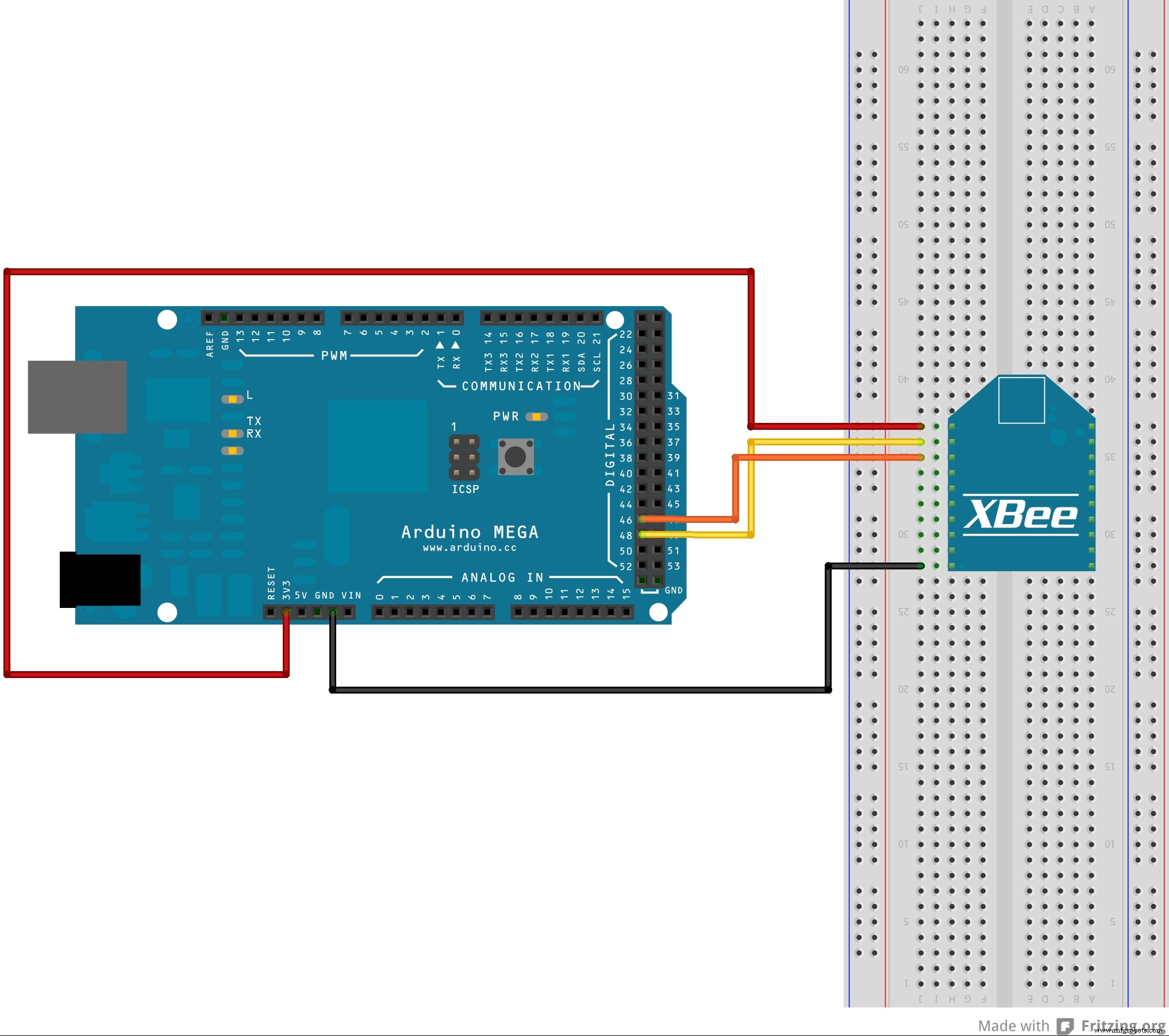
Advanced Hiking Tracker with Arduino: GPS, Sensors & Battery Pack
Smart Urban Plant Watering System: Sensor-Driven Automated Hydration
Manufacturing process
- The Cloud Revolution: How Cloud Computing Transforms IT, Security, and Careers
- AM Around the World: Asia‑Pacific 3D Printing Maturity and Rapid Growth
- Additive Manufacturing Worldwide: Current 3D Printing Adoption in North America & Europe
- Drone Pi: A Dual‑Mode Multiwii & Raspberry Pi Quadcopter for Smartphone and Remote Control
- Global Landscape of Maintenance: Trends, Practices, and Future Directions
- Virtual Reality Revolutionizes Design: From Immersive Modeling to Rapid 3D Printing
- How Smartphones Are Shaping the Future of Connected Cars
- How IoT is Revolutionizing Everyday Life
- Understanding Urethane: Global Uses and Key Advantages
- Should You Coat Your Pump? Weighing the Benefits and Drawbacks