A few months ago, I modelled and printed one of my colleague's head for fun. I thought It would be funny to push the joke and build a mechanism for this head which can detect people and keep staring at them as they move around the room.
I struggled to make the mechanism small enough to fit my 3D print so instead of locking the project in a cupboard forever and forget about it, I decided to make an easy to assemble model with a easy to use software for everyone to enjoy and build upon.
The camera moves using two servos driven by an Arduino Uno. The camera is plugged to a computer where a software tries to find faces in the images received from the camera.
If a face is found, the software will send a message to the Arduino to make the camera move in order to get the detected face in the centre of the image.
If no face is found, the software will send a message to the Arduino to make it move to a random position.
I tried to make the software quite flexible with option such as:
modifiable servo ranges
possibility to invert the servos rotation
manual control
Hopefully this will make it easy to reuse it for other purposes.
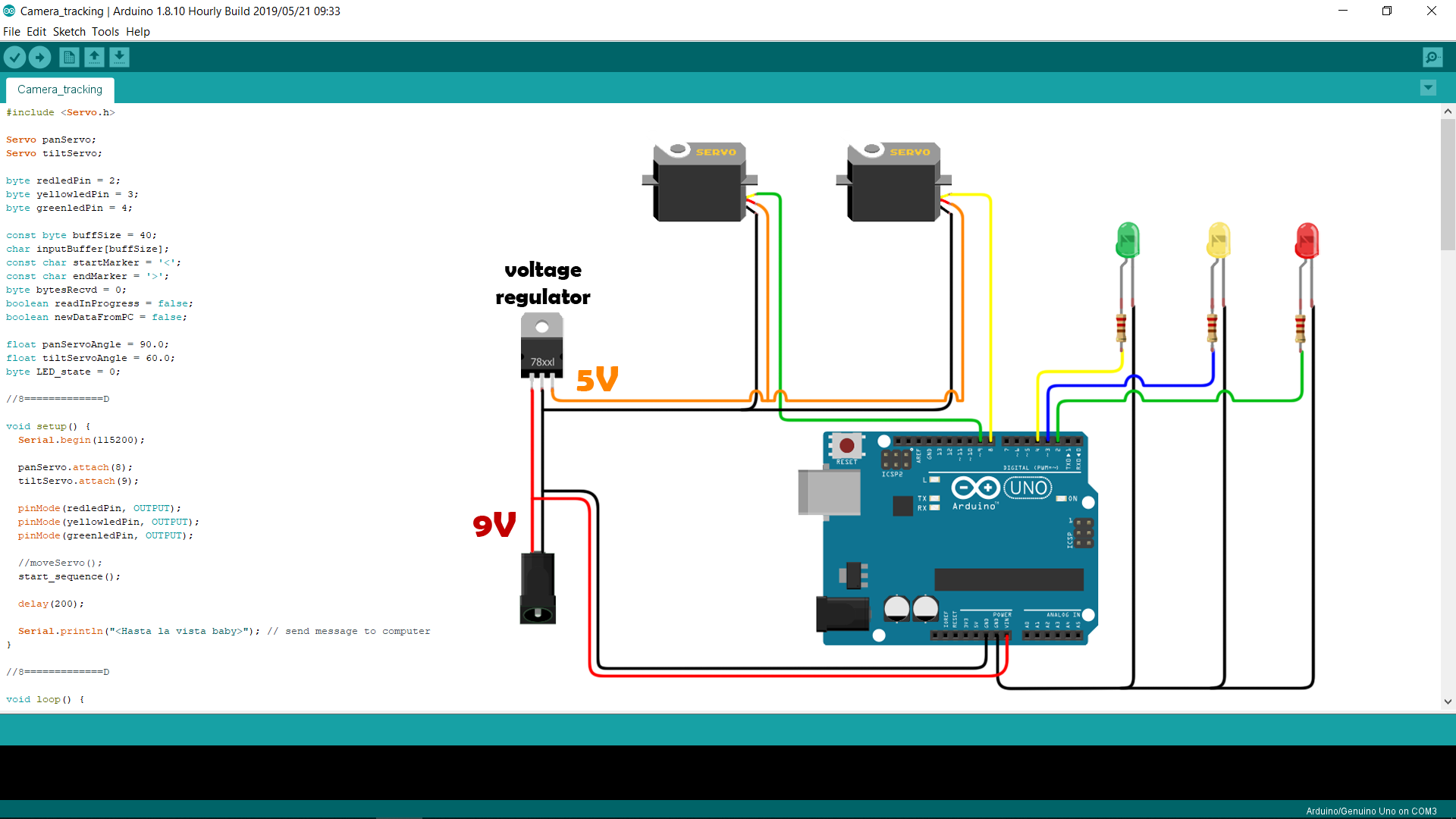
I also added 3 LEDs that show the state of the detection, red for no detection, yellow when a face is detected but not in the center of the image, and green when a face is detected and in the center of the image.
The LEDs are not very interesting on their own but it should be easy to modify the device to perform a useful action instead of just turning ON and OFF a few lights.
The communication between the Arduino and the software is done through serial communication (via USB).
The face detection software was written in Python. I left all the Python files on GitHub in case you want to have a look at the code (warning : it's probably not great, I am learning on my own) or reuse them for your own project.
If Python isn't your thing you can also download the executable version on my website.
If you want to build your own, check the following videos. I tried to make them as easy as possible to follow, I hope I did a good job at that.
Everything you needAssemblyWiringSoftware and setup
Code
Arduino code
Arduino codeC/C++
This is the code that will be uploaded to the arduino
//Sketch based on work done by Robin2 on the arduino forum
//more info here
//https://forum.arduino.cc/index.php?topic=225329.msg1810764#msg1810764


#include <Servo.h>

Servo panServo;
Servo tiltServo;

byte redledPin = 2;
byte yellowledPin = 3;
byte greenledPin = 4;

const byte buffSize = 40;
char inputBuffer[buffSize];
const char startMarker = '<';
const char endMarker = '>';
byte bytesRecvd = 0;
boolean readInProgress = false;
boolean newDataFromPC = false;

float panServoAngle = 90.0;
float tiltServoAngle = 90.0;
int LED_state = 0;

//8=============D

void setup() {
  Serial.begin(115200);

  panServo.attach(8);
  tiltServo.attach(9);

  pinMode(redledPin, OUTPUT);
  pinMode(yellowledPin, OUTPUT);
  pinMode(greenledPin, OUTPUT);

  //moveServo();
  start_sequence();

  delay(200);

  Serial.println("<Hasta la vista baby>"); // send message to computer
}

//8=============D

void loop() {
  getDataFromPC();
  replyToPC();
  moveServo();
  setLED();
}

//8=============D

void getDataFromPC() {

    // receive data from PC and save it into inputBuffer

  if(Serial.available() > 0) {

    char x = Serial.read();              //read char from serial

    if (x == endMarker) {                //look for end marker
      readInProgress = false;            //if found, set read in progress true (will stop adding new byte to buffer)
      newDataFromPC = true;              //let arduino know that new data is available
      inputBuffer[bytesRecvd] = 0;       //clear input buffer
      processData();                      // process data in buffer
    }

    if(readInProgress) {
      inputBuffer[bytesRecvd] = x;      //populate input buffer with bytes
      bytesRecvd ++;                    //increment index
      if (bytesRecvd == buffSize) {     //when buffer is full
        bytesRecvd = buffSize - 1;      //keep space for end marker
      }
    }

    if (x == startMarker) {              // look for start maker
      bytesRecvd = 0;                    // if found, set byte received to 0
      readInProgress = true;             // set read in progress true
    }
  }
}

//8=============D

void processData() // for data type "<float, float, int>"
{
  char * strtokIndx; // this is used by strtok() as an index

   strtokIndx = strtok(inputBuffer,",");      // get the first part
   panServoAngle = atof(strtokIndx);         // convert this part to a float

   strtokIndx = strtok(NULL,",");          // get the second part(this continues where the previous call left off)
   tiltServoAngle = atof(strtokIndx);     // convert this part to a float

   strtokIndx = strtok(NULL, ",");      // get the last part
   LED_state = atoi(strtokIndx);          // convert this part to an integer (string to int)
}

//8=============D

void replyToPC() {

  if (newDataFromPC) {
    newDataFromPC = false;
    Serial.print("<");
    Serial.print(panServo.read());
    Serial.print(",");
    Serial.print(tiltServo.read());
    Serial.println(">");
  }
}

//8=============D

void moveServo()
{
  panServo.write(panServoAngle);
  tiltServo.write(tiltServoAngle);
}

void setLED()
{
  if(LED_state == 2){
    digitalWrite(redledPin, LOW);
    digitalWrite(yellowledPin, HIGH);
    digitalWrite(greenledPin, LOW);
    }
  else if(LED_state == 1){
    digitalWrite(redledPin, LOW);
    digitalWrite(yellowledPin, LOW);
    digitalWrite(greenledPin, HIGH);
    }
  else if(LED_state == 0){
    digitalWrite(redledPin, HIGH);
    digitalWrite(yellowledPin, LOW);
    digitalWrite(greenledPin, LOW);
    }
  else if(LED_state == 3){
    digitalWrite(redledPin, HIGH);
    digitalWrite(yellowledPin, HIGH);
    digitalWrite(greenledPin, HIGH);
    }
  else{
    digitalWrite(redledPin, LOW);
    digitalWrite(yellowledPin, LOW);
    digitalWrite(greenledPin, LOW);
    }

  }

//8=============D

  void start_sequence()
  {
    panServo.write(90);
    tiltServo.write(90);
    delay(300);


    digitalWrite(redledPin, HIGH);
    delay(100);
    digitalWrite(redledPin, LOW);
    digitalWrite(yellowledPin, HIGH);
    delay(100);
    digitalWrite(yellowledPin, LOW);
    digitalWrite(greenledPin, HIGH);
    delay(100);

    digitalWrite(redledPin, LOW);
    digitalWrite(yellowledPin, LOW);
    digitalWrite(greenledPin, LOW);
    delay(100);
    digitalWrite(redledPin, HIGH);
    digitalWrite(yellowledPin, HIGH);
    digitalWrite(greenledPin, HIGH);
    delay(100);
    digitalWrite(redledPin, LOW);
    digitalWrite(yellowledPin, LOW);
    digitalWrite(greenledPin, LOW);
    }
Face detection software
Here is the repository where you can find the files for the face detection software .
You can also find a executable version on my website .https://github.com/LittleFrenchKev/face_tracking_camera
Custom parts and enclosures
face tracking camera parts
all the parts needed to built the face tracking camera mini . You can also find them here : https://www.littlefrenchkev.com/downloadCAD file on thingiverse.com