Multi‑Position Temperature Sensor System for Smart Home Integration
Components and supplies
DS18B20
×
8
screws
×
1
Arduino Nano R3
×
1
experiment pcb
×
1
resistor 4.7k
×
1
2 port screwterminal
×
1
SparkFun RS232 Shifter - SMD
×
1
3D printed case
×
1
wire
×
1
Necessary tools and machines
3D Printer (generic)
screwdriver
Apps and online services
Arduino IDE
About this project
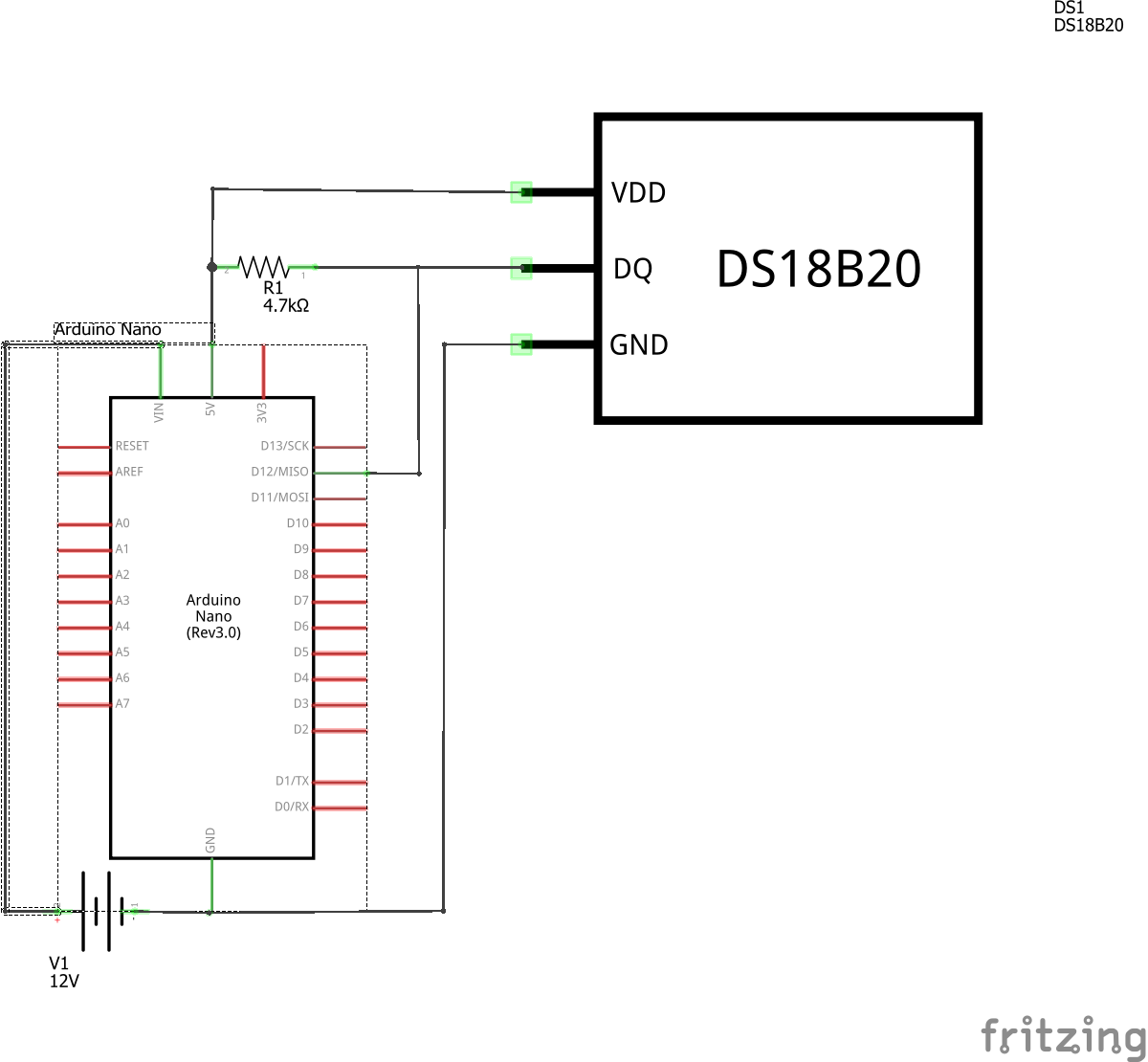
I needed to read out temperatures on several positions. The temperature should be parsed to a domotica system (Crestron/AMX). The solution shouldn't cost too much. This way I decided to use DS18B20 sensors because these are widely availlable and fairly cheap. Last but not least, it's a bus system.
The sensors are connected to an Arduino Nano. The Serial output of the Arduino (ttl) is converted to RS232 to make it compatible with the domotica system.
To make it all look nice I designed a case and printed it on my Zortrax M200 3D printer.
Questions? Feel free to ask!
Code
MultiTempSensor v1.0.0
MultiTempSensor v1.0.0Arduino
Arduino Code
/*
MultiTempSensor code by WT040
The sensor code is based on the examples from Rik Kretzinger and some other snippets of code

History:
v0.1.1  27/11/2016
v0.1.5  04/12/2016 pre-release version
v1.0.0	04/12/2017 release version
*/

//Include's
#include <OneWire.h>
#include <DallasTemperature.h>

//Constants
#define SENSOR_PIN 12
#define READ_TIMER 10000  //10 seconds
//

OneWire oneWire(SENSOR_PIN);

// Pass our oneWire reference to Dallas Temperature.
DallasTemperature sensors(&oneWire);

//Sensor Adresses
DeviceAddress Sensor1 = { 0x28, 0xFF, 0x89, 0x0F, 0x61, 0x16, 0x03, 0x40 };
DeviceAddress Sensor2 = { 0x28, 0xFF, 0xE2, 0x0F, 0x61, 0x16, 0x03, 0x21 };
DeviceAddress Sensor3 = { 0x28, 0xFF, 0x38, 0xB3, 0x60, 0x16, 0x03, 0xEA };
DeviceAddress Sensor4 = { 0x28, 0xFF, 0xA4, 0xBE, 0x60, 0x16, 0x03, 0xE1 };
DeviceAddress Sensor5 = { 0x28, 0xFF, 0xFE, 0x13, 0x61, 0x16, 0x03, 0x56 };
DeviceAddress Sensor6 = { 0x28, 0xFF, 0x89, 0xBA, 0x60, 0x16, 0x03, 0xFB };
DeviceAddress Sensor7 = { 0x28, 0xFF, 0xFA, 0xBC, 0x60, 0x16, 0x03, 0xD1 };
DeviceAddress Sensor8 = { 0x28, 0xFF, 0x57, 0xB1, 0x60, 0x16, 0x03, 0x93 };

int amountOfSensors = 8;


//variable to check amount of sensors on bus once in a while
int counterCheckBus = 0;

void setup()
{
	// start serial port to show results
	Serial.begin(9600);
	//display_Running_Sketch();
	printProgramName();
	Serial.print("Initializing Temperature Control Library Version ");
	Serial.println(DALLASTEMPLIBVERSION);

	Serial.print("Searching for ");
	Serial.print(amountOfSensors);
	Serial.println(" sensors...");

	// Initialize the Temperature measurement library
	sensors.begin();

	// set the resolution to 10 bit (Can be 9 to 12 bits .. lower is faster)
	sensors.setResolution(Sensor1, 10);
	sensors.setResolution(Sensor2, 10);
	sensors.setResolution(Sensor3, 10);
	sensors.setResolution(Sensor4, 10);
	sensors.setResolution(Sensor5, 10);
	sensors.setResolution(Sensor6, 10);
	sensors.setResolution(Sensor7, 10);
	sensors.setResolution(Sensor8, 10);

	getSensorsOnBus();
	Serial.println("System initialized");
}

void loop()
{
	counterCheckBus++;
	delay(READ_TIMER);
	Serial.println();

	if (counterCheckBus == 360)
	{
		getSensorsOnBus();
		counterCheckBus = 0;
	}


	sensors.requestTemperatures();

	Serial.print("Sensor 1:   ");
	printTemperature(Sensor1);
	Serial.println();

	Serial.print("Sensor 2:   ");
	printTemperature(Sensor2);
	Serial.println();

	Serial.print("Sensor 3:   ");
	printTemperature(Sensor3);
	Serial.println();

	Serial.print("Sensor 4:   ");
	printTemperature(Sensor4);
	Serial.println();

	Serial.print("Sensor 5:   ");
	printTemperature(Sensor5);
	Serial.println();

	Serial.print("Sensor 6:   ");
	printTemperature(Sensor6);
	Serial.println();

	Serial.print("Sensor 7:   ");
	printTemperature(Sensor7);
	Serial.println();

	Serial.print("Sensor 8:   ");
	printTemperature(Sensor8);
	Serial.println();


}

void printTemperature(DeviceAddress deviceAddress)
{

	float tempC = sensors.getTempC(deviceAddress);

	if (tempC == -127.00)
	{
		Serial.print("Sensor error!");
	}
	else
	{
		Serial.print("C: ");
		Serial.print(tempC);
	}
}

void printProgramName() {
	String path = __FILE__;
	int slash = path.lastIndexOf('\\');
	String programName = path.substring(slash + 1);
	int dot = programName.lastIndexOf('.');
	programName = programName.substring(0, dot);

	Serial.print("\nProgram version: ");
	Serial.println(programName);
}

void getSensorsOnBus() {
	Serial.print("Number of sensors found on bus: ");
	Serial.println(sensors.getDeviceCount());
}
Custom parts and enclosures
3D printable case - bottom3D printable case - top3D printable case - sub-d 9 mount