



Arduino UNO: Distance Measurement Using HC‑SR04 Ultrasonic Sensor and Adafruit OLED Display
Components and supplies
 |
| × | 1 | |||
 |
| × | 1 | |||
| × | 1 |
Apps and online services
 |
|
About this project

Here you have my previous tutorial about it:
#includesand#defines, before runsetup():
#include <SPI.h>   //we need all those nasty libraries for OLED
#include <Wire.h>
#include <Adafruit_GFX.h>
#include <Adafruit_SSD1306.h>
#define OLED_RESET 4 // this is the reset pin, IM NOT USING IT
Adafruit_SSD1306 display(OLED_RESET);
- In the
setup()function:
 display.begin(SSD1306_SWITCHCAPVCC, 0x3C);
//initialize with the I2C addr 0x3C (128x64)
 display.clearDisplay();  // clear the display before start
- In
loop()function:
display.setCursor(22,20);        //x,y coordinates
 display.setTextSize(3);         //size of the text
 display.setTextColor(WHITE);    //if you write BLACK it erases things
 display.println(distance);      //print our variable
 display.setCursor(85,20);       //set size,print the units (cm/in)
 display.setTextSize(3);
 #ifdef CommonSenseMetricSystem//if theres#define CommonSenseMetricSystem
 display.println("cm");        //print "cm" in oled
 #endif
 #ifdef ImperialNonsenseSystem//if there´s#define ImperialNonsenseSystem
 display.println("in");       //print "in" in oled
 #endif
 display.display();          //you need to actually display all that data
 delay(500);                 //wait!, human speed
 display.clearDisplay();      //clear black the display
Here you have the datasheet, the HC module sends a burst of pulses and then measures the time that the ultrasound´s echo takes to return to its original place.
- Make a pulse for HC trigger, the HC will do a pulse burst:
 long duration, distance; //our beloved variables
 digitalWrite(trigPin, LOW);  //PULSE ___|---|___
 delayMicroseconds(2);
 digitalWrite(trigPin, HIGH);
 delayMicroseconds(10);
 digitalWrite(trigPin, LOW);
- PulseIn() is a rare used function, detects the length of the step high (__----__) or low (----___---)
We use #ifdef for only compiling the parts that we need.
duration = pulseIn(echoPin, HIGH); //
 #ifdef CommonSenseMetricSystem
 distance = (duration/2) / 29.1;
 #endif
 #ifdef ImperialNonsenseSystem
 distance = (duration/2) / 73.914;
 #endif
- And this for debugging in case your Oled is not working:
Serial.println(distance);//debug
Code
- Distance ultrasound measure and display
Distance ultrasound measure and displayArduino
Main code//CODE BY Javier Muñoz Sáez,05/11/2016 questions to javimusama@gmail.com
#include <SPI.h>
#include <Wire.h>
#include <Adafruit_GFX.h>
#include <Adafruit_SSD1306.h>
#define CommonSenseMetricSystem
//#define ImperialNonsenseSystem
#define trigPin 13
#define echoPin 12
#define OLED_RESET 4
Adafruit_SSD1306 display(OLED_RESET);
void setup() {
Serial.begin (9600);
pinMode(trigPin, OUTPUT);
pinMode(echoPin, INPUT);
display.begin(SSD1306_SWITCHCAPVCC, 0x3C); //initialize with the I2C addr 0x3C (128x64)
display.clearDisplay();
}
void loop() {
long duration, distance;
digitalWrite(trigPin, LOW); //PULSE ___|---|___
delayMicroseconds(2);
digitalWrite(trigPin, HIGH);
delayMicroseconds(10);
digitalWrite(trigPin, LOW);
duration = pulseIn(echoPin, HIGH);
#ifdef CommonSenseMetricSystem
distance = (duration/2) / 29.1;
#endif
#ifdef ImperialNonsenseSystem
distance = (duration/2) / 73.914;
#endif
display.setCursor(22,20); //oled display
display.setTextSize(3);
display.setTextColor(WHITE);
display.println(distance);
display.setCursor(85,20);
display.setTextSize(3);
#ifdef CommonSenseMetricSystem
display.println("cm");
#endif
#ifdef ImperialNonsenseSystem
display.println("in");
#endif
display.display();
delay(500);
display.clearDisplay();
Serial.println(distance);//debug
}
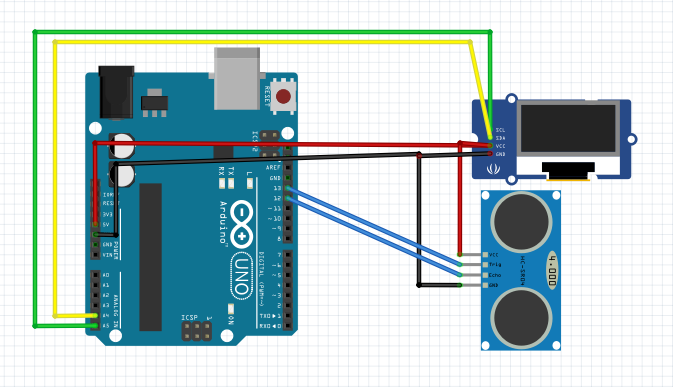
Schematics
Building an IoT Device with ESP8266‑01 and Arduino Nano: A Complete Guide
DIY Smart IoT Device: Build with ATmega32U4, ESP8266 & Sensors
Manufacturing process
- How Distance Sensors Work and Their Key Applications
- Build a Remote Temperature Sensor with Raspberry Pi and Python – Step‑by‑Step Guide
- Build a Multi‑Sensor Temperature & Light Monitoring System with Raspberry Pi & DS18B20
- Mastering Raspberry Pi Sensor & Actuator Control: Accelerometer, Servo, and Data Streaming
- Verify and Calibrate Your Humidity Sensor for Precise Measurements
- Accurate Temperature & Humidity Monitoring with SHT15 on Windows 10 IoT Core
- Integrating a Thermocouple Sensor with the Arduino Portenta H7 Using the MAX6675 IC
- Pushing Limits: 30 FPS Video on SSD1106 OLED Display with Arduino Nano
- Build a Credit‑Card‑Sized Arduboy Clone with Arduino Nano & I2C OLED
- Precise Ultrasonic Distance Sensing with Arduino – Step‑by‑Step Guide