



Understanding Work Orders: Essentials and Best Practices for Operations Management
If you're tasked with the responsibility of overseeing operations at one or more manufacturing or heavy industrial facilities, you undoubtedly have a great deal on your plate. You want time for the most critical tasks, as well as to strategize for long-term improvements when possible — but you have to balance those wants with the realities of your day-to-day workload. Work orders are a major part of that workload.
Leveraging work order software and enterprise asset management (EAM) tools can be a big help in these situations. But it's just as important to have a truly comprehensive understanding of how the ideal work order should be crafted and distributed to the appropriate recipients, in the interest of improving efficiency.
What is a work order?
In the context of facilities management, a work order is a request sent from any unit of the business with a repair (or routine upkeep) need of any kind and directed to the maintenance department. (This should not be confused with a purchase order, which will come later, when spare parts or tools must be obtained to complete the maintenance in question.) Years ago, work orders were exclusively written down on paper — and paper orders are still used by numerous manufacturing companies in certain contexts — but they must also be available in digital formats for easy accessibility.
In most work order or EAM software systems, the orders themselves fall into several different categories. These are as follows:
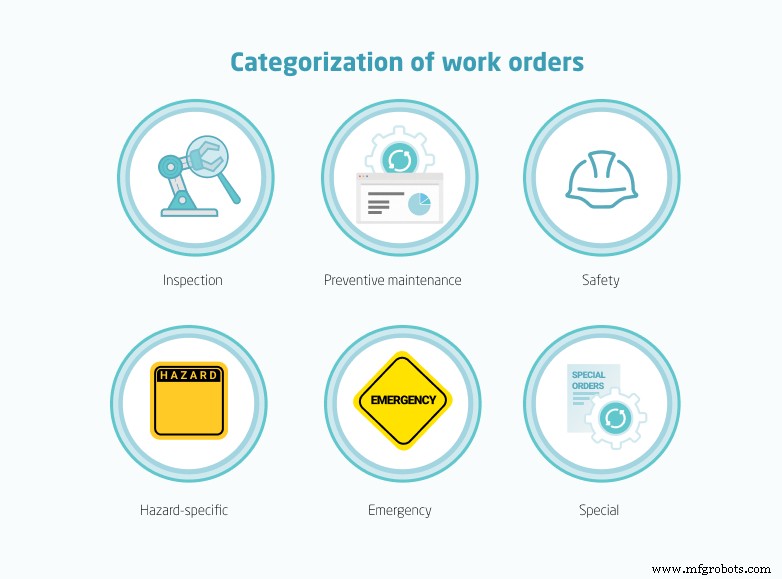
- Inspection: This type of work request is sent when a given component, device, machine or system needs to be checked for any issues — typically in conjunction with a pre-established schedule. (Government regulators require periodic inspections for all potentially hazardous equipment; in other cases, you'll have set up the schedule of your own volition.) Inspections may well uncover no problems at all, but they're critical for due diligence.
- Preventive maintenance: As with inspections, preventive maintenance work orders are not necessarily requested in response to any obvious problem with a machine, but rather to get out ahead of malfunctions or faults before they happen. (It is essentially the polar opposite of reactive maintenance, in which a maintenance work order for a piece of equipment only goes out after failure has occurred.)
- Safety: If a safety work order has been requested, it means that the business unit making this request wants the maintenance team to focus on updates and repairs that will specifically benefit the personal physical safety of workers using a given machine or system, as opposed to focusing on the equipment's life span.
- Hazard-specific orders: Maintenance work that involves specific (and particularly dangerous) hazards demands a specific work order. For example, if the repair demands skill and experience with faulty wiring, circuitry and other electrical components, an electrical work order would go out to maintenance management. Similarly, if hot work, line breaks, confined spaces or heavy machinery is involved, the work order must reflect that. (Additionally, a maintenance technician will have to request a permit to work that is just as specific.)
- Emergency: An emergency order would be requested when immediate maintenance is necessary for the sake of worker safety or equipment health. If the situation is dire and immediate enough, the work order process might be ignored to get repair personnel on the job right away (at the discretion of the maintenance manager).
- Special order: This type of order covers anything that wouldn't fit under any of the previously mentioned categories: replacements of legacy assets, installation of new equipment to improve the overall maintenance situation and so on.
The ideal work order workflow
On a surface level, the internal work order workflow looks somewhat simple: A department within the business makes a work request to the maintenance department, which can either approve or deny it. If approved, the job will be scheduled, and then another more formal work order will be sent to the technician responsible for completing the task enumerated in the original request. That individual completes the necessary maintenance. Then, the work order is considered closed, and it is archived for future reference.
Nothing is wrong with any of those steps, of course. But it may be wise to think of work order management in a more focused and holistic way. Consider the following set of steps:

- Identify: Experienced production operators and technicians should identify the issue, and use precise language to detail it in work orders (e.g., "Forklift actuator failing to activate hydraulics and raise forks").
- Prioritize: Is this the most pressing corrective maintenance issue for the team to address, or should it be put on the back burner? Answer the question based on factors like asset criticality, production needs, safety requirements and quality.
- Plan: Maintenance managers must draw up detailed plans for team members handling complex jobs. In addition to instructions for necessary tasks, include any relevant safety requirements, especially those steps necessary for regulatory compliance.
- Schedule and assign: Find the ideal time for the maintenance to take place and assign a technician with relevant experience. Keep priorities in mind — assign the most skilled techs to the most challenging orders and leave routine maintenance to those with less experience.
- Execute: Complete the work in a timely manner (without sacrificing quality).
- Evaluate: Look at what went right or wrong with the order, what could've been done better or faster, the parts used and so on.
Avoiding common order process headaches
Nobody's perfect, and errors can occur at any stage of the work order life cycle. The most likely mistakes are typos on a work order form. For something like that, if it doesn't stop the tech from understanding what's required of them, it's not a big deal. Missing, incomplete or incorrect information, by contrast, is a much bigger problem.
At a minimum, the order should describe the task in as much detail as necessary, identify who requested it, name the technician assigned to execute it, provide a location, offer an estimated completion time and enumerate any tools, safety gear and parts essential to the job. Even one inaccurate or missing item in that list can delay the maintenance process, a lag which costs time and (ultimately) money.
Observe the following practices for minimizing the occurrence of errors in work orders:

- Use a template for work orders that includes fields for all appropriate information and is easy for techs to follow.
- Automate the process wherever possible.
- Maintain visibility throughout the process so you can quickly notice any issues and address them before they become bigger problems.
- Track orders using relevant metrics including mean time between failure, mean time to repair or replace, overall equipment effectiveness and cost.
Leveraging agile software for work order excellence
You need not search long to find a la carte work order software solutions that can manage the processes detailed above — or that claim they can. But it's unlikely that these tools or field service management (FSM) tools will offer enough functionality to be quite worth the expense.
You'll be best off if you use the work order management tools available in a computerized maintenance management system (CMMS) alongside a leading-edge EAM tool like Dynaway, which is neatly integrated into Microsoft Dynamics 365. Taking this approach not only streamlines the work order process for more effective and efficient results from initial request to order closure. It also fully integrates this function with all other facility, inventory and asset management processes, allowing your organization to realize more comprehensive oversight.
To learn more about key features of Dynaway, contact us or take a look at one of our latest webinars.

Equipment Maintenance and Repair
- Leveraging Work Order Data: A Proven Path to Maintenance Excellence
- Mastering Maintenance Work Orders: A Complete Guide
- Asset Identification: Proven Methods & Best Practices for Accurate Tracking
- MIL‑STD‑129 Explained: Barcode Standards, Compliance Tips & Best Practices
- Mastering Warehouse Logistics: Challenges, Benefits, and Proven Best Practices
- Top 50 Work Order Management Software Solutions for Efficient Operations
- Master Cloud Monitoring: Unlock Performance, Reliability, and Proactive Insights
- Top Equipment Management Best Practices to Boost Construction Efficiency
- Essential Best Practices for Effective Maintenance Management
- Mastering Maintenance Scheduling: Proven Best Practices for Optimal Asset Management