



Mastering Maintenance Work Orders: A Complete Guide
Work orders drive every maintenance operation. They coordinate teams, prioritize tasks, and ensure work moves efficiently from initiation to completion. This guide shows how to master the fundamentals of maintenance work orders so your organization operates as smoothly as a high‑performance vehicle.
A template for creating the perfect work order every single time (without spending hours at your desk)
Table of contents
- What is a work order?
- The work order process
- Key elements of a work order
- Managing work orders effectively
- Bottom line
What is a work order?
A work order is a formal document that contains all the details required to complete a maintenance task. It outlines the scope, assigns responsibility, and sets expectations for completion. Work orders are essential for maintaining clarity across the maintenance team and ensuring tasks are tracked from start to finish.
Work orders are the engine of your maintenance operation. They power your team and move work from point A to point B.
Because maintenance activities span from routine inspections to emergency repairs, a well‑structured work order keeps everyone aligned. It serves as a single source of truth that managers, technicians, and non‑maintenance staff can reference.
While a work request and a work order are related, they differ in scope. A work request is an initial notice of a problem submitted by an operator or end‑user. The maintenance manager reviews the request, adds necessary details, schedules the job, and converts it into a formal work order.
Creating the perfect work order in six simple steps
The work order process
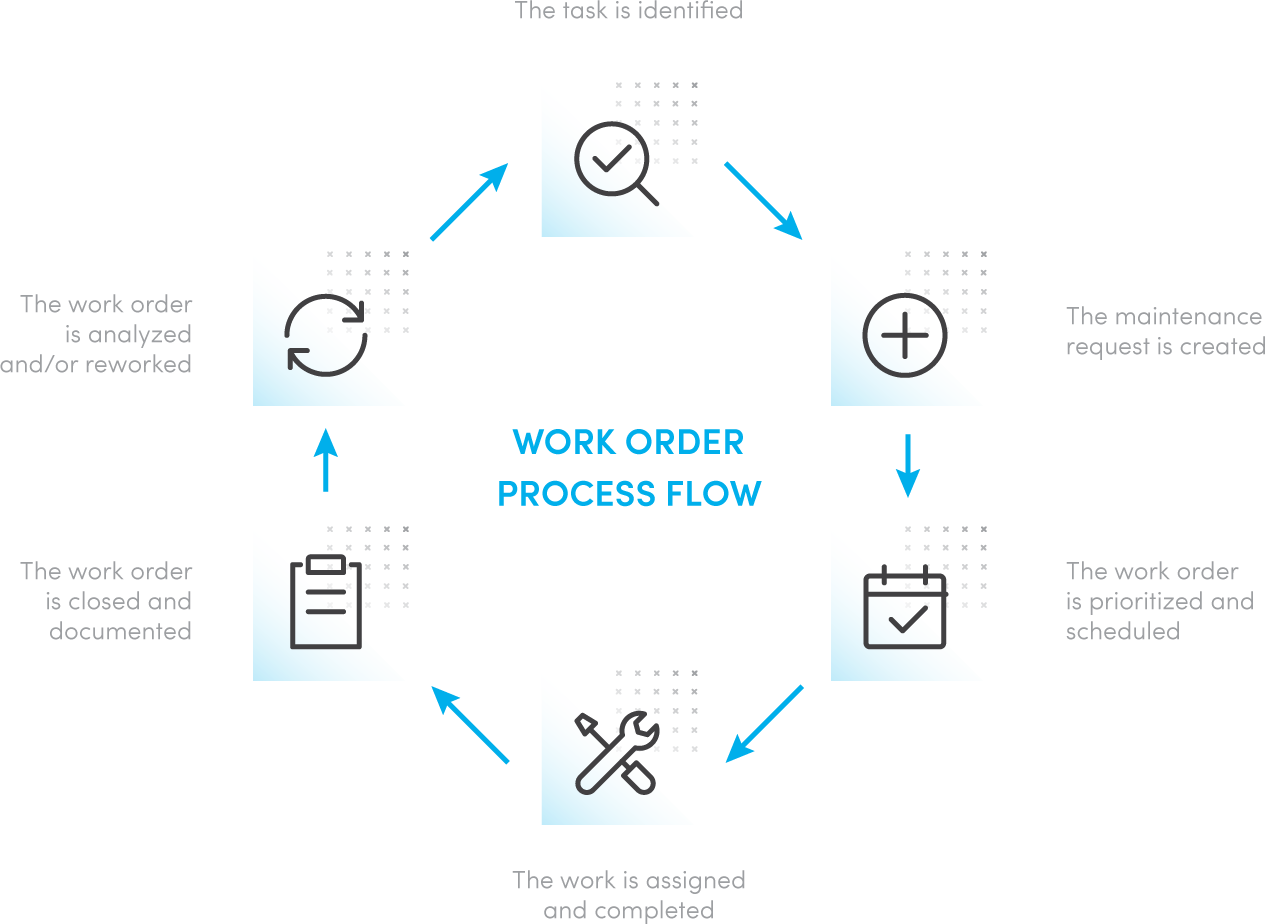
Every maintenance work order follows a clear lifecycle: creation, execution, and documentation. Understanding each phase prevents tasks from stalling and turning into backlog.
Step 1: Identify the task
Tasks are categorized as planned or unplanned. Planned maintenance includes scheduled inspections and preventive actions, whereas unplanned maintenance covers unexpected breakdowns.
Step 2: Create the maintenance request
After a task is identified, its details are documented and submitted to the maintenance team. For example, a machine operator might submit a work request for a malfunctioning conveyor belt.
Step 3: Prioritize and schedule
Not all tasks carry the same urgency. A burnt‑out light bulb can wait, but a broken conveyor belt could halt production. Prioritizing ensures high‑impact jobs receive timely attention. Scheduling can be deadline‑based, trigger‑based, or time‑block based.
Step 4: Assign and complete
The work order is assigned to the appropriate technician or team. Completion may range from a quick equipment check to a multi‑day overhaul.
Step 5: Close and document
Upon fulfillment, the work order is closed and signed off by management if required. A clean log of closed orders supports asset history, audit readiness, and future planning.
Step 6: Analyze and refine
Closed orders provide insight into trends, recurring issues, and opportunities for process improvement. Regular analysis helps fine‑tune preventive strategies and reduce repeat incidents.
Key elements every work order should contain
Missing or inaccurate data can derail an entire operation. Below is a checklist of critical fields:
- Asset: Identify the equipment or location.
- Description of issue: Capture symptoms, observations, and any relevant data.
- Scope of work: Define tasks, required skills, and deliverables.
- Parts & tools: List replacements and specialized tools.
- Health & safety notes: Specify PPE, lockout/tagout procedures, and past incidents.
- Date requested: Timestamp of the work order creation.
- Requester info: Name, department, and contact details.
- Expected completion date: Target finish time.
- Actual completion date: Real finish time.
- Estimated hours: Forecasted effort.
- Actual hours: Logged effort.
- Task checklist: Step‑by‑step instructions.
- Priority: High, medium, or low.
- Assigned to: Technician or team.
- Associated documents: SOPs, manuals, diagrams, purchase orders, images.
- Notes: Observations, frequency of the issue, troubleshooting insights.
A template for building maintenance checklists that work every time
Get the template
Managing work orders effectively
Even a flawless work order is only as good as its management. A robust system ensures seamless transitions between stages and prevents bottlenecks that can lead to increased downtime and costs. Below is a comparison of common tools.
Pen and paper

Traditional paper work orders are inexpensive and familiar. However, they are prone to misfiling, loss, and delayed response times. Manual entry can introduce errors, and retrieving historical data is laborious.
Some jobs are more time‑sensitive than others. A burnt‑out light bulb doesn’t need to be fixed immediately, but a broken conveyor belt might. That’s why you need to prioritize every work order that hits your desk.
Whiteboards
Whiteboards centralize visible tasks and allow quick updates. Yet, they lack audit trails, are difficult to archive, and make it hard to generate reports or build asset histories.
Excel spreadsheets
Spreadsheets digitize records, improve searchability, and enable basic reporting. Nevertheless, they are limited by single‑user access, lack automation for preventive triggers, and provide minimal real‑time visibility.
CMMS software
Computerized Maintenance Management Systems combine mobile, cloud, and analytics capabilities. Technicians can receive instant notifications, access asset histories, attach photos, and document completion on the fly. CMMS also generates KPI reports, identifies trends, and supports predictive maintenance. While implementation requires investment and training, the long‑term gains in reliability, cost control, and audit readiness outweigh the upfront costs.
Bottom line
Work orders are the backbone of a reliable maintenance program. When created and managed with rigor, they provide clarity, accountability, and data that fuels continuous improvement. Selecting the right tools—whether a modern CMMS or a well‑structured manual system—ensures your team stays productive and your assets stay operational.
Equipment Maintenance and Repair
- Data‑Driven Prioritization of Maintenance Work Orders
- When Is It Acceptable to Deviate From a Maintenance Schedule?
- Reevaluating Maintenance Supervisors: From Desk to Floor
- Why Standing Work Orders Streamline Maintenance Management
- Why a Maintenance Work Order System Is Essential for Your Business
- Maximizing Asset Reliability with Advanced Maintenance Work Order Software
- Creating Effective Maintenance Work Orders: A Complete Guide
- Mastering Preventive Maintenance: A Step-by-Step Guide to Scheduling Work Orders
- Strategic Maintenance Planning: Optimize Work Orders for Safety & Cost Savings
- Streamline Work Order Execution with Proven Maintenance Checklists