



Seven CMMS Features that Resolve 90% of Maintenance Challenges
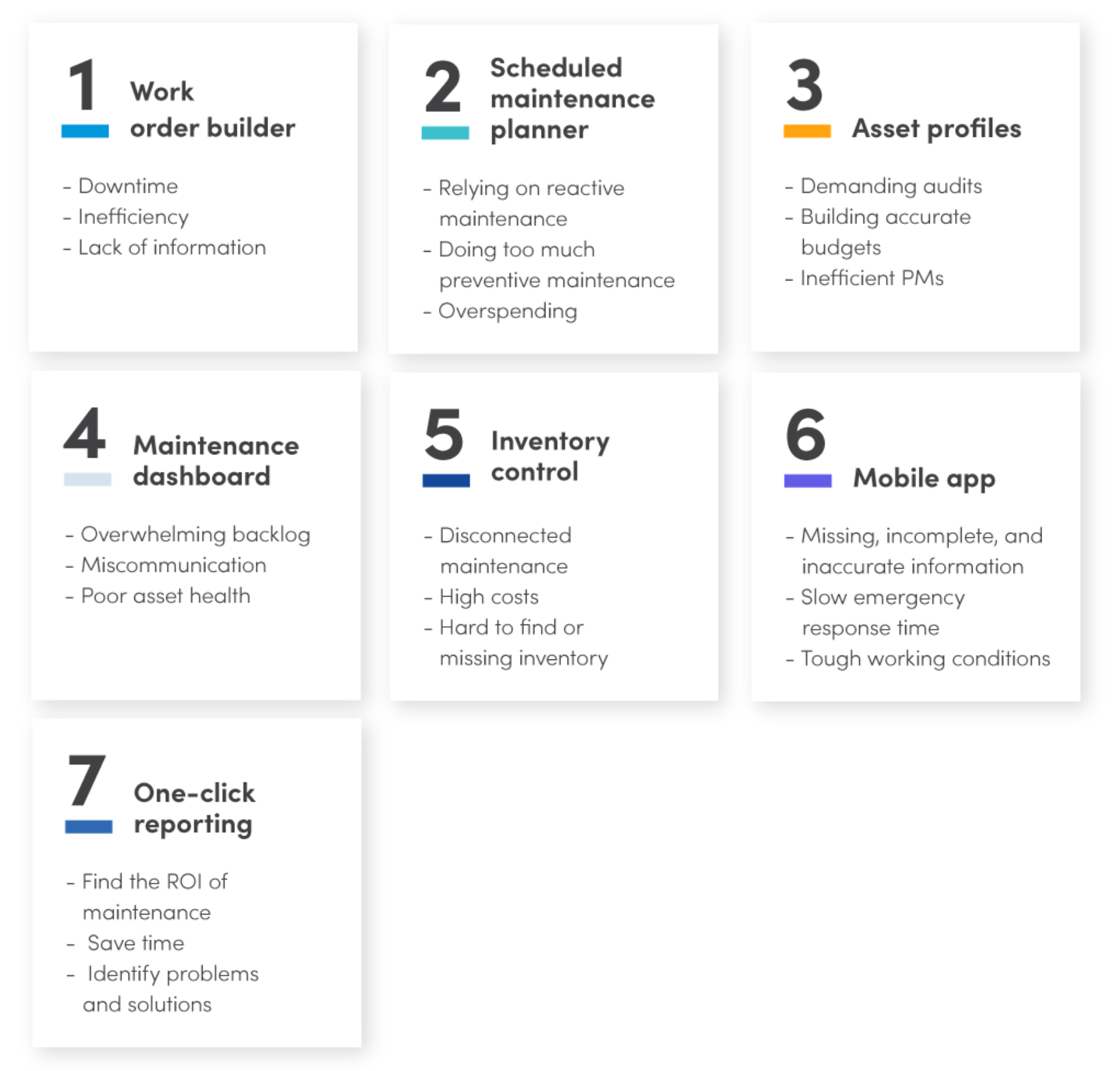
Maintenance teams face daily hurdles—unexpected breakdowns, growing backlogs, missing parts, and escalating costs. A robust CMMS can address these pain points without the need to juggle multiple tools. In fact, seven key CMMS features alone can resolve approximately 90% of maintenance issues by tackling them at their source.
Work order builder
What is it?
CMMS software lets you create, assign, complete, and document digital work orders and requests with a few intuitive tools:
- Work request portal: Enables staff outside of maintenance to generate and track work requests via customized forms.
- Asset hierarchy: Search assets or groups and link a work order directly to them.
- Instructions and documents: Attach task lists, manuals, photos, and more to each order.
- Parts and safety equipment: Specify all spare parts and safety gear required for a job.
- Failure codes: Document the problem, root cause, and corrective action for asset failures.
- Logistical information: Set deadlines, priority levels, and assign technicians.
- Notes: Add additional details, such as unusual sounds before a breakdown.
- Tracking: Monitor work status, track costs, and archive closed orders.
Create work orders in a fraction of the time with this free work order template
The problems it solves
A digital work order builder removes three critical obstacles for maintenance teams:
Downtime: The streamlined process speeds creation, assignment, and completion, reducing asset downtime and extending machine life.
Inefficiency: Real‑time submission and instant visibility eliminate duplicate paperwork and file searching, allowing technicians to act quickly and correctly.
Lack of information: Every task detail is centrally stored, promoting standard results, easier troubleshooting, and data‑driven decisions that enhance asset health.
Scheduled maintenance planner
What is it?
This CMMS tool eliminates scheduling headaches with features like:
- PM triggers: Schedule work based on time, usage, condition, or events.
- Calendar: View team workloads and assign tasks accordingly.
- Maintenance forecaster: Align upcoming tasks with inventory needs and staffing.
- Inspection checklist: Attach pass/fail criteria to inspection tasks.
- Scheduled maintenance metrics: Track compliance and other key indicators.
- All work order builder elements: Include comprehensive details in scheduled tasks.
Build a maintenance schedule without hours at your desk with this template
The problems it solves
This planner shields your organization from three major issues:
Reactive maintenance overload: By establishing a preventive program, you reduce firefighting, improving safety and production.
Over‑scheduled PMs: It identifies optimal frequencies, preventing equipment and staff burnout.
Overspending: Insight into required parts, labor, and scheduling keeps costs in check and eliminates waste.
Maintenance challenges—breakdowns, backlogs, missing parts, cost overruns—are common, but CMMS offers a clear solution.
Asset profiles
What is it?
Digital asset profiles give you a complete view of every asset, preventing key problems:
- Asset hierarchy and location: Organize assets and pinpoint exact locations.
- Repair history: Review past issues, solutions, and responsible technicians.
- Asset category: Group assets and link them to actions and reports.
- Documents and notes: Attach bills of materials, manuals, diagrams, safety notes, and more.
- Financial tracking: Track labor and part spend per asset.
- Online/offline status: Set availability and monitor MTTR, MTBF.
- Vendor information: Store warranty and vendor contact details.
Organize your assets in one place with this asset hierarchy template
The problems it solves
Digital asset profiles equip teams to overcome:
Audits: Quickly locate precise asset data and maintenance history.
Budgeting: Use complete cost data for accurate maintenance budgeting and CAPEX decisions.
inefficient PMs: Provide technicians with ready access to task details, speeding scheduled maintenance.
Maintenance dashboard
What is it?
The central dashboard offers a 360° view of operations with:
- KPIs and metrics: View key performance indicators by facility.
- Work order and backlog status: See current, upcoming, and overdue work at a glance.
- Customizable view: Prioritize the data most relevant to you.
- Real‑time data sync: Receive up‑to‑minute updates.
- Sharing: Create and share dashboard templates across teams.
Asset profiles provide all the details needed to calculate maintenance costs and inform capital decisions.
The problems it solves
With real‑time insights, a dashboard mitigates:
Backlog overload: Spot overdue tasks instantly and allocate resources proactively.
Miscommunication: Shared dashboards keep everyone aligned on the latest metrics and decisions.
Poor asset health: Highlight key metrics to pinpoint performance gaps and drive improvements.
Inventory control
What is it?
Manage all inventory-related tasks efficiently:
- Parts monitoring: Know quantity, location, and cost.
- Low‑stock alerts: Set minimum levels and trigger automatic reorder for critical parts.
- First‑in, first‑out tracking: Use parts based on purchase date.
- Multi‑site organization: View and share spare parts across locations.
- Work‑associated parts: Attach recommended parts to work orders and PMs.
- Purchasing: Create, send, and record digital purchase orders and RFQs.
Stop over‑ and under‑stocking with this inventory tracking template
The problems it solves
Effective inventory management resolves:
Disconnected maintenance: Sync data with ERP and other financial tools to reflect true costs.
High costs: Eliminate inefficiencies by forecasting needs and adopting just‑in‑time delivery.
Missing inventory: Pinpoint precise locations, reducing downtime caused by unavailable parts.
Mobile app
What is it?
Modern maintenance relies on mobile solutions. A mobile CMMS app delivers:
- QR codes and barcodes: Scan to instantly retrieve asset information.
- Push notifications: Receive new work order alerts immediately.
- Asset profiles and work orders: Access full details on the go.
- Offline access: Log information without an internet connection.
- Photos: Capture and attach images directly from your device.
- Voice‑to‑text: Add notes via speech while working.
The problems it solves
With a mobile app, maintenance teams overcome:
Incomplete or inaccurate data: Reduce errors by capturing information instantly.
Slow emergency response: Cut the interval between failure detection and action, lowering downtime.
Challenging work environments: Gather data and document work without leaving the site or damaging paper records.
CMMS features are powerful tools, but they only work when properly implemented and supported by trained staff.
One‑click reporting
What is it?
Key elements of one‑click reporting streamline analysis:
- Pre‑built and custom reports: Choose templates or design your own.
- Dashboard reports: Push real‑time metrics to the dashboard.
- Report scheduler: Automate regular reports and email them to stakeholders.
- Financial and audit reporting: Generate spend and compliance reports.
The problems it solves
Accurate data enables teams to:
Demonstrate ROI: Link maintenance to higher production and lower costs.
Save time: Automate reporting, freeing executives and technicians alike.
Identify root causes: Filter data to isolate problems and devise targeted solutions.
Better tools are the first step to better maintenance
Your maintenance challenges can feel overwhelming, but the right CMMS features can tackle 90% of them. Yet, tools alone are not enough—people must be equipped to use them effectively. Invest in comprehensive training and a thoughtful implementation plan to set your team up for lasting success.
Equipment Maintenance and Repair
- 3 Essential Reasons to Adopt a Mobile CMMS App for Maintenance Teams
- Discover 7 Powerful IXON Cloud Features That Boost Productivity
- Maximize CMMS Value: Technology, Processes, and People Aligned
- Seven CMMS Features that Resolve 90% of Maintenance Challenges
- Top CMMS Integrations to Accelerate Your Maintenance Program
- Master Maintenance Management with Limble CMMS – Video Tutorials & Proven Results
- 4 Key Reasons Your CMMS Rollout May Fail (and How to Avoid Them)
- 14 Must‑Have EAM Features to Optimize Asset Performance
- 5 Proven Ways CMMS Software Boosts Maintenance Organization
- Find the Ideal CMMS: Key Features Every Facility Needs