



Haas CNC G71 Bolt Hole Arc Command – Practical Example for Efficient Hole Drilling
CNC program example code for the G71 Bolt Hole Arc command.
G71 bolt hole arc command makes it easy to drill/tap/bore evenly spaced holes in an arc.
Canned cycles G73, G74, G76, G77, or G81-G89 can be used with G71 bolt hole arc G-code.
G71 Bolt Hole Arc Format
G71 I J K L
I – Radius of the bolt hole arc
J – Starting angle of first hole ( 0 to 360° CCW from horizontal at the 3 o’clock position).
K – Angular spacing between holes (+ or -)
L – Number of evenly spaced holes around bolt hole arc.
Read full article G71 Bolt Hole Arc – CNC Mill Programming
G71 Bolt Hole Arc Programming Example
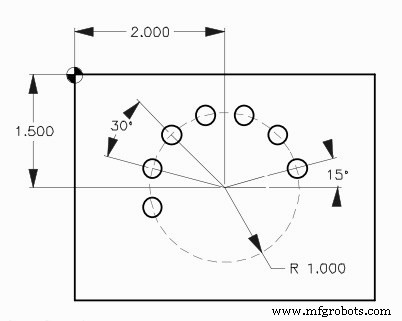
G71 Bolt Hole Arc Example Program
O005
N10 T2 M06
N20 G90 G54 G00 X2. Y-1.5
N30 S1451 M03
N40 G43 H02 Z1. M08
N50 G81 G99 Z-0.45 R0.1 F8. L0
N60 G71 I1.0 J15. K30. L7
N70 G80 G00 Z1. M09
N80 G53 G49 Z0. M05
N90 M30
Efficient G72 Programming: Drilling Evenly Spaced Bolt Holes Along an Angle
G71 Bolt Hole Arc: Easy CNC Mill Programming for Precise Arc Hole Drilling
CNC Machine
- Fanuc CNC Programming Guide: A Simple, Feature‑Rich Example
- CNC Program Example: G03 Circular Interpolation – Master the Math Behind CNC Machining
- Haas G71 Roughing Cycle Program Example for Inside Roughing
- CNC G72 Bolt Hole Angles – Sample Code for Accurate Drilling
- G71 Bolt Hole Arc: Easy CNC Mill Programming for Precise Arc Hole Drilling
- CNC Milling: G70 Bolt Hole Circle Program – Simple & Accurate Example
- Master Haas CNC M97 Local Sub-Program Calls: Step-by-Step Example
- CNC Milling Arc Example: Using G2 with I & J Parameters
- Fanuc G72.1 & G72.2 Figure Copy Example – CNC Program for Bolt Hole Circle
- Complete CNC Lathe G71 Stock Removal Cycle – NCT Control Programming Example