



Master CNC Milling with G91 Incremental Programming: A Practical 4-Axis Exercise
This CNC mill programming exercise will give you more idea to understand drawing and how to find exact coordinate of each drawing point.
Completely based on G91 Incremental Dimensioning System, so cnc programmers/machinists can learn and understand how G91 Incremental Programming works.
This program is written for 4-axis CNC mill, where C-axis is used for rotary table.
3-axis CNC mill can also run this program, so for this just remove program block no. N15.
CNC Mill Programming Exercise
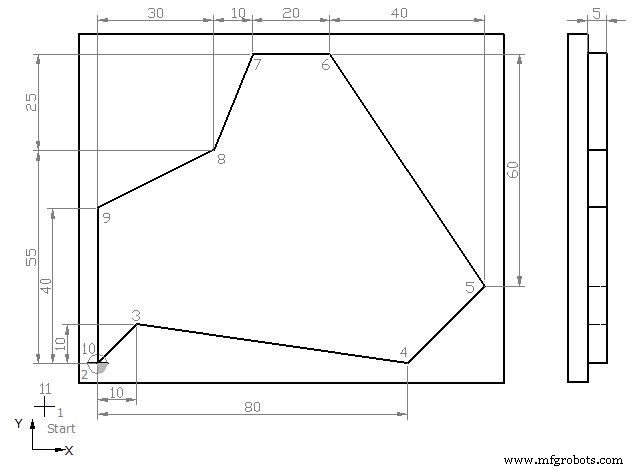
G91 Incremental Programming CNC Mill Exercise
N5 G00 G54 G64 G90 G17 X-20 Y-20 Z50     ;Point 1
N10 S450 M03 F250 D01 (12.5 MM DIA)
N15 C0
N20 Z5
N25 G01 Z0
N30 Z-5
N35 G42 G91 X20 Y20                      ;Point 2
N40 X10 Y10                              ;Point 3
N45 X70 Y-10                             ;Point 4
N50 X20 Y20                              ;Point 5
N55 X-40 Y60                             ;Point 6
N60 X-20                                 ;Point 7
N65 X-10 Y-25                            ;Point 8
N70 X-30 Y-15                            ;Point 9
N80 X0 Y-40                              ;Point 10
N85 G40 G90 X-20 Y-20                    ;Point 11
N90 G00 Z50
N95 Y100
N100 M30
Finished Part
After completing the machining process, your job will look like this in 3D view,
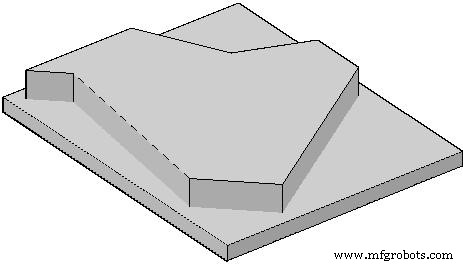
Complete Machined Part in 3D
Explanation of CNC G-Code
G00 : Rapid traverse.
G54 : Zero Offset no. 1.
G64 : Continuous-path mode.
G90 : Absolute dimensioning system.
G91 : Incremental dimensioning system.
G17 : X-Y plan selection.
G42 : Cutter radius compensation activation (right hand side movement)
G40 : Cutter radius compensation de-active
S : Spindle speed
F : Axises motion feed
M : Cutter motion (3=clockwise, 4=anti-clockwise)
D : Tool no
CNC Machine
- Master CNC Arc Programming: Step‑by‑Step G‑Code Exercise Using I and K Parameters
- CNC Milling Example: G90 Absolute, G91 Incremental, and Circular G02/G03 Interpolation
- G71 Bolt Hole Arc: Easy CNC Mill Programming for Precise Arc Hole Drilling
- G70 Bolt Hole Circle: Automate CNC Milling for Precise Circular Bolt Holes
- Understanding G90 vs G91: Absolute and Incremental Coordinates in Hust CNC Mill Programming
- Sinumerik 810 CNC Mill Programming: Master Radius & Chamfer Control
- CNC Milling Programming Demo: Master G90 Absolute & G91 Incremental Techniques
- CNC Milling Program Example – Step-by-Step G‑Code Tutorial
- Mastering CNC Milling: G91, G41, G43 Code Usage Explained
- Beginner CNC Lathe Programming: Fill-in-the-Blank Exercise