



Understanding G90 vs G91: Absolute and Incremental Coordinates in Hust CNC Mill Programming
Hust CNC simple basic G-code program example, which shows the difference between G90 Absolute Coordinate & G91 Incremental Coordinate.
This tutorial also applies on most Fanuc cnc controls as well.
This is a good resource for beginner level cnc machinists and cnc programmers to understand the difference between G90 and G91.
On Hust CNC Mill Controls
G90 G Code is used for Absolute Coordinate
G91 G Code is used for Incremental Coordinate.
G90 Absolute Coordinate
The origin (Workpiece Zero Point) is the reference. The coordinates of all points describing the shape of the work-piece (machine part) are calculated from the origin.
G91 Incremental Coordinate
The coordinates of all points describing the shape of the work-piece (machine part) are calculated from the end point of the previous block.
Hust CNC Flexibility
G90 Absolute Coordinate
In G90 Absolute Coordinate mode
X is used for X-axis Absolute movements.
Y is used for Y-axis Absolute movements.
Z is used for Z-axis Absolute movements.
But in G90 Absolute Coordinate mode U, V, W can be used for axis incremental movement commands
U is used for X-axis incremental movements.
V is used for Y-axis incremental movements.
W is used for Z-axis incremental movements.
So in short if you are working in G90 Absolute Coordinate mode then if you wish you can make Incremental movements by using U, V, W.
So there is no need to use G91 Incremental Coordinate command G-Code.
G91 Incremental Coordinate
In G91 Incremental Coordinate mode
X is used for X-axis Incremental movements.
Y is used for Y-axis Incremental movements.
Z is used for Z-axis Incremental movements
In G91 Incremental Coordinate mode U, V, W cannot be used.
Example CNC Program
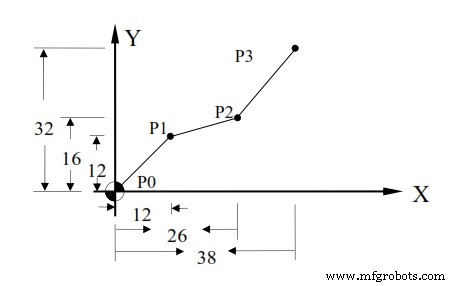
Hust CNC Mill G90 Absolute Coordinates G91 Incremental Coordinate Example
G90 Absolute Coordinate
N10 G00 X0.000 Y0.000              Position to work origin
N20 G90                            Set program to absolute value
N30 G1 X12.000 Y12.000 F300.00     P0 to P1
N40 X26.000 Y16.000                P0 to P2
N50 X38.000 Y32.000                P2 to P3
N60 M2
G91 Incremental Coordinate
N10 G00 X0.000 Y0.000              Position to work origin
N20 G91                            Set program to increment value
N30 G1 X12.000 Y12.000 F300.00     P0 to P1
N40 X14.000 Y4.000                 P0 to P2
N50 X12.000 Y16.000                P2 to P3
N60 M2
G90 Absolute Coordinate
N10 G00 X0.000 Y0.000              Position to work origin
N20 G1 U12.000 V12.000 F300.00     P0 to P1
N30 U14.000 V4.000                 P1 to P2
N40 U12.000 V16.000                P2 to P3
N60 M2
Mixed Usage
N10 G00 X0.000 Y0.000              Position to work origin
N30 G1 U12.000 V12.000 F300.00     P0 to P1
N40 X26.000 V4.000                 P1 to P2
N50 X38.000 V16.000                P2 to P3
N60 M2
Or
N10 G00 X0.000 Y0.000              Position to work origin
N30 G1 U12.000 V12.000 F300.00     P0 to P1
N40 U14.000 Y16.000                P1 to P2
N50 U12.000 Y32.000                P2 to P3
N60 M2
CNC Machine
- CNC Milling Example: G90 Absolute, G91 Incremental, and Circular G02/G03 Interpolation
- Haas CNC Mill G Codes: Comprehensive Guide to Preparatory Functions
- Sinumerik 810 CNC Mill Programming: Master Radius & Chamfer Control
- Master CNC Milling with G91 Incremental Programming: A Practical 4-Axis Exercise
- CNC Milling Programming Demo: Master G90 Absolute & G91 Incremental Techniques
- CNC Milling Program Example – Step-by-Step G‑Code Tutorial
- CNC Milling Program Tutorial: G01, G02, G03, G90, G91 Commands Explained
- Master G02 & G03 Circular Interpolation: CNC Mill Example Program
- CNC Milling Program: Converting G90 Absolute to G91 Incremental Mode with G03 Example
- CNC Subprogram Tutorial: Using G91 Incremental Mode for Precise Z‑Axis Control