



CNC Milling Guide: Using G41 & G40 for Accurate Cutter Radius Compensation
Cutter Radius Compensation Example program shows how G41, G40 can be used in a cnc mill program.
Cutter Compensation code used in this program are,
- G41 Cutter Radius Compensation Left
- G40 Cutter Radius Compensation Cancel
Cutter Radius Compensation Example
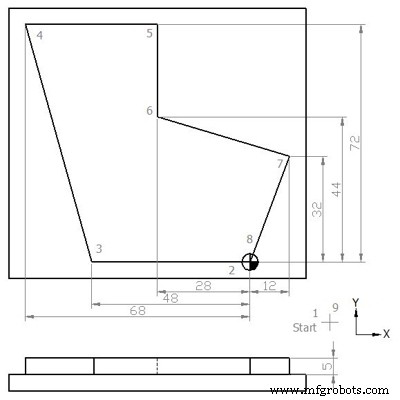
G41 G40 Cutter Radius Compensation Example
N5 G00 G54 G64 G90 G17 X20 Y-20 Z50
N10 S450 M03 F250 D01 (12.5 MM DIA)
N15 C0
N20 Z5
N25 G01 Z0
N30 Z-5
N35 G41 X0 Y0
N40 X-48
N45 X-68 Y72
N50 X-28
N55 Y44
N60 X12 Y32
N65 X0 Y0
N70 G40 X20 Y-20
N75 G00 Z50
N80 Y100
N85 M30
Finished Part
After machining process completion, component will look like
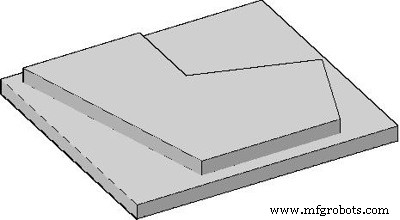
Cutter Radius Compensation Example Finished Part
Explanation of CNC G-Code
G00 : Rapid traverse.
G54 : Zero Offset no. 1.
G64 : Continuous-path mode.
G90 : Absolute dimensioning system.
G17 : X-Y plan selection.
G41 : Cutter radius compensation activation (left hand side movement)
G40 : Cutter radius compensation de-active
S : Spindle speed
F : Axis motion feed
M : Cutter rotation (3=clockwise, 4=anti-clockwise)
D : Tool offset no
Vertical Machining Center CNC Programming Guide for Beginners
CNC Milling Program: Demonstrating G41 Left Cutter Radius Compensation
CNC Machine
- Fanuc CNC Programming Guide: A Simple, Feature‑Rich Example
- Step-by-Step Guide: Mill a Full Circle on CNC Machines Using Practical G‑Code
- Master Sinumerik 810 CNC Mill Radius & Chamfer Programming – Step‑by‑Step Example
- CNC Milling Program: Demonstrating G41 Left Cutter Radius Compensation
- CNC Milling Program Example – Step-by-Step G‑Code Tutorial
- CNC Milling Program Tutorial: G01, G02, G03, G90, G91 Commands Explained
- CNC Milling Program: Mastering Multiple Arc Interpolations with G2/G3 I & J Parameters
- Mastering CNC Milling: G91, G41, G43 Code Usage Explained
- Example CNC Program: Selca Profile – Step-by-Step Guide
- Comprehensive CNC Programming Example for Selca Machines