



Deploying Handwritten Digit Recognition on the i.MX RT1060 MCU Using TensorFlow Lite
This guide demonstrates how to implement handwritten digit recognition on the i.MX RT1060 crossover MCU, leveraging a TensorFlow Lite model and a touch‑enabled GUI.
The i.MX RT1060, powered by an Arm® Cortex®‑M7 core, excels in cost‑effective industrial solutions and high‑performance consumer devices that require rich display interfaces. In this tutorial we walk through building an embedded machine learning application that detects and classifies user‑drawn digits using the popular MNIST eIQ example.
A Look at the MNIST Dataset and Model
We use the standard MNIST dataset, consisting of 60,000 training and 10,000 test images of centered grayscale handwritten digits, each 28×28 pixels. The data were collected from high‑school students and Census Bureau employees in the United States, so it reflects North American handwriting styles. Convolutional neural networks (CNNs) perform exceptionally well on this dataset, and even modest architectures can reach high accuracy, making TensorFlow Lite an ideal choice for deployment on embedded hardware.
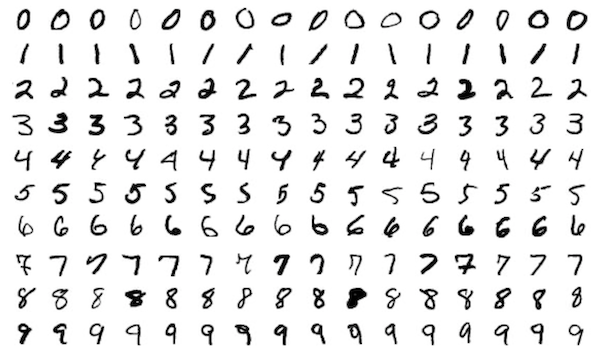
Figure 1. MNIST dataset example
The official TensorFlow GitHub repository provides a Python implementation of the MNIST model, built with Keras, tf.data, and tf.estimator. The CNN achieves excellent performance on the test set and serves as a reference for our conversion process.
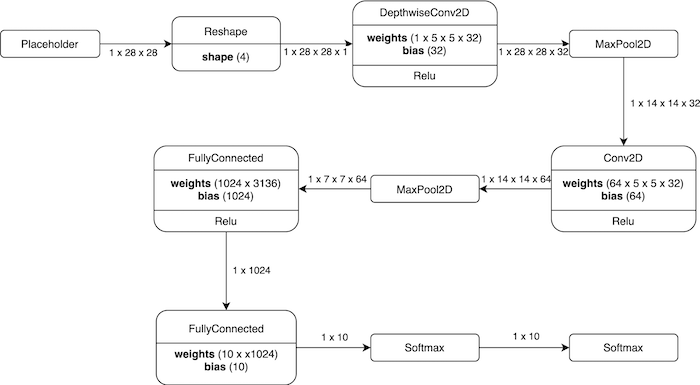
Figure 2. Model architecture visualization
Below is the raw model definition that corresponds to the visualization above.
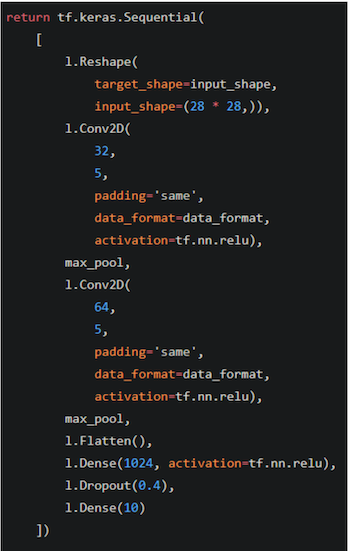
Figure 3. TensorFlow model definition
What is TensorFlow Lite and How It’s Used Here?
TensorFlow is a widely adopted, open‑source deep learning framework maintained by Google. To bring TensorFlow inference to resource‑constrained devices, Google introduced TensorFlow Lite, a lightweight runtime that supports a subset of TensorFlow operations. While TensorFlow Lite models cannot be further trained on device, they can be optimized with quantization, pruning, and other post‑training techniques to reduce size and improve inference speed.
Converting the Model to TensorFlow Lite
We first train the model using TensorFlow 1.13.2 to ensure compatibility with the conversion tools. The model is then converted to the .tflite format with the following command:
tflite_convert
  --saved_model_dir=
  --output_file=converted_model.tflite
  --input_shape=1,28,28
  --input_array=Placeholder
  --output_array=Softmax
  --inference_type=FLOAT
  --input_data_type=FLOAT
  --post_training_quantize
  --target_ops TFLITE_BUILTINS
After conversion, we use xxd to embed the binary model into our application:
xxd -i converted_model.tflite > converted_model.h
The xxd utility produces a C/C++ header that contains the model as a byte array, enabling the eIQ project to load it directly at compile time. Detailed instructions can be found in the eIQ user guides and the official TensorFlow Lite documentation.
A Quick Intro to Embedded Wizard Studio
To take advantage of the MIMXRT1060‑EVK’s graphics capabilities, we incorporate a touch‑enabled GUI built with Embedded Wizard Studio. The IDE generates MCUXpresso and IAR projects from XNP’s SDK, allowing developers to test the interface immediately on hardware. The evaluation version limits GUI complexity and adds a watermark, but the full license unlocks unlimited features.
Because the generated GUI code is in C while the eIQ examples are in C/C++, we wrap all included headers with:
#ifdef __cplusplus
extern "C" {
#endif
/* C code */
#ifdef __cplusplus
}
#endif
We also relocate source and header files into the SDK’s middleware folder and adjust include paths. Device‑specific configuration files are merged to ensure a smooth build.
The Finished Application and Its Features
The GUI presents a touch‑capable input area for drawing digits and an output field that displays the classification result. Two buttons allow the user to run inference or clear the canvas. After inference, the application prints the predicted digit and confidence score to the standard output for debugging purposes.
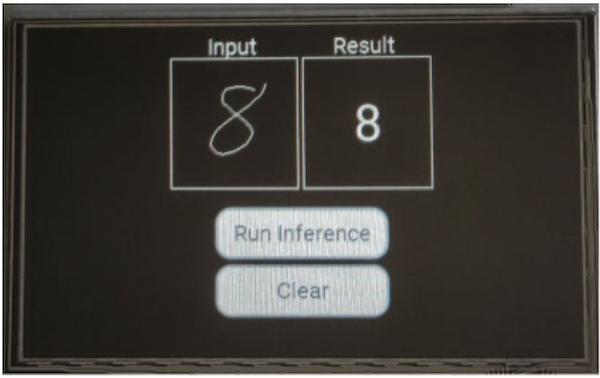
Figure 4. Application GUI with input, output, and control buttons
TensorFlow Lite Model Accuracy
While the CNN achieves high accuracy on paper‑based MNIST samples, handwritten digits drawn on a touch screen differ significantly. This discrepancy underscores the importance of training with production‑grade data that matches the target input modality. To improve performance, collect a new dataset using the touch screen and apply transfer learning, as detailed in the NXP Community walk‑through.
Implementation Details
Embedded Wizard uses slots to react to user interactions. The drawing slot captures touch movements, rendering a 1‑pixel line in the main color. The clear slot resets both input and output fields to the background color. When the run‑inference slot is triggered, it retrieves the bitmap data, resizes it to 28×28, and feeds it into the TensorFlow Lite interpreter.
Because the input canvas is 112×112, we preprocess the image as follows:
- Allocate an 8‑bit array sized 112×112 and initialize it to zero.
- Copy each drawn pixel (value 0xFF) into the array.
- Expand each pixel into a 3×3 block to thicken strokes.
- Crop and center the drawing to match MNIST preprocessing.
- Resize the 112×112 image to 28×28, converting each pixel to a floating‑point value for the model.
Figure 5 illustrates the intermediate array after preprocessing.
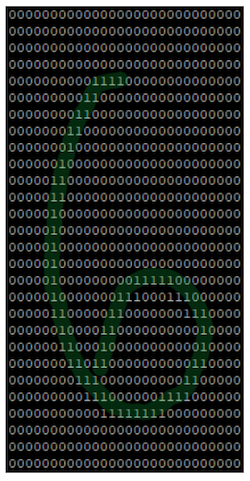
Figure 5. Preprocessed input array ready for inference
The TensorFlow Lite interpreter is initialized once at startup. For each inference request, the preprocessed input tensor is copied pixel by pixel into the interpreter’s input buffer. The memory footprint and runtime characteristics are documented in the NXP application note.
TensorFlow Lite: A Viable Solution
Deploying handwritten digit recognition on embedded devices poses challenges such as limited compute resources and varied input modalities. TensorFlow Lite mitigates these issues by providing a lightweight runtime and a rich ecosystem of optimization tools. The i.MX RT1060’s M7 core, combined with the SDK’s middleware, makes it feasible to implement complex use cases like a secure numeric keypad for a digital lock.
Training models on real production data—digits drawn with a finger on a touch screen—remains essential for maintaining high accuracy. Additionally, regional handwriting variations should be considered when designing the dataset.
The i.MX RT crossover MCU series offers a balanced mix of performance and cost, making it suitable for a wide range of embedded applications. For more details, visit the i.MX RT product page.
Industry Articles are a form of content that allows industry partners to share useful news, messages, and technology with All About Circuits readers in a way editorial content is not well suited to. All Industry Articles are subject to strict editorial guidelines with the intention of offering readers useful news, technical expertise, or stories. The viewpoints and opinions expressed in Industry Articles are those of the partner and not necessarily those of All About Circuits or its writers.
Industrial robot
- Cutting Waste and Energy Costs with Autonomous Robots
- Build a Raspberry Pi Digit Recognizer with TensorFlow & OpenCV
- Mastering Power Management with NXP i.MX RT500 Crossover MCUs
- Leveraging NXP i.MX RT500 for DSP-Enabled Smart Devices: Multi-Threading, XOS, and Cadence Fusion F1 Audio DSP
- Building a Variational Autoencoder with TensorFlow: A Practical Guide
- Java Interfaces Explained: How to Define and Implement Them with Practical Examples
- Automate CNC Machine Tending with Cobots: Boost Efficiency and Precision
- Beginner’s Guide to Yaskawa Motoman Robot Programming: Boost Speed & Accuracy
- Revolutionizing Electric Vehicle Production: How Robotics Boost Efficiency and Cut Costs
- Invoking PLC Function Blocks via OPC UA Clients: A Practical Guide