



How to Choose the Right External AC/DC Power Supply for Your Product
Choosing the Right External AC/DC Power Supply
When engineers set out to design a new product, selecting an appropriate AC/DC power supply can feel overwhelming. Decisions about whether to use an internal or external supply, regional compliance, and medical‑grade safety requirements all come into play. The following guide clarifies the key considerations and helps you choose a supply that meets performance, safety, and regulatory expectations.
1. Identify the Power Supply Type Needed
Space constraints often dictate the choice between an internal supply and an external adapter. Internal converters can take up valuable real‑estate, making the finished device larger than competitors. An external wall‑plug or desktop unit keeps the product footprint minimal, which is especially important for consumer electronics that sit on a countertop or next to a media system.
Wall‑plug adapters are ideal for loads from a few watts up to about 50 W. Anything above that requires a desktop unit, such as the CUI SDI160G‑U series, which delivers 160 W of continuous power while meeting UL, EN, and IEC 62368‑1.
Figure 1: CUI’s SWI product family offers a compact, efficient, and economical solution for AC‑DC wall adapters.
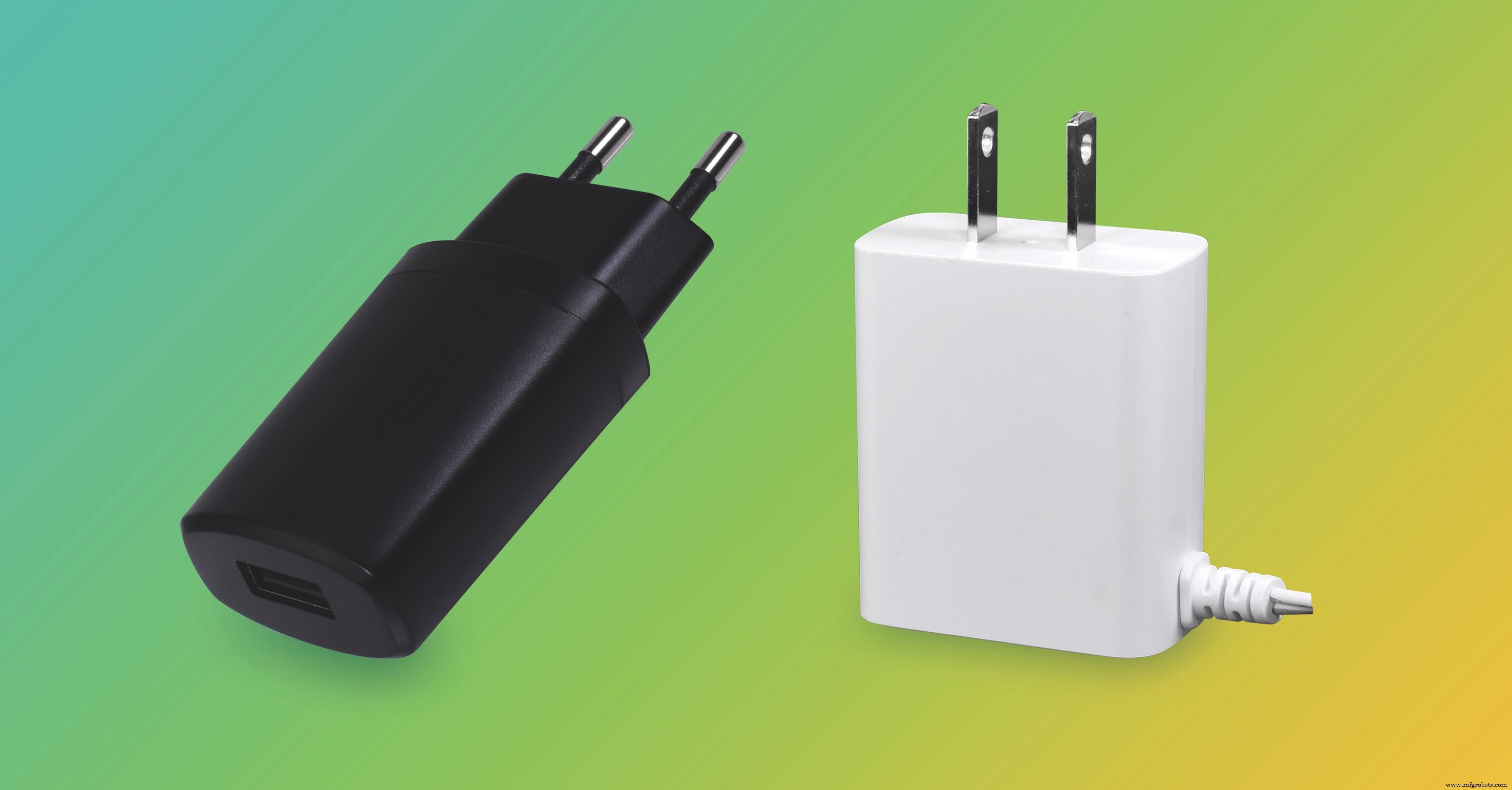
Figure 1: CUI SWI wall adapters – compact and efficient.
Figure 2: The SDI160G‑U and SDI160G‑UD provide 160 W continuous power and comply with UL/EN/IEC 62368‑1.
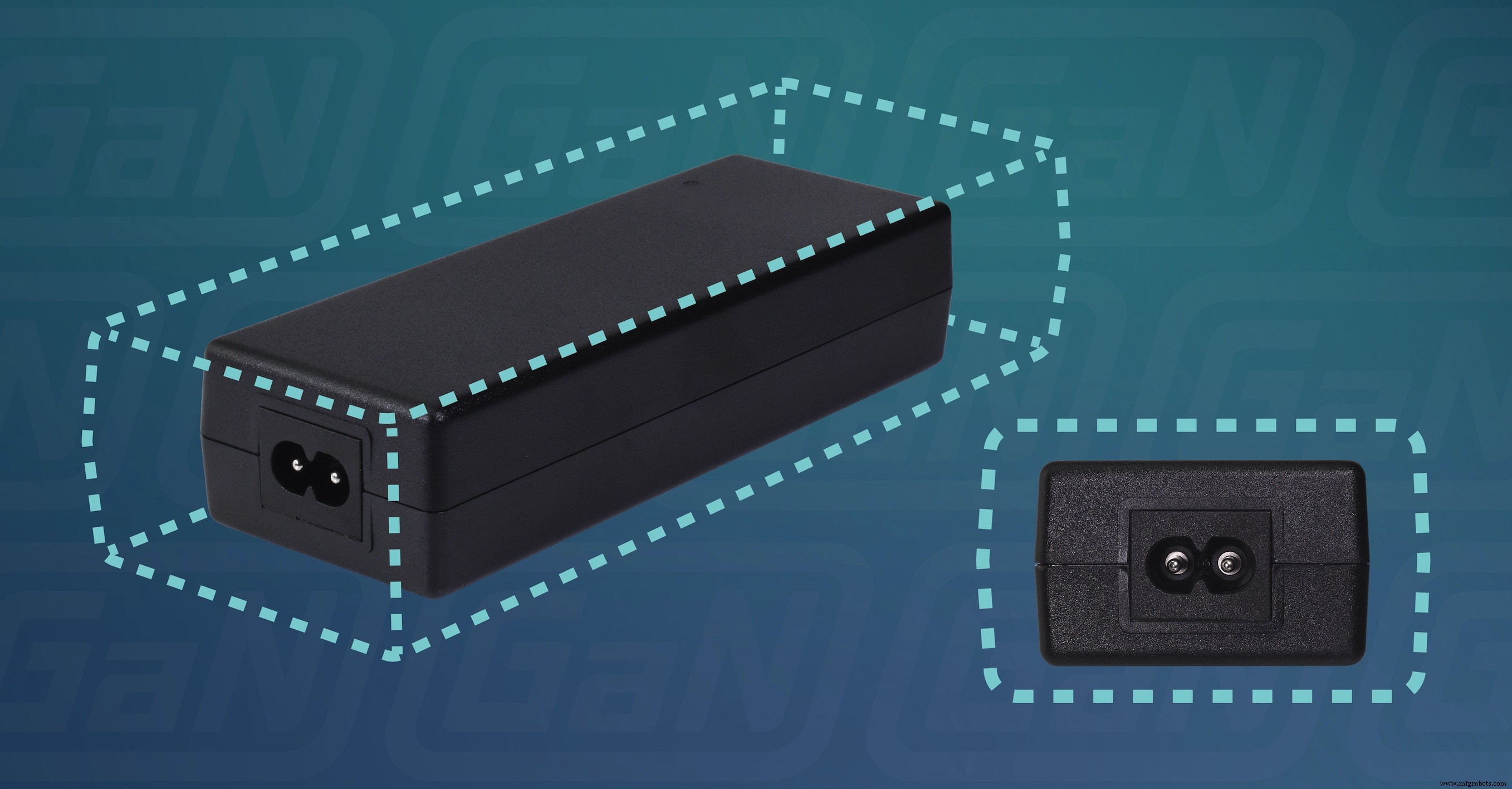
Figure 2: SDI160G‑U desktop adapter – high‑power, UL/EN/IEC 62368‑1 compliant.
For many designers, a standard 5 VDC USB‑A adapter is the simplest solution when the device draws up to 2 A. Alternatively, designing for 12 V, 15 V, or 24 V DC is common because manufacturers readily supply units at these nominal voltages. Always verify the input socket type you plan to use; some are standard while others incur an extra cost from the supplier.
Peak power matters, especially for inductive loads such as motors. Selecting an adapter that cannot meet peak demand will overheat the supply, stressing components and reducing reliability.
2. Match Your Requirements to Datasheet Specs
Beyond output voltage and current, carefully examine each candidate’s datasheet. Key attributes include:
- Grounding Class – Class II adapters float the DC output relative to ground and omit a protective earth connection; Class I supplies provide grounding and are usually desktop units.
- Line Regulation – Indicates how tightly the supply maintains output voltage under varying mains conditions. A ±10 % regulation for a 12 V output means the voltage can swing from 10.8 V to 13.2 V.
- Ripple & Noise – Excessive ripple can harm sensitive circuitry. If necessary, add filtering, but remember it increases BOM cost and PCB space.
- Protection Features – Look for over‑voltage, over‑current, over‑temperature, and under‑voltage lock‑out (UVLO) protection. UVLO is critical if the device must fail safely when input voltage drops.
- Certifications – Verify UL, IEC, and regional approvals relevant to your market.
3. Safety and Energy‑Efficiency Standards
Power adapters must meet rigorous safety, EMC, and efficiency requirements. Key standards include:
- IEC 62368‑1 – Governs safety for commercial, IT, and AV equipment, covering isolation, leakage currents, and voltage‑stress distances.
- IEC 60601‑1‑4 – Required for medical devices that contact patients, such as blood pressure monitors and oximeters.
- EU Ecodesign 2019/1782 – Sets minimum average active efficiency at 25 %, 50 %, 75 %, and 100 % load, plus 10 % load documentation.
- DOE Level VI – U.S. energy‑efficiency benchmark for desktop and other adapters.
- EMC – FCC Part 15 Class B, CISPR 32, and IEC 61204‑3 dictate acceptable emission and susceptibility levels.
Figure 3: Isolation test requirements for an AC/DC power adapter.
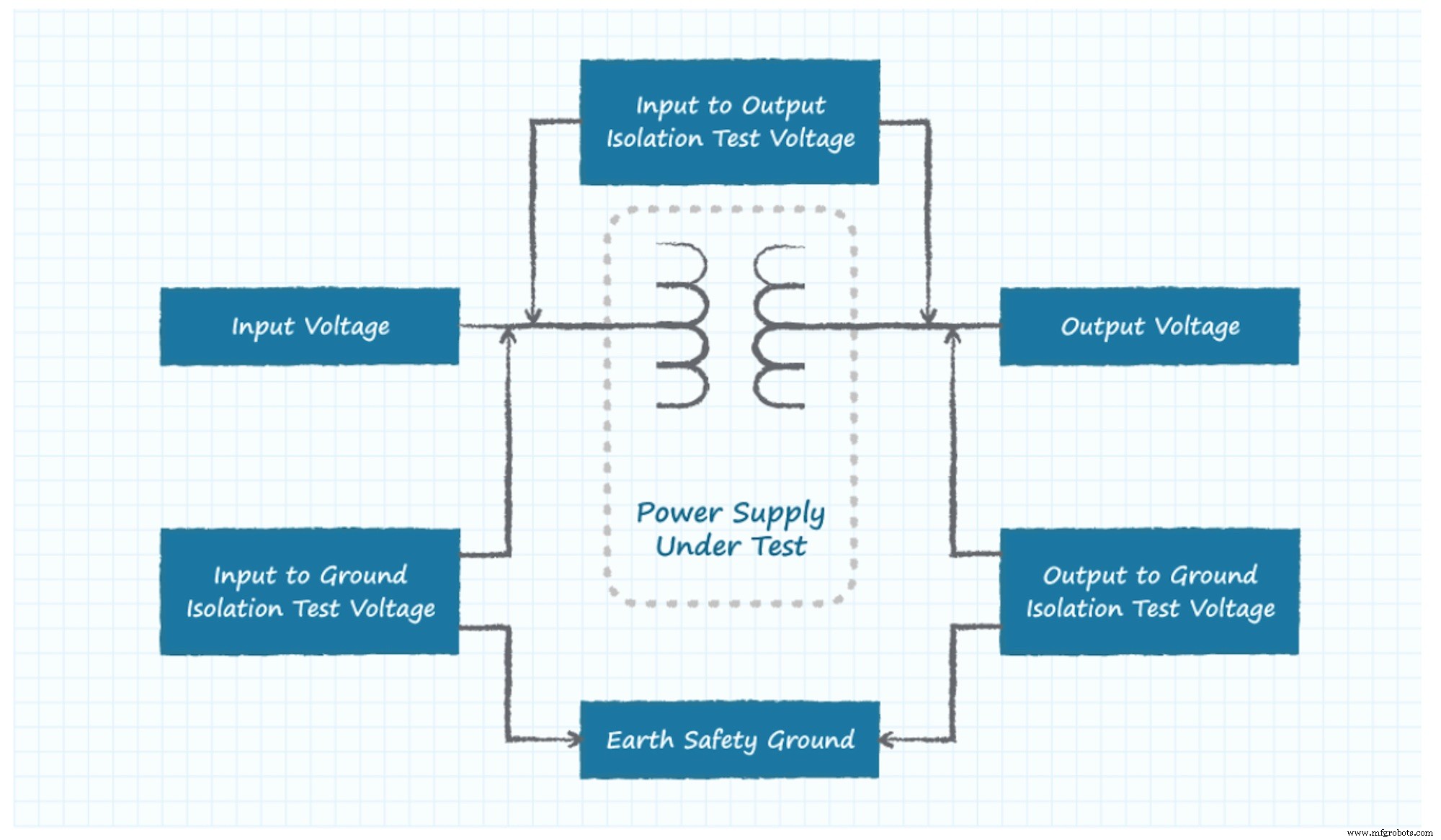
Figure 3: IEC 62368‑1 isolation test procedure.
Figure 4: Energy efficiency standards timeline.
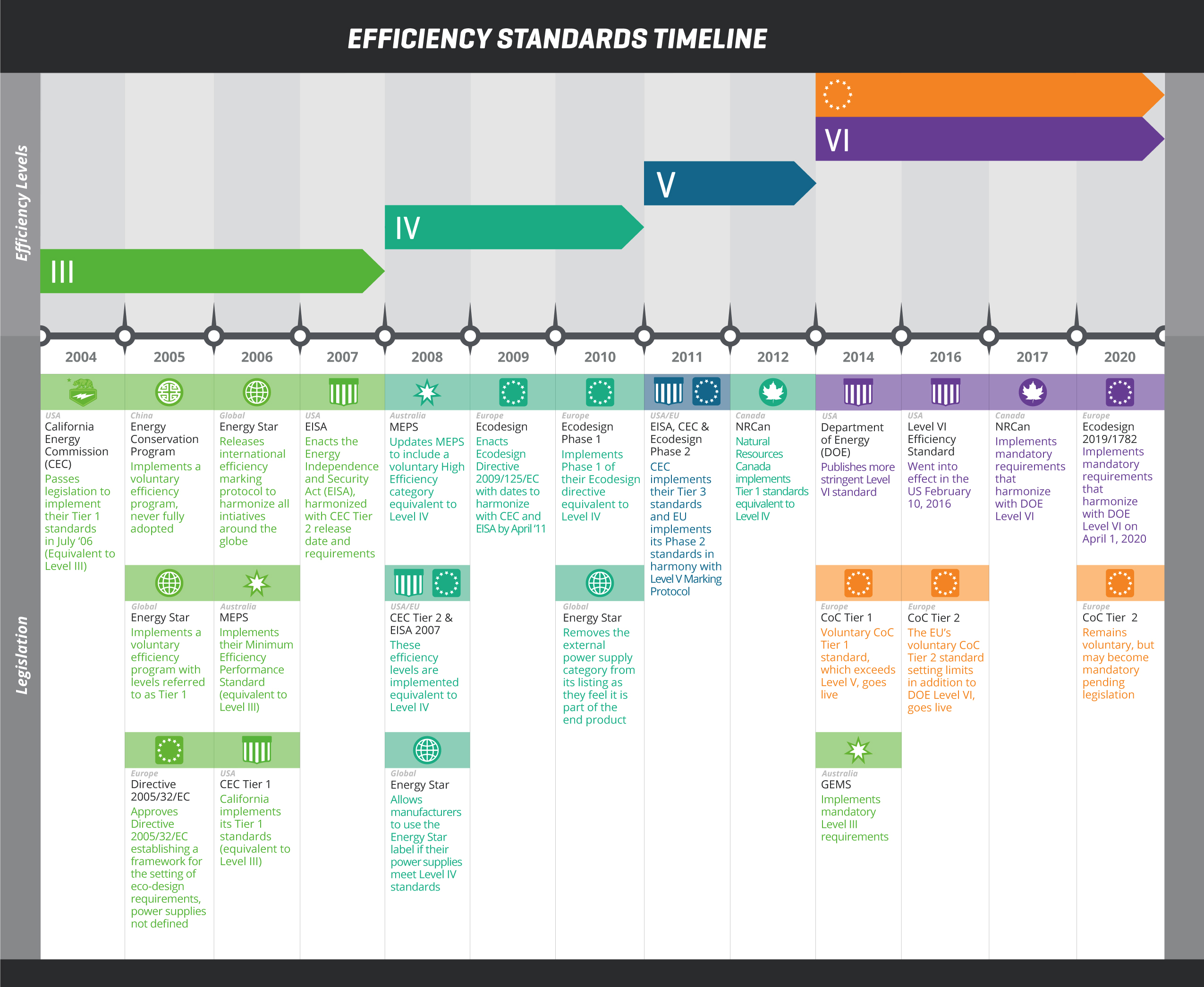
Figure 4: Evolution of energy‑efficiency standards (CUI).
Modern silicon carbide (SiC) and gallium nitride (GaN) devices enable higher efficiency and lower standby consumption, helping meet aggressive regulatory targets.
4. Final Checklist
- Define maximum continuous and peak power.
- Choose wall‑plug or desktop based on power level and space.
- Verify grounding class and input socket compatibility.
- Confirm regulation, ripple, noise, and protection features.
- Ensure compliance with IEC 62368‑1, IEC 60601‑1‑4 (if medical), Ecodesign, DOE Level VI, and EMC standards.
- Document efficiency at all required load levels.
By systematically reviewing these criteria, you can confidently select an external AC/DC power supply that delivers reliability, safety, and regulatory compliance for your next product launch.
Embedded
- Transformer‑Based Power Supply: Building a Safe 12 VAC Step‑Down Circuit
- Power Supply Circuits: Types, Design Principles, and Performance
- Choosing an Internal AC‑DC Power Supply for Your Product
- CNC Power Supply Troubleshooting Guide
- Professional Lambda Power Supply Repair Services – Trusted Expertise
- Expert Fanuc Power Supply Repair Services
- Is Your Industrial Power Supply Worth Repairing?
- Expert Power Supply Repair & Maintenance by Tectrol – Trusted Canadian Engineering Since 1968
- Top 5 Causes of Power Supply Failures in 2020 — Insights & Prevention
- Power Supply Rails Explained: The Backbone of Modern Electronics