



Deep Dive: i.MX RT1170 MCU’s Heterogeneous Graphics Pipeline
This article examines the i.MX RT1170 MCU’s heterogeneous graphics pipeline, highlighting its three core acceleration engines.
Embedded devices today deliver a growing array of advanced features, yet designers face the challenge of delivering a polished, intuitive user experience without overwhelming users with complexity.
Smartphone‑style graphical user interfaces offer a compelling alternative to mechanical controls, delivering rich visuals and interactive feedback. NXP empowers developers to create such interfaces by integrating display controllers and graphics accelerators directly into the i.MX RT1170 crossover MCU.
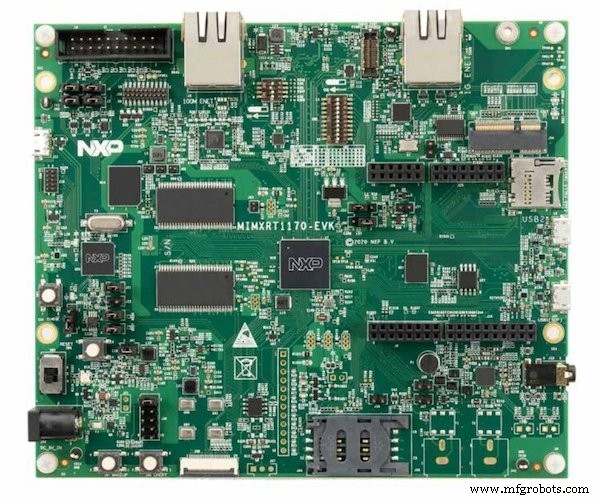
Figure 1. The i.MX RT1170 MCU
The i.MX RT1170’s Three Display Engines
The i.MX RT1170 goes beyond a traditional MCU by bundling a 2D vector graphics GPU, a Pixel‑Processing Pipeline (PxP) accelerator, and an LCDIFV2 display controller. Each engine targets a specific set of visual tasks, allowing designers to offload heavy work from the Cortex‑M7 core.
The 2D Vector Graphics GPU
Unlike pixel‑based graphics, which map individual pixels to a fixed resolution, vector graphics describe shapes through mathematical commands such as moveTo, lineTo, and curveTo. This abstraction lets images scale, rotate, or transform without loss of fidelity, making it ideal for UI elements, icons, and logos.
The i.MX RT1170’s GPU supports real‑time vector rendering, including affine transformations (translation, rotation, scaling), color conversion, and image manipulation. By handling these operations in hardware, the MCU conserves power and frees the CPU for application logic.
Rendering a vector image requires a rendering target (the framebuffer), path data (geometry commands), fill information (rules that decide which pixels inside a shape to color), transformation data (matrices for geometric changes), color information, and blend rules that govern how layers merge. See AN13075 for detailed API usage.
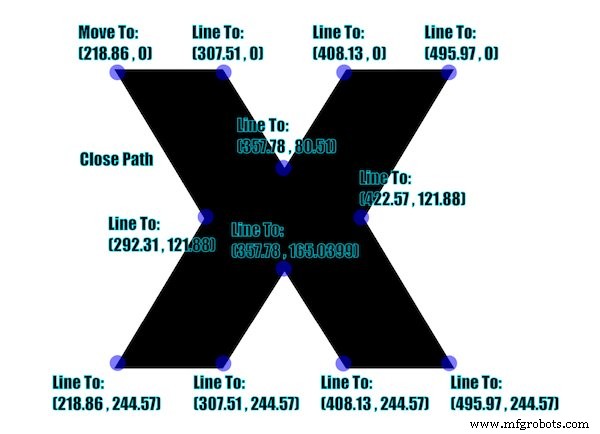
Figure 2. Rendering vector images typically requires a rendering target, path data, fill information, transformation data, color information, and blend rules.
The fill rule determines how overlapping paths are filled. Two common rules are non‑zero and even‑odd. The non‑zero rule casts a ray from the point to infinity, counting how many times the ray crosses path segments and adding or subtracting based on direction. The even‑odd rule simply counts crossings, regardless of direction, treating the shape as filled when the count is odd.
Affine transformations are handled through 3×3 matrices that encode translation, rotation, scaling, and shear. The GPU applies these matrices to each vertex before rasterization.

Figure 3. Transformation is performed by manipulating matrices to represent various operations. When drawing shapes, programmers assign color information to each path.
The blending rule defines how a source path’s alpha channel combines with the destination framebuffer. The VGLite API implements a suite of blending modes (e.g., source‑over, destination‑over, additive) and is fully documented in AN13075. VGLite also offers a raster pipeline for bitmap images.
The PxP 2D Accelerator
The PxP engine is a versatile 2D accelerator capable of blitting, alpha blending, color‑space conversion, rotation, and scaling. By delegating these tasks to PxP, developers avoid CPU‑bound loops and achieve smoother frame rates.
A common use case is compositing a background buffer with UI overlays, each at different resolutions. PxP can resize and blend these layers in a single pass. AN12110 provides a comprehensive example where PxP scales an internal buffer to match an LCD’s native resolution.
Offloading routine 2D operations to PxP frees the Cortex‑M7 core for application logic, reducing latency and power consumption—key metrics in battery‑operated products.
The LCDIFV2 Display Controller
The LCDIFV2 controller abstracts the process of transferring framebuffer data to a TFT LCD panel. It supports up to eight independently configurable layers, each with its own color format, size, and position. Layer blending occurs entirely in hardware, eliminating the need for software mixing.
With dual‑buffer support, designers can update one buffer while the controller displays the other, achieving flicker‑free updates. LCDIFV2 also supports the Index8BPP format, allowing developers to store 32‑bit ARGB images efficiently via a lookup table and index array—details are in AN13075 and the official SDK samples.
i.MX RT1170 Crossover MCU and Its Supported Devices
The heterogeneous pipeline—2D GPU, PxP, and LCDIFV2—works in concert to simplify development and boost performance. NXP’s ecosystem extends beyond the RT1170: the Cortex‑M7 RT1050 and RT106x series provide PxP and an LCD controller, while the Cortex‑M33 RT500 incorporates a 2D GPU.
NXP backs these platforms with comprehensive APIs, SDKs, and training resources. The official NXP website hosts application notes, video tutorials, SDK examples, and on‑demand webinars to help engineers quickly harness the full power of the graphics stack.
Industry Articles are a form of content that allows industry partners to share useful news, messages, and technology with All About Circuits readers in a way editorial content is not well suited to. All Industry Articles are subject to strict editorial guidelines with the intention of offering readers useful news, technical expertise, or stories. The viewpoints and opinions expressed in Industry Articles are those of the partner and not necessarily those of All About Circuits or its writers.
Embedded
- Mastering UART: The Universal Asynchronous Receiver/Transmitter Explained
- How Predictive Maintenance Drives Efficiency and Cuts Downtime
- How a Maintenance Storeroom Drives Reliability and Efficiency
- Milling Machines 101: A Comprehensive Guide to Their Function, Components, and Uses
- Understanding Vector vs Raster Graphics: Why Your Sheet Metal Projects Need Vector Files
- How AI Is Revolutionizing Robotic Process Automation
- How Automation Drives Value and Efficiency in Modern Manufacturing
- How Shock Absorbers Work: Enhancing Vehicle Balance and Comfort
- What Is a Coupling? Key Functions and Applications in Industrial Machinery
- Exploring Material Flexibility: How Elasticity Determines Performance