



Firmware‑Over‑the‑Air (FOTA) via LoRa: Why It’s Hard and How Symphony Link Solves It
Updating device firmware over the air (FOTA) using LoRaWAN is nearly impossible for battery‑powered nodes.
The LoRa Alliance notes that multicast frames—available only on class B and C devices—can carry firmware, but this does not address the practical limitations of class A devices that most deployments use. Community forums such as The Things Network, Libelium, and others confirm that standard LoRaWAN FOTA is not viable. Symphony Link, a proprietary LoRa protocol, was built with FOTA in mind and offers a proven solution.
- Key Business Benefits of Firmware‑over‑the‑Air
Why FOTA over LoRaWAN Is Challenging
- Uncoordinated Gateway Transmissions – Gateways broadcast firmware segments without listening to the network. Nodes cannot detect that the gateway is transmitting and will lose any packets they send during that period.
- No Multicast Capability for Class A – Multicast was added for class B/C to support functions like street‑light control, not firmware. Battery‑powered class A nodes cannot receive multicast, making FOTA impossible for them.
- Duty‑Cycle Restrictions – In regions governed by ETSI, gateways may transmit only 1 % of the time. The bulk of that bandwidth is consumed by acknowledgements and MAC traffic, leaving virtually no headroom for multicast downlinks. In the US, the lack of a duty‑cycle limit means the network would break down during heavy downlink activity.
Firmware‑over‑the‑Air Using Symphony Link
Symphony Link can deliver a file up to 256 KB from an access point to a single node or a group of nodes. By temporarily extending the Infrastructure Beacon (IB) period, the access point gains extra downlink capacity for the firmware transfer while the network remains functional for uplink traffic. Once the update is finished, the access point reverts to its normal IB schedule.
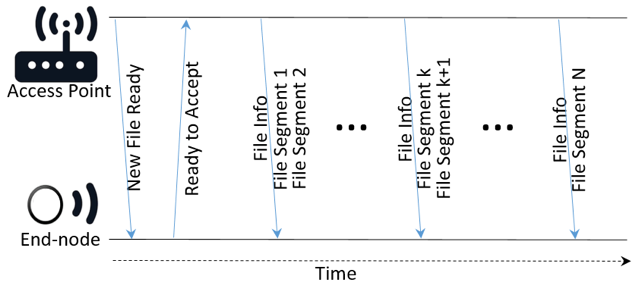
OTA File Transfer Initialization
During initialization, the access point announces a new firmware file to its associated end nodes. It then pauses, awaiting responses. Once a predefined criterion—such as a minimum number or percentage of nodes ready—is met or a timeout occurs, the access point begins transmitting the file in segments.
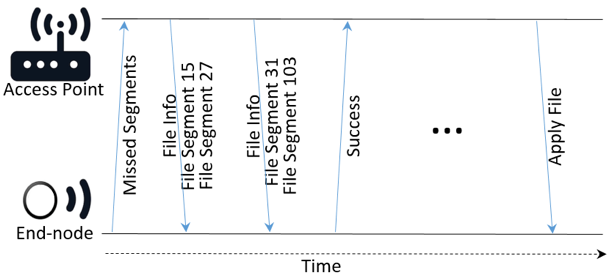
OTA File Transfer Process
To maximize throughput, an access point sends multiple file segments in a single frame. Unlike typical downlinks—where only one message per node or one broadcast is transmitted—the access point aggregates several segments. The node receives and stitches these segments together. After each full burst, the node reports any missing segments.
The access point then compiles a retransmission list based on the nodes’ reports and sends the missing segments. This stop‑and‑wait acknowledgment‑retransmission (ARQ) cycle continues until all nodes confirm successful receipt or a failure threshold is reached.
OTA File Transfer Termination
Once a node reports successful receipt, it remains awake until it receives an Apply File command from the access point. That command finalizes the update and triggers the firmware activation.
Conclusion
The Symphony Link OTA method can transport application code, scripts, configuration data, encryption keys, databases, or module firmware. It unlocks a range of industrial and enterprise use cases that were previously infeasible with standard LoRaWAN.
Internet of Things Technology
- Integrated QR, RFID, and Temperature Verification Access Control System
- Begin with IXON Cloud: Fast, Secure Remote Access for Industrial Equipment
- How IoT Enhances Accessibility for People with Disabilities
- Understanding C# Access Modifiers (Specifiers) with Practical Examples
- Mastering C# File Streams: StreamReader & StreamWriter – Step‑by‑Step Guide
- C# Serialization & Deserialization: A Practical Example
- Reading Files in Java with BufferedReader – A Practical Guide with Examples
- Creating ZIP Archives in Python: From Full Directory to Custom File Selection
- Mastering Python’s readline() – Efficient Line‑by‑Line File Reading
- Effortlessly Serve Static Files with Go: A Proven Approach